

Government Training Video Production Workflow Guide
Updated: May 18

PMG has created hundreds of videos for government agencies and while over the years we have made our internal process more streamlined and responsive to the government way of doing things. Here are best practices we can highlight.
Managing a government training video project feels manageable until the compliance review lands on your desk. Suddenly you’re reconciling Section 508 requirements, stakeholder approval chains, caption file formats, and a production timeline that was already tight. A well-structured government training video production workflow doesn’t just keep the project moving. It protects your agency from legal exposure, ensures every employee can access the training, and prevents the budget-draining reshoots that happen when reviews come too late. This guide walks you through each stage, from planning to final delivery, with the specific considerations that make government video production its own distinct challenge.
Table of Contents
Key Takeaways
Point | Details |
Accessibility compliance is mandatory | Government training videos must meet WCAG 2.2 and Section 508 standards including captions and transcripts. |
Plan approval gates early | Integrate stakeholder reviews at script and draft stages to avoid costly late-stage changes or reshoots. |
Captions require human review | Automatically generated captions often need editing to ensure accuracy and synchronization quality. |
Deliver complete accessibility packages | Provide caption files, transcripts, and metadata alongside videos for full compliance and usability. |
Treat captions as core deliverables | Integrate captioning as a production step, with dedicated QA and ownership from the start of post-production. |
Understanding compliance and accessibility requirements
Before a single frame is shot, you need a clear picture of what your finished video must deliver beyond the content itself. For government agencies, that means understanding two overlapping frameworks: WCAG 2.2 and Section 508 of the Rehabilitation Act. Both require synchronized captions for all prerecorded video with audio. That’s not a suggestion. It’s a baseline.
What surprises many training directors is how much the deliverable list expands once you account for full compliance. The video file itself is just the beginning. A complete government training video package typically includes:
Synchronized caption files (usually in .SRT or .VTT format) timed precisely to the audio
Full transcripts that can be read independently of the video
Speaker identification within captions, so deaf and hard-of-hearing employees know who is speaking at any given moment
Accessibility metadata embedded in or accompanying the video file for platform compatibility
Audio descriptions for any visual content not covered by the narration or dialog
The ADA guidance on web accessibility is direct: videos can be made accessible by including synchronized captions and speaker identification. Skipping speaker tags might seem minor, but for a deaf employee trying to follow a panel discussion or a multi-presenter training module, it’s the difference between usable and unusable content. Before you start any production, it’s worth reviewing the key questions every organization should ask before a video project gets underway. Getting clarity on accessibility scope at the start saves significant rework later.
Having outlined the compliance requirements, let’s examine how to prepare your team and resources to meet these standards efficiently.
Preparing for a streamlined production workflow
The planning phase is where most government video projects either gain momentum or quietly fall apart. In our experience, the agencies that produce training videos on time and on budget are the ones that treat pre-production as seriously as production itself. That means getting the right people in the room early, not just the video team.
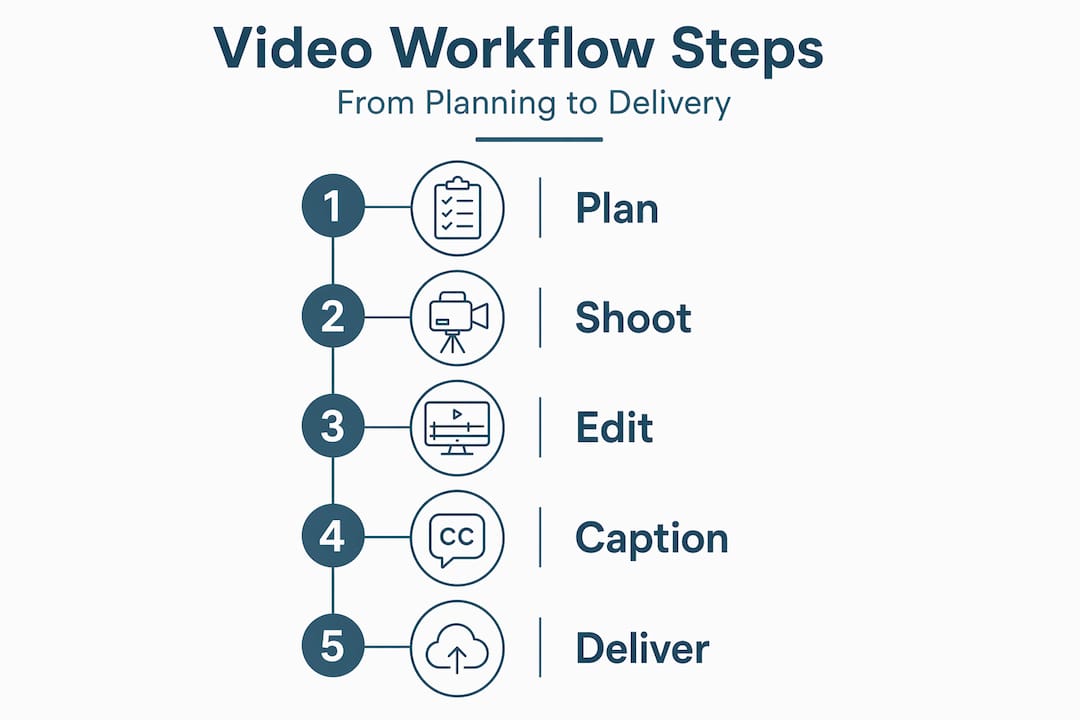
Here’s a practical sequence for building a government training video production workflow that holds together under real-world pressure:
Define the training objective and audience. What behavior or knowledge should employees have after watching? Who exactly is the audience, including any employees with disabilities who will need accessible formats?
Identify all stakeholders and their approval authority. Legal, public affairs, leadership, and subject matter experts all have different roles. Map out who must approve versus who should be consulted.
Develop the concept and script with compliance in mind. Write narration that works as a standalone transcript. Avoid relying on visuals alone to convey critical information.
Build formal approval gates into the timeline. Per OVC video production guidelines, approval gates at the script stage and draft cut stage prevent expensive reshoots by catching issues before they become production problems.
Assign caption and transcript ownership. Decide who is responsible for caption quality review before the project kicks off, not after the video is edited.
Plan your shooting schedule around re-use. Capture b-roll and supplemental footage that can cover narration changes without requiring a full reshoot.
Pro Tip: Brief your production team on the compliance requirements before they set foot on location. A well-briefed video team captures audio with caption accuracy in mind, which means fewer retakes and cleaner transcription. Refer to your media planning guidance to align production scope with budget from day one.
With a solid plan in place, the next step is executing production and post-production while embedding accessibility throughout.
Executing video production with built-in accessibility
Production day is not the time to start thinking about captions. By the time cameras roll, your accessibility plan should already be in motion. The single biggest factor in caption quality is audio quality. Clean, professional audio captured with proper microphones reduces transcription errors dramatically, whether you’re using a human captioner or an automated tool.
Here’s what we recommend building into your production and post-production process:
Use lavalier or boom microphones for all on-camera speakers. Room audio captured by a camera’s built-in mic creates transcription errors that cost hours to fix in post.
Record a clean audio track separately if your production setup allows. This gives your captioning team or service a cleaner source file.
Treat captions as a primary deliverable, not a finishing step. Assign a team member or vendor to own caption production from the moment editing begins.
Use automated tools as a starting point only. Auto-generated captions typically require human editing to meet accessibility standards. They are a time-saver, not a final product.
Upload a clean transcript to improve automated accuracy. YouTube’s auto-sync feature can align a manually written transcript to the audio, producing more accurate timing than raw auto-captioning alone.
The table below shows how different captioning approaches compare in a government training video context:
Captioning method | Accuracy level | Human review required | Typical turnaround |
Fully automated (no review) | 70-85% | No | Immediate |
Automated with human edit | 95-99% | Yes | 1-3 business days |
Professional captioning service | 99%+ | Minimal | 1-5 business days |
In-house transcript upload + auto-sync | 90-97% | Yes | 1-2 business days |
Pro Tip: Build caption review time into your editing schedule as a discrete task with a named owner. When caption review is listed as “someone will handle it,” it gets done last and done fast. That’s where errors slip through and compliance fails. For more on executing video projects with quality in mind, the pre-production questions apply equally well at the execution stage. And if remote or distributed production is part of your reality, these high-quality video production practices translate directly to government training contexts.
After producing accessible and compliant video content, it is critical to verify quality and prepare final deliverables for distribution.

Verifying quality and finalizing deliverables for government use
Quality assurance for government training videos is not a single pass. It’s a structured review that covers the video itself, the caption file, the transcript, and the metadata. Skipping any one of those checks creates compliance gaps that can surface during audits or, worse, when an employee files a complaint about inaccessible training.
Here’s how the verification stage should be structured:
Review caption accuracy against the audio. Play the video with captions on and listen for errors, mistimed lines, and missing speaker identifications. This is not a task for the person who wrote the script. Fresh eyes catch more.
Verify caption synchronization. Captions that are even a few seconds off from the audio are disorienting and, in some cases, non-compliant. Use your video platform’s caption preview tools to check timing throughout.
Confirm the transcript matches the final cut. If the edit changed any narration after the transcript was written, the transcript must be updated to match. They must be identical.
Check accessibility metadata. Confirm that the video file or hosting platform entry includes language tags, title, description, and any required accessibility flags your agency’s systems require.
Test on the intended platform. Government learning management systems (LMS platforms) and intranets sometimes strip or mishandle caption files. Test the full package in the actual delivery environment before sign-off.
The comparison below shows what a complete versus incomplete deliverable package looks like:
Deliverable element | Complete package | Incomplete package |
Video file | ✓ Final edited video | ✓ Final edited video |
Caption file (.SRT or .VTT) | ✓ Human-reviewed, synced | ✗ Missing or auto-only |
Full transcript | ✓ Matches final audio | ✗ Draft version, not updated |
Speaker identification in captions | ✓ All speakers labeled | ✗ Absent |
Accessibility metadata | ✓ Language, title, description | ✗ Default or blank |
As NHS elearning video accessibility guidance makes clear, caption files, transcripts, and accessibility metadata must all be part of the published video package. Government and government-adjacent environments hold to the same standard. Explore Puritano’s video production services to see how end-to-end production support covers all of these deliverables as part of the engagement, not as add-ons.
With quality-checked deliverables ready, let’s explore a unique perspective on why efficient workflows are critical for government training video success.
Why accessibility-centric workflows transform government training video success
Here’s something we’ve seen play out more times than we can count: agencies treat captions as a formatting task rather than a production task. The video gets edited, approved, and then someone asks, “Did we do the captions yet?” That question, asked at the wrong moment, can add weeks to a delivery timeline and real dollars to a budget.
The honest truth is that captions deserve QA treatment equal to the video itself. They are not decoration. They are a primary access channel for a portion of your workforce, and they carry legal weight. When we build a government training video production workflow, we treat the caption file as a first-class deliverable from day one. That means a named owner, a review slot in the timeline, and a sign-off requirement before the project closes.
The other pattern we see consistently is the approval bottleneck. Government projects involve multiple layers of review, and that’s appropriate. But when those reviews aren’t planned into the timeline with clear deadlines and defined feedback scope, they become the reason a video that was “almost done” sits in limbo for two months. OVC production best practices address this directly: embedding approval gates at the script and draft-cut stages keeps the project moving and prevents the expensive late-stage changes that kill budgets.
What we’d push back on is the assumption that thorough compliance work slows production down. Done right, it speeds things up. When accessibility is built into each phase rather than bolted on at the end, you eliminate the rework loop. You deliver faster, spend less, and produce training that actually works for every employee who needs it. The agencies that plan their video projects thoughtfully before production begins are the ones that finish on time.
How Puritano Media Group supports government training video production
Government training video production carries requirements that general video vendors often underestimate. At Puritano Media Group, we’ve spent over two decades working with agencies and organizations that operate under strict compliance and accessibility mandates. We understand what a complete deliverable package looks like, and we build our video production services to include captioning, transcripts, and accessibility metadata as standard components, not afterthoughts.
Our workflow is designed around the approval stages and stakeholder review cycles that government projects require. We plan for them, not around them. Whether your agency needs a full e-learning module, a compliance training series, or virtual event video solutions for distributed teams, we bring the production discipline and compliance knowledge to get it done right. Take a look at our video production portfolio to see the range of work we deliver. Then let’s talk about what your training video project actually needs.
Frequently asked questions
What accessibility standards must government training videos meet?
Government training videos must comply with WCAG 2.2 and Section 508 standards, which require synchronized captions, transcripts, and speaker identification for all prerecorded video with audio.
Are automatically generated captions sufficient for government videos?
No. Auto-generated captions typically require human review and editing before they meet the accuracy standards required for government training video compliance.
When should approval reviews occur during video production?
Approval gates should be built into the script stage and the draft-cut stage. Catching issues at those points avoids expensive reshoots and delays at the final delivery stage.
What additional files should accompany training videos for government compliance?
A complete package includes caption files, transcripts, and accessibility metadata alongside the video file. All elements must be reviewed and finalized before the video is published or distributed.
Recommended

Comments