

B-Roll Footage Strategy for Events That Actually Works
Updated: Jul 31

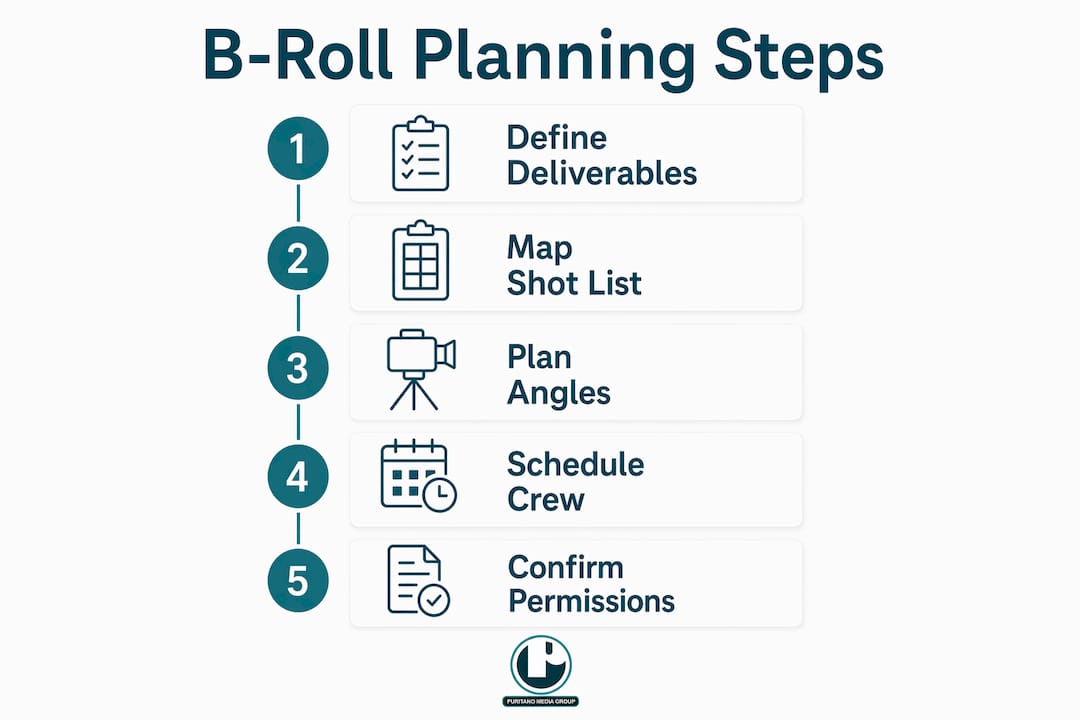
A solid b-roll footage strategy for events means planning every shot around a specific deliverable before you ever step on-site. Start by building a shot list mapped to your final assets, then confirm the aspect ratios each platform requires so your crew frames correctly from the first take.
B-roll is supplemental footage — venue exteriors, audience reactions, signage, networking moments — not a scripted production. It’s different from primary coverage like sit-down interviews or main-stage recordings. That distinction matters for budget and scope: b-roll is often captured alongside photography by the same on-site team, but it requires its own plan to be editorially useful.
What should your event b-roll shot list cover?
Think in content layers, not a flat checklist. Each layer corresponds to a moment in the event timeline and maps directly to a deliverable your editor will build.
Arrival and registration layer
Exterior venue wide shot (16:9 hero and center-framed 9:16 for reels)
Signage and branding close-ups
Attendees arriving, checking in, badge pickup
Venue and atmosphere layer
Foyer flow and crowd density
Sponsor banners, branded displays, booth overviews
Room setup before doors open (clean plates, no people)
Program and content layer
Speaker on stage: wide establishing, medium two-shot, close-up hands/face
Audience reactions: nodding, note-taking, laughter
Panel discussions from multiple angles
Networking and engagement layer
Candid conversations, handshakes, group clusters
Demo interactions at booths
Food and beverage moments (detail close-ups)
Closing layer
Applause, award moments, group photos
Venue clearing, teardown details for behind-the-scenes content
Map each layer to a deliverable: the arrival and venue shots anchor your 90-second recap opener; audience reactions fill sponsor clips; networking close-ups drive vertical reels. Specify distribution intent in the shoot brief — vertical framing, hero deliverables, and cutdowns — or risk producing footage that can’t be efficiently repurposed across channels.
Pro Tip: Frame center-weighted compositions on location so you can export the same clip as 16:9 for YouTube and 9:16 for Instagram Reels without recomposing.
How do you capture b-roll that editors actually want to use?
Hold every shot for at least 10–15 seconds and shoot each idea from wide, medium, and close-up angles. That discipline alone separates footage that cuts cleanly from footage that forces an editor to improvise.
Shot sizes and what they do. Establishing wides set context and open sequences. Medium shots show interaction and energy. Detail close-ups — a speaker’s hands, a badge being scanned, a logo on a podium — are the shots editors reach for when they need a motivated cut. Capture multiple times the final video length in b-roll so your editor has genuine options, not just coverage.
Stabilization. Use a tripod for locked-off speaker shots and clean plates. A gimbal or monopod works well for run-and-gun networking coverage. Reserve handheld for intentional energy moments; shaky footage from a crowded hallway rarely survives the edit.
Frame rates. Shoot primary coverage at 24fps for a cinematic look or 30fps for broadcast-safe delivery. Capture crowd reactions and detail shots at 60fps so your editor can slow them down without judging the motion. Consistency within a sequence matters more than any single frame-rate choice.
Audio. Even when you’re not conducting interviews, capture ambient room tone and coordinate with AV for a line-level feed. Room tone fills gaps in the edit and gives your mixer something to work with under music. Technique and intentionality matter more than camera brand; modern mirrorless cameras handle event conditions well.
How should you plan crew, timeline, and budget before the event?
Plan for editability: write your shot list in the order the final video will flow and mark the transition windows your editor needs. That single habit reduces wasted coverage and speeds post-production.
Pre-event essentials. Get the run-of-show at least a week out. Scout the venue or request a floor plan. Connect with the AV team about feed access and restricted areas. Collect shot priorities from stakeholders — the marketing director may need to sponsor logo coverage the event manager never mentioned.
Crew by event size
Event size | Recommended crew | Coverage scope |
Small event | 1 photo/video hybrid | Key moments, b-roll, no live switching |
Medium event | 2–3 person team | Multi-angle coverage, dedicated b-roll shooter |
Large event | Full multi-cam crew | Live switching, dedicated b-roll, audio tech |
Sample day-of timeline
Phase | Timing | Priority |
Pre-event setup | 90 min before doors | Clean plates, signage, room tone |
Green room / speaker prep | 60 min before | Speaker b-roll, sponsor branding |
Session coverage | During program | Audience reactions, speaker angles |
Networking blocks | Breaks and post-session | Candid interactions, booth demos |
Wrap and pickups | Final 30 min | Closing moments, teardown details |
Ballpark delivery ranges vary by scope. Raw footage delivery typically runs 3–5 business days. An edited recap with cutdowns is usually 10–15 business days. Full post-production with captions, color grade, and sponsor deliverables can extend to 3–4 weeks depending on revision rounds. See live event coverage options for a breakdown of what different crew sizes typically include.
How do you edit b-roll into recap videos and social assets?
Edit for story and distribution. Build the hero edit first — a 2–3 minute highlight reel — then cut down from there. Never start with the 15-second version; you’ll make decisions that hurt the longer cut.
Establish the story. Open with venue wides and arrival energy to set context.
Deliver the message. Intercut speaker moments or interview A-roll with audience reaction b-roll.
Show engagement. Networking, booth interactions, and candid moments prove the event had real energy.
Hit sponsor moments. Logo close-ups, branded activations, and sponsor-specific clips belong here.
Close strong. Applause, award moments, or a final wide of the room wrapping up.
From that hero edit, cut your 60-second, 30-second, and 15-second versions. Each cutdown should feel complete, not truncated. Label files by shot type and tag footage with metadata at ingest — “Networking_Wide_01,” “Speaker_Reaction_Close_03” — so editors can find the best takes without scrubbing hours of footage.
For audio, target –14 LUFS for YouTube and –16 LUFS for most social platforms. Capture room tone on-site to fill under music. Color-match any stock footage to your custom clips; mismatched grades are the fastest way to make a polished recap look amateur.
Where should you publish event b-roll and how do you measure impact?
Match asset format to platform and KPI. A 2–3 minute recap drives awareness on YouTube and LinkedIn. Vertical reels drive engagement on Instagram and TikTok. Sponsor clips serve retention and reporting.
YouTube / LinkedIn: 16:9, 2–3 minutes, captions required for autoplay-off environments, KPI is watch time and click-through to registration
Instagram Reels / TikTok: 9:16, 15–60 seconds, captions on-screen, KPI is engagement rate and shares
Email / event recap page: 16:9 embed, 90 seconds or under, KPI is click-through and time on page
Sponsor deliverables: 16:9 and 9:16 versions, 30–60 seconds, KPI is impressions and reporting metrics
Distribution cadence. Release a teaser clip same-day or within 24 hours while the event is still trending. Post the full recap within 5–7 days. Repurpose individual moments — a speaker quote clip, a crowd reaction reel — over the following 4–6 weeks to extend the content’s shelf life.
What permissions do you need before filming an event?
Always secure written permission to film at the venue and use model releases where attendees are identifiable. Posted signage at entry points is the minimum standard for public events; it does not replace releases for close-up, identifiable footage used in promotional materials.
Venue permission: written agreement covering filming areas, restricted zones, and usage rights
Model releases: collect on-site for any attendee featured prominently; use a digital release form for speed
Minors: a parent or guardian must sign; never feature a minor without written consent
Speakers: confirm usage rights in the speaker agreement before the event, not after
Sponsor IP: clarify in the contract which logos and branded assets you can feature in deliverables
Music: avoid capturing unlicensed in-room music in your clean audio tracks; license music for deliverables through services like Musicbed or Artlist
Pro Tip: Post clear filming notice signage at every entrance and include a one-line consent statement on the registration confirmation email. Both steps are standard U.S. best practice and reduce friction on-site.
For safe shooting logistics and a deeper look at press and stakeholder permissions, Puritano’s production guides cover the operational details. This article is general information, not legal advice; confirm your specific situation with a qualified attorney or your venue’s legal team.
Puritano handles the full event b-roll workflow for you
When you work with Puritano, you get the complete production chain: pre-event planning, on-site capture, post-production, and distribution-ready deliverables for sponsors and social channels. Puritano’s team arrives with a shot list already mapped to your final assets, frames for both 16:9 and 9:16 on-site, and delivers captioned hero recaps, cutdowns, and sponsor clips without you managing separate vendors.
Puritano has spent over two decades producing event video packages for corporate clients, nonprofits, associations, and government agencies across the DMV and nationally. The process is straightforward: a discovery call to scope your deliverables, a production brief, and a signed agreement before your event date. Request a quote through the Puritano portfolio page or reach out directly to start scoping your event coverage today.
Key Takeaways
A strong b-roll footage strategy for events requires mapping every shot to a specific deliverable before the crew arrives on-site.
Point | Details |
Map shots to deliverables | Build your shot list around final assets (recap, reels, sponsor clips) before the event. |
Hold shots 10–15 seconds | Give editors runway to cut cleanly; shoot each idea from wide, medium, and close-up angles. |
Frame for both aspect ratios | Capture center-weighted compositions on-site to export as 16:9 and 9:16 without recomposing. |
Secure permissions early | Collect venue permission, model releases, and speaker usage rights before shoot day. |
Puritano covers the full workflow | Puritano plans, shoots, edits, and delivers multi-format b-roll packages for events nationally. |
What most event teams get wrong about b-roll
The most common mistake we see is treating b-roll as an afterthought — something the videographer captures “when there’s time.” That mindset produces footage that looks fine but edits poorly. You end up with three angles of the keynote speaker and almost nothing from the networking hour, which is often where the most authentic energy lives.
The second mistake is planning for one format. An event that generates a 2-minute recap and nothing else is leaving real value on the table. The same footage, properly captured and organized, can produce a sponsor deliverable, six weeks of social content, and a registration teaser for next year’s event. The shoot itself doesn’t change much; the planning does.
We’ve also seen organizers skip the AV coordination step, which costs them clean audio and forces the editor to work around room noise. A five-minute conversation with the AV team before doors open can save hours in post. That’s the kind of production discipline that separates a good event video from one that actually performs.
Useful sources and further reading
Event Photography and Video: When to Add B-Roll — scope and expectations for b-roll alongside photography
27 Pro Tips for Filming Corporate Events and Conferences — content layers, audio, and distribution-ready framing
B-Roll: The Secret Weapon of Compelling Video — hold times, shooting ratios, and editorial flexibility
How to Shoot and Edit Amazing B-Roll Videos — ingest organization and metadata tagging
B-Roll Footage: The Complete Guide — platform specs, pacing, and clip length guidance
Puritano: The Role of Videography in Event Documentation — strategies and technical approaches for event b-roll
Puritano: Audio Setup Live Event Videography Guide — AV coordination and audio redundancy
Puritano: Event Recap Video Examples for D.C. Organizers — hero recaps and cutdown examples
Recommended
Comments