

The Role of Audio in Live Event Video: 2026 Guide
Updated: 3 days ago
Audio is the primary factor that determines whether viewers stay or leave a live event video. Strong visuals attract attention in the first few seconds, but poor sound quality triggers cognitive friction that drives viewers away before your message lands. For event organizers and videographers, understanding the role of audio in live event video is not optional. It is the difference between a production that builds credibility and one that quietly loses its audience.
How does audio influence viewer engagement in live event video?
Audio keeps viewers engaged past the first three seconds, even when the visuals are strong. High-quality audio is the primary factor sustaining attention beyond that initial hook. That means your camera work and lighting can be flawless, but if the audio is muddy or inconsistent, viewers disengage without fully understanding why.
The reason is neurological. When audio is unclear, the brain works harder to fill in the gaps. That extra effort creates fatigue, and fatigue creates distrust. Poor audio causes a mental fatigue stress response that damages event credibility and audience trust. Viewers do not consciously think “the audio is bad.” They simply feel less confident in the speaker and the brand behind the event.
Audio also carries emotional weight that visuals cannot replicate on their own. Music sets anticipation before a keynote begins. A speaker’s vocal clarity signals authority and preparation. Ambient crowd sound tells a remote viewer that something real and significant is happening. These cues work together to shape perception.
“Audio is the fundamental infrastructure for event engagement, essential for accessibility and remote viewing.” — Audio Solutions in Events
The importance of audio in events goes beyond technical quality. Strategic audio design means choosing the right emotional tone for each segment, controlling dynamics so no moment feels jarring, and ensuring every word reaches every viewer clearly. That is sound engineering working as event design.
Key ways audio shapes viewer perception:
Speech clarity signals speaker credibility and preparation
Music pacing controls emotional energy across event segments
Consistent volume levels reduce listener fatigue over long sessions
Ambient sound creates presence and authenticity for remote audiences
Silence used deliberately creates emphasis and anticipation
What are the key audio challenges in live event video production?
The biggest mistake in live event sound engineering is treating in-room audio and online stream audio as the same thing. They are not. Sending the main in-room mix to the livestream causes muddy sound and room echo for online viewers. The in-room mix includes reverb, speaker reinforcement, and room acoustics that sound natural in person but become noise on a stream.
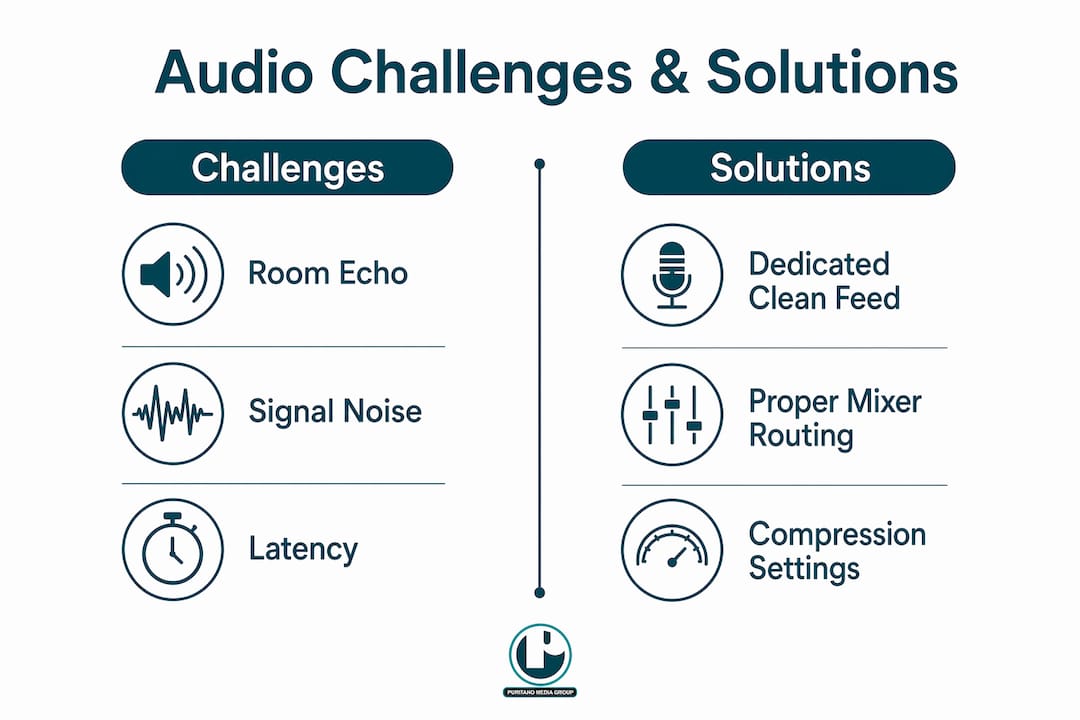
The solution is a dedicated clean feed. Create a separate signal path from an auxiliary output on your mixer, routed directly to your streaming encoder. This feed contains only the dry microphone signals and music, with no room processing. Online viewers hear exactly what was said, without the acoustic character of the physical space.
Hybrid events add another layer of complexity. Hybrid events require separate audio mixes for in-room and online audiences to prevent sync delays, echo, and inaudible content online. Dedicated online feed monitoring is not optional at hybrid events. It is a core production responsibility.
Here is a practical workflow for addressing the most common live event audio problems:
Assign a dedicated audio engineer to the online feed. Do not split attention between in-room and stream audio. Each feed needs its own monitor.
Use a separate aux bus for the stream mix. Route clean, unprocessed microphone signals to this bus and keep room mics off it entirely.
Address wireless mic management before doors open. Check frequencies, replace batteries, and confirm backup mics are staged and ready.
Apply compression to speech channels. For conference-style speaking, compressor settings of attack 10 ms, release 60 ms, and a 4:1 ratio with 6–8 dB gain reduction deliver natural speech clarity without over-processing.
Monitor both feeds continuously during the event. Use headphones, not room speakers, to check the stream mix in real time.
Pro Tip: Apply compression in stages on speaking mic groups using a bus ratio of 2:1 to 3:1 with 2–4 dB gain reduction. This approach maintains speech dynamics and sounds more natural than a single heavy compressor on each channel.
Which audio equipment best supports live event video?
Microphone choice is the foundation of good audio setup for live video. Lavalier microphones work well for seated speakers and panel discussions because they stay close to the source regardless of head movement. Handheld dynamic microphones suit presenters who move across a stage. Hypercardioid shotgun microphones mounted on camera rigs capture ambient sound and audience reactions without picking up excessive room noise.
Mixer configuration matters as much as microphone selection. A digital mixing console with multiple aux outputs gives you the routing flexibility to create separate feeds for the room, the stream, and recording. Consoles from brands like Yamaha, Allen & Heath, and Behringer offer this capability at different price points. The key feature to prioritize is independent aux bus control, not the number of channels.
Monitoring equipment is where many productions cut corners and pay for it later. In-ear monitors and closed-back headphones let engineers hear exactly what each feed sounds like without room acoustics coloring the judgment. Checking the stream mix through the room speakers is unreliable. The room changes what you hear.
Essential backup equipment for any live event audio setup:
Spare wireless microphone transmitters and receivers, pre-programmed to backup frequencies
Extra batteries for every wireless device, staged at the mix position
A direct injection box for any presenter using a laptop or playback device
A spare XLR cable run from the stage to the mix position
A backup recording device capturing a stereo mix independently of the main system
How can you integrate audio planning into your live event video workflow?
Audio planning should be a core design responsibility, not an afterthought addressed during load-in. The best productions treat audio as part of the event design conversation from the first planning meeting. That means your audio engineer is in the room when the run of show is built, not handed a script the morning of the event.
Pre-event coordination with the venue AV team is non-negotiable. Confirm what infrastructure exists, what you are bringing in, and who owns each signal path. Ambiguity about who controls the room speakers or the stream encoder creates problems during the event that no amount of skill can fully fix.
Rehearsal and sound check protocols make a measurable difference in production quality. Virtual sound checks using headphones on an external device reveal problems that studio monitors hide, including phase cancellation and room bleed. Join your own stream from a phone or laptop before the event starts. What you hear on that device is what your online audience will hear.
Pro Tip: Monitor viewer comments and chat during a live stream for audio complaints. Audience feedback is real-time quality control. If three people in a row mention the audio is low or distorted, trust them and adjust immediately.
Additional workflow practices that protect audio quality throughout the event:
Use intercom headsets so the director, camera operators, and audio engineer can communicate without disrupting the program
Assign someone specifically to watch the stream on a consumer device throughout the event
Build a five-minute buffer before program start for final audio checks on all feeds
More than 85% of videos are watched on mute in general social media contexts, but live event video audiences are actively listening. Add captions anyway to support accessibility and hearing-impaired viewers.
Archive a clean multitrack recording of every event for post-production fixes and future reference
Key takeaways
Audio quality is the single most important factor in live event video viewer retention, and it requires dedicated planning, separate signal paths, and continuous monitoring to get right.
Why audio deserves the same respect as your camera package
Here is what I have seen over two decades of live event video production: audio gets underestimated at almost every budget level. Clients will approve a second camera operator without hesitation, but push back on a dedicated stream audio engineer. That is a mistake with real consequences.
The productions that hold up over time are the ones where the audio was treated as seriously as the visuals. I have watched beautifully shot event videos get buried because the keynote speaker was barely audible. I have also seen modest single-camera setups become genuinely compelling because the audio was clean, balanced, and emotionally on point.
The uncomfortable truth is that viewers forgive imperfect video far more readily than they forgive bad audio. Shaky footage reads as authentic. Distorted or inaudible speech reads as unprofessional. That asymmetry should change how you allocate resources and attention on every production.
Treat audio as core event design. Bring your engineer into the planning process early. Build redundancy into your signal chain. And always, always check your stream from the audience’s perspective before you go live. That single habit will catch more problems than any amount of gear.
How Puritano can support your live event audio and video production
Puritano has spent over two decades producing live event video for clients across the Washington D.C. area and nationally. Audio quality is built into every production from the planning stage, not added as an afterthought. The team handles everything from dedicated stream mix engineering to virtual event production with professional audio setups designed for hybrid audiences. If you want to see the standard of work that comes from treating audio as a core production element, the live event video portfolio shows what that looks like in practice. Reach out to discuss your next event and what a properly engineered audio setup can do for your audience experience.
FAQ
Why does audio matter more than video quality in live events?
Poor audio causes cognitive fatigue and subconscious distrust, which drives viewers away faster than imperfect visuals. Viewers tolerate shaky footage but disengage quickly when speech is unclear or distorted.
What is a clean feed and why does live streaming need one?
A clean feed is a separate audio signal routed from an auxiliary mixer output that contains only dry microphone and music signals, with no room processing. Livestreams require a clean feed because the in-room mix includes reverb and room acoustics that sound muddy online.
What compressor settings work best for live event speech?
A compressor with a 4:1 ratio, 10 ms attack, 60 ms release, and 6–8 dB gain reduction delivers natural speech clarity for conference-style events without over-processing the voice.
How do you check audio quality for a live stream before going live?
Join your own stream from an external device using headphones before the event starts. This virtual sound check reveals phase cancellation, room bleed, and level issues that studio monitors do not expose.
Do captions replace the need for good audio in live event video?
Captions support accessibility and viewers watching without sound, but they do not replace audio quality for live event audiences. More than 85% of videos are watched on mute in social media contexts, but live event viewers are actively listening and expect clear, professional sound.
Recommended
At a spoken-word event, the recording is only worth keeping if every word can be heard without effort. We recorded and edited the TransForce company meeting in Crystal City into programs the company still uses year-round, and work like that is planned on paper first, with the room, the speakers, and the listening experience settled before anyone arrives. Viewers forgive a plain camera angle at a meeting. They do not forgive straining to hear the person the meeting was called to hear. Plan the sound as carefully as the shot list, and the program earns its archive life.


Comments