

Live stream production setup: A guide for event organizers
Updated: May 18

You think you need a camera and a Wi-Fi password. That is the most common misconception we hear from event organizers and marketing managers before their first professional live stream. The reality is that a live stream production setup is an end-to-end workflow that moves camera and audio signals through encoding, ingest, delivery, and playback before a single viewer sees a frame. Every stage in that chain can fail independently. Understanding what the full pipeline looks like is what separates a broadcast that runs clean from one that drops out in front of your most important audience.
Table of Contents
Understanding the core components of a live stream production setup
Ensuring reliability with redundancy and bandwidth management
Latency considerations and delivery protocols in live streaming
Advanced workflows and monitoring for professional live streaming
Why thinking of live streaming as a pipeline transforms event success
Puritano Media Group: Your partner for professional live streaming and virtual events
Key Takeaways
Point | Details |
Live streaming is a pipeline | Successful streams depend on a coordinated workflow covering capture, encoding, delivery, and playback. |
Redundancy is critical | Backup encoders and internet connections prevent interruptions during live events. |
Latency impacts experience | Choose the right latency balance for your event goals and audience stability needs. |
Clear roles boost efficiency | Defined production phases and team roles avoid chaos and enable fast incident response. |
Monitoring enables quick fixes | Real-time data and telemetry help operators detect and resolve issues before viewers notice. |
Understanding the core components of a live stream production setup
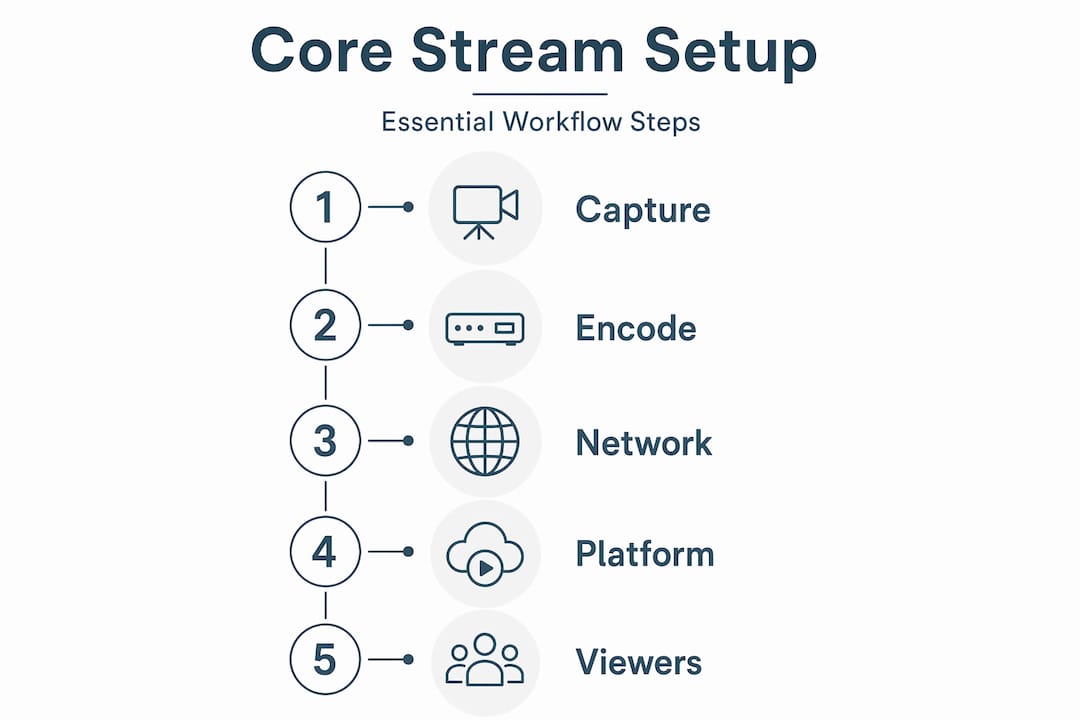
Think of the production setup as a relay race. Each runner hands the baton to the next, and a fumble anywhere ends the race. As every stage hands off to the next, a bottleneck anywhere can stop the whole show. Here is what each stage actually does.
The five core components:
Capture devices: Cameras and microphones gather raw video and audio signals. The quality of your capture gear sets the ceiling for everything downstream. We cover camera and audio gear in more depth elsewhere, but the short version is that a broadcast-grade camera paired with a dedicated audio feed beats a webcam every time.
Encoder: Software or hardware that compresses your raw signal into a streamable format, typically H.264 or H.265. Without encoding, your raw camera feed is far too large to transmit in real time.
Ingest server: The destination where your encoder sends the compressed stream, usually via RTMP (Real-Time Messaging Protocol). This is the handoff point between your production environment and the delivery infrastructure.
Content Delivery Network (CDN): A globally distributed network of servers that replicates your stream and delivers it to viewers wherever they are. Without a CDN, every viewer would pull from a single origin server, which would collapse under load.
Playback layer: The player on the viewer’s device that decodes and renders the video. This is the piece you have the least direct control over, which is exactly why everything upstream needs to be solid.
Understanding the core streaming components in this sequence helps you diagnose problems quickly. If your stream looks great in the encoder preview but viewers see buffering, the issue is almost certainly in delivery or playback, not your camera.
Component | Primary function | Common failure point |
Camera / mic | Capture raw signal | Poor lighting, audio clipping |
Encoder | Compress for transmission | Overloaded CPU, wrong bitrate |
Ingest server | Receive encoded stream | Dropped RTMP connection |
CDN | Distribute to viewers | Capacity limits, routing issues |
Playback player | Decode for viewer | Unsupported codec, buffering |
Pro Tip: Always monitor your encoder’s output bitrate in real time during the event, not just at setup. A bitrate that drops without warning is your first signal that something is wrong upstream, before viewers start complaining.
Ensuring reliability with redundancy and bandwidth management
With the core setup understood, let’s focus on building reliability through careful redundancy and bandwidth planning.

A single point of failure in a live stream is not a hypothetical risk. It is a when, not an if. Professional workflows emphasize redundancy and testing before go-live, including at least 20% bandwidth headroom and backup encoders for failover. Here is what that looks like in practice.
Redundancy and bandwidth checklist:
Run a sustained internet stress test for at least 30 minutes at the venue before the event. Not a quick speed test. A real load test that mimics your actual encoder output.
Provision upload bandwidth at 20% above your combined encoder bitrate. If you are streaming at 10 Mbps total, you need a connection that can reliably deliver 12 Mbps.
Keep a second encoder instance configured and ready to go live within seconds. This can be a second hardware encoder or a second machine running your software encoder with identical settings.
Prepare backup stream keys in advance. Switching to a backup key on the same platform takes less than a minute if you have done it before.
Pre-assign failover ownership to a specific team member. During a live incident, ambiguity about who makes the call costs you precious seconds and viewer trust.
Good team coordination and backup roles are just as important as the technical redundancy itself. The best backup encoder in the world does nothing if no one knows when to switch to it.
Pro Tip: Test your failover procedure during rehearsal, not just your primary stream. Actually kill your primary encoder and watch your backup take over. You will almost always discover something you did not anticipate.
Latency considerations and delivery protocols in live streaming
Understanding reliability, we now examine how latency and delivery protocols impact viewer experience.
Latency is the gap between what happens on stage and what your viewer sees on screen. It matters more for some events than others. A keynote address can tolerate 20 seconds of delay. A live Q&A session where remote viewers are asking questions cannot. Low-latency delivery targets 2 to 6 seconds but risks stream disruptions, while a larger buffer size improves playback stability on poor connections.
Common delivery protocols and their tradeoffs:
RTMP (Real-Time Messaging Protocol): The standard for ingest from encoder to server. Reliable and widely supported, but not designed for viewer-facing delivery.
HLS (HTTP Live Streaming): The most common viewer-facing protocol. Standard HLS carries 15 to 30 seconds of latency. Low-latency HLS (LL-HLS) brings that down to 2 to 6 seconds.
MPEG-DASH: Similar to HLS in function, with low-latency variants available. More flexible for adaptive bitrate delivery.
SRT (Secure Reliable Transport): Preferred for contribution feeds over unreliable networks. SRT handles packet loss gracefully, making it a strong choice for remote locations or cellular connections.
RIST (Reliable Internet Stream Transport): Similar to SRT, designed for broadcast-grade contribution over public internet.
Adaptive bitrate streaming (ABR) automatically delivers multiple quality renditions of your stream, so a viewer on a slow connection gets a lower-resolution version rather than a stalled player. This is not optional for professional events. It is expected.
Matching your technical protocol basics to your event type is a decision worth making before production day, not during it.
Organizing live stream production phases and team roles
Next, we turn from technical setup to the human coordination that ensures smooth live stream execution.
Technical infrastructure without organized people is a recipe for chaos. We have seen well-equipped productions fall apart because no one knew who owned a specific decision at a critical moment. Organizing your setup into pre-production, production, and post-production phases with defined runbooks and team roles, including fallback ownership, is what separates a professional broadcast from an expensive experiment.
The three production phases:
Pre-production: This is where you earn your reliability. Tasks include network diagram creation, rights clearance for any music or third-party content, technical run-throughs with all equipment in place, and runbook documentation. Do not skip the technical run-through. Every surprise you find in rehearsal is one you will not face live.
Production (live): The active broadcast phase covers live switching between camera sources, stream health monitoring, audience moderation for chat or Q&A, and real-time communication between team members. Clear communication channels, typically a private intercom or group chat, are non-negotiable.
Post-production: After the stream ends, the work continues. Archive the recording, repurpose content for social media and on-demand viewing, review stream analytics, and document what worked and what did not for the next event.
Core team roles for a professional live stream:
Producer: Owns the overall show and makes final calls on timing and content.
Director: Calls camera cuts and manages the visual narrative in real time.
Switcher operator: Executes the director’s calls on the video switcher.
Audio engineer: Manages all audio inputs, levels, and mix.
Technical operator: Monitors encoder health, stream output, and CDN status.
Moderator: Manages audience interaction, chat, and Q&A queues.
Our live production team roles article goes deeper on how to brief each of these people effectively. You can also explore our virtual event case studies to see how these roles play out in real productions.
Advanced workflows and monitoring for professional live streaming
Having covered roles and phases, we now explore infrastructure and monitoring strategies that safeguard stream quality.
Here is something most live stream guides do not tell you: failure points often lie in delivery pipeline stability, not camera choice. You can have the best cameras on the market and still deliver a broken experience if your monitoring and failover infrastructure is not solid.
Advanced infrastructure considerations:
Layered planes model: Think of your live stream as three planes operating simultaneously. The media plane carries the actual video and audio. The control plane manages encoder settings, switching, and CDN configuration. The data plane handles telemetry, monitoring, and analytics. Problems in one plane do not always look like problems in that plane.
Real-time telemetry: Client-side monitoring tools report buffering events, bitrate drops, and error rates back to your operations team as they happen. Without this data, you are flying blind.
Multi-CDN delivery: For high-stakes events, routing through more than one CDN provider adds a layer of protection against regional outages or capacity issues at a single provider.
Encoder validation: Encoder settings are not set-and-forget. Keyframe intervals, bitrate caps, and resolution settings need to be confirmed active and correct before and during the broadcast.
Monitoring metric | What it tells you | Action threshold |
Encoder output bitrate | Stream health at source | Drop below 80% of target |
CDN edge error rate | Delivery health | Above 0.5% errors |
Viewer buffering ratio | Playback experience | Above 1% of sessions |
Ingest reconnects | Connection stability | Any reconnect during live |
Pro Tip: Assign one team member exclusively to monitoring dashboards during the live event. When everyone is watching the show, no one is watching the data. A dedicated technical operator who is not distracted by content is the fastest early-warning system you have.
Why thinking of live streaming as a pipeline transforms event success
Most clients come to us focused on one question: what camera should we use? It is a reasonable question, but it is the wrong starting point. After more than two decades of producing live events and broadcasts, we have learned that camera selection accounts for maybe 20% of what determines whether a live stream succeeds or fails. The other 80% lives in the pipeline.
Treating live streaming as a pipeline with media, control, and data planes helps teams avoid blaming single components and improve overall reliability. This framing is genuinely useful because it changes how you diagnose problems. When a stream goes down, the instinct is to look at the camera or the internet connection. But the actual failure is usually somewhere in encoding, ingest, or CDN delivery, places that are invisible to the audience but critical to the experience.
The pipeline mindset also changes how you build your team. Instead of hiring more camera operators, you start asking whether you have someone watching the encoder output, someone managing CDN health, and someone with the authority to trigger failover without waiting for approval. Those team workflow insights are what actually protect your event.
Latency management is another area where the pipeline view pays off. The right latency target is not always the lowest possible. For a large corporate keynote where interaction is limited, a 20-second buffer buys you stability that a 3-second buffer cannot. For a live auction or interactive Q&A, you accept more risk to gain responsiveness. That is a production decision, not a technical default.
We also believe strongly in operational runbooks. Write down every failover procedure, every backup stream key location, every escalation path before the event starts. A runbook does not slow you down during a crisis. It is the only thing that speeds you up.
Puritano Media Group: Your partner for professional live streaming and virtual events
At Puritano Media Group, we handle the full pipeline for you. Whether you need a single-camera stream or a multi-camera production with real-time graphics and remote contributors, our production services are built to match your event goals. Reach out and let us help you build a live stream that works.
Frequently asked questions
What equipment is essential for a basic live stream production setup?
At minimum, you need a good camera, microphone, encoder (hardware or software), stable internet connection, and a streaming platform to deliver your content. As one live streaming guide puts it, it all starts with capturing clean, reliable signals from your camera and microphone.
How much internet upload speed do I need for reliable live streaming?
You should have upload bandwidth at least 20% higher than your total encoder bitrate, and you should test sustained performance for 30 minutes before the event to confirm stability under real load.
What role does latency play in live stream quality?
Latency controls how quickly viewers see the action. Lower latency enables real-time interaction but increases the risk of playback disruptions, while a larger buffer improves stability for viewers on poor connections.
Why is redundancy important in live streaming production?
Redundancy ensures that if one encoder or network path fails, a backup can take over quickly, preventing stream interruptions. Planning encoder failover and keeping backup stream keys ready are standard practice for any professional broadcast.
What is the typical structure of a live streaming production team?
A live stream team typically includes a producer, director, switcher operator, audio engineer, technical operator, and moderator. Operational runbooks with defined responsibilities for each role, including fallback ownership, are what keep the team coordinated when things go wrong.
Recommended
Comments