

U.S. Procurement: 2026 Training Video Costs and AI Options
Updated: 3 days ago

Expect to pay anywhere from $500 to $10,000+ per finished minute for a professional training video, with total programs running $1,000 for a single DIY module to $150,000+ for a full enterprise rollout. The single biggest driver isn’t runtime. It’s scope and complexity, meaning how much instructional design, interactivity, and revision work sits behind each minute. Before you request a quote, nail down your learning objective, your target learners, and how often the content will need updating.
TL;DR:
Instructional design, interactivity, talent costs, post-production effort, and localization significantly influence the final training video price, often more than runtime.
Per-minute costs vary widely, with simple talking-head videos costing $500 to $1,500, and highly interactive, custom content exceeding $10,000 per minute.
Accurate quotes require detailed breakdowns of scope, including revision limits, accessibility, LMS packaging, and ownership terms, to avoid scope creep.
High-volume and frequently updated content benefit most from AI-assisted production, which can cost as little as $25 to $150 per minute but lacks emotional nuance.
Internal team review hours often surpass vendor costs and should be factored into budgeting for more accurate cost estimates and better project planning.
What Does a Training Video Cost Per Minute?
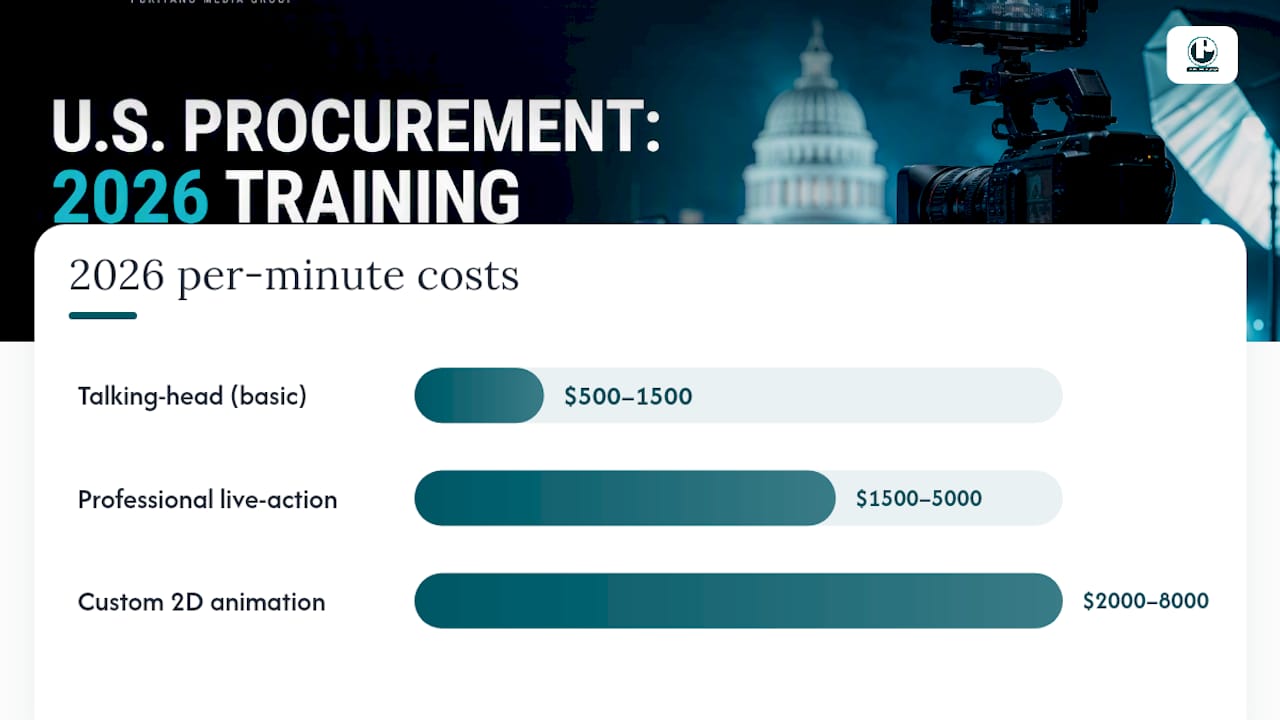
Per-minute pricing gives you a starting benchmark, and in 2026 the spread across formats is wide enough to change your entire budget conversation. A basic talking-head video, someone on camera walking through a process with light graphics, typically runs $500 to $1,500 per finished minute. Bump that up to professional live-action, with a crew, proper lighting, and a scripted set, and you’re looking at $1,500 to $5,000 per minute. Custom 2D animation lands between $2,000 and $8,000 per minute because every frame is built from scratch. Interactive or branching video, the kind with decision points and scored assessments, starts around $10,000 per minute and climbs from there.
Total program costs offer more insight than just per-minute estimates. Small projects might be modest in cost, mid-size series often require a mid-range budget, and enterprise rollouts with complex needs typically require a significantly larger budget.
Here’s the catch with per-minute pricing: it assumes a linear relationship between length and cost that rarely holds up. A tight, well-scripted 90-second compliance video with one on-camera talent can cost more per minute than a rambling 8-minute product walkthrough, because the first requires legal review, multiple takes, and precise messaging while the second just needs a steady camera and a confident presenter. Element-level cost ranges, a filming day at $2,500 to $10,000, professional voiceover at $300 to $1,000, motion graphics at $1,000 to $4,000, give you a far more accurate way to sanity-check a quote than dividing total price by minutes.
The Five Cost Drivers That Explain Most Quote Variance
Two vendors can look at the same training brief and come back with numbers $30,000 apart. That gap almost never comes down to greed. It comes down to five variables that most first-time buyers underestimate.
Instructional design and scripting effort. Turning a subject-matter expert’s knowledge into a script that actually teaches something takes far more labor than the finished video suggests. Every distinct learning objective you need covered functions almost like its own mini-production effort, with its own script pass, review cycle, and visual plan.
Interactivity and branching. Add decision points, quizzes, or scenario branches, and effort multiplies fast. Production-hour ratios for eLearning run 80 to 300 hours of work per finished hour of content depending on how interactive it gets, since each branch is effectively a separate video that needs its own shoot, edit, and QA pass.
Talent, crew, and location. A single presenter in a rented studio costs a fraction of a multi-day shoot with actors, a location scout, and a crew billing day rates.
Post-production depth. Motion graphics, custom sound design, and multiple rounds of stakeholder revisions all add hours that rarely show up in the initial estimate.
Localization, accessibility, and maintenance. These aren’t one-time costs. They’re recurring line items every time your content needs an update or a new market.
Pro Tip: Ask any vendor to break their quote into these five categories before you compare it to another bid. A quote that only shows one lump sum is hiding where your money actually goes.
DIY, Freelancers, Agencies, or AI: Which Approach Fits Your Budget?
The right production model depends less on your total budget and more on your volume, timeline, and how much polish the content actually needs to do its job.
DIY and software tools. Screen recording and basic editing software can produce a functional module for under $200 total. This works for internal process documentation and low-stakes tutorials where production value doesn’t matter, but it shows on camera, and employees notice.
Freelancers. Independent editors and videographers typically charge $500 to $2,000 per finished minute, a sweet spot for single projects, smaller companies, or organizations with a clear script and limited need for coordination across departments.
Full-service agencies. Agencies run $2,000 to $10,000 or more per finished minute because they bring instructional designers, production crews, and post-production teams under one roof. This is the right call when the stakes are high, compliance is involved, or you’re producing a multi-module series that needs consistent visual identity.
AI-assisted production. Generative platforms that turn a script directly into an on-screen presenter can bring costs down to $25 to $150 per minute for straightforward, presenter-led content. Organizations with higher video production volumes or frequently updated content generally gain the most benefit from AI-assisted video production. Where it still falls short: high-stakes compliance training, anything requiring human demonstration or emotional nuance, and branding-sensitive content where a synthetic presenter undercuts trust.
Most organizations end up blending these tiers. Use an agency for your flagship onboarding series and evergreen brand content, then lean on AI-assisted tools for the compliance updates and policy refreshers that change every quarter.
How to Build a Training Video Budget That Survives Finance Review
Numbers on a page mean little until you tie them to your actual use case. Here’s how three common scenarios shake out.
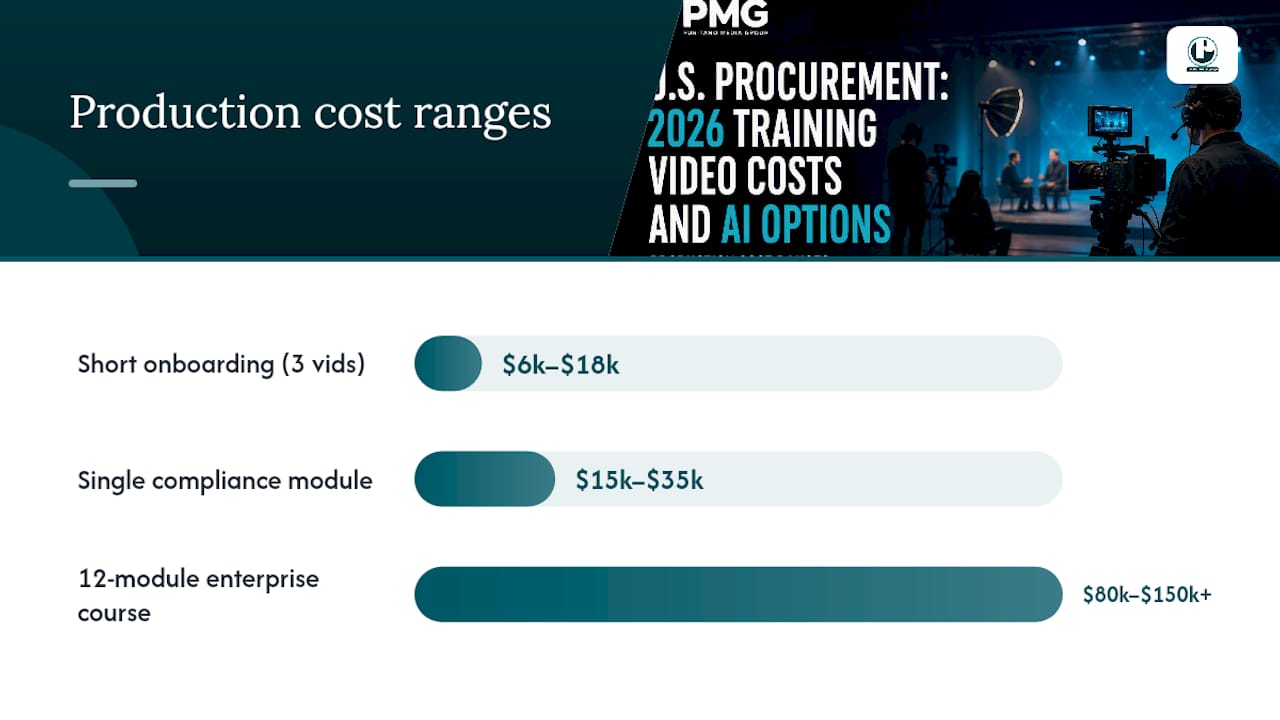
Three short onboarding videos (2-3 minutes each, talking-head style with light graphics): $6,000 to $18,000 total, delivered by a freelancer or small production team.
Single compliance module (5 minutes, professional live-action, legal review built in): $15,000 to $35,000, typically an agency job given the accuracy stakes.
12-module enterprise course (mixed formats, some interactivity, LMS packaging): $80,000 to $150,000+, almost always agency-led with instructional design as a separate line item.
To judge whether any of this pencils out, calculate cost-per-learner: total production cost divided by expected number of viewers over the content’s useful life. A $20,000 module viewed by 2,000 employees costs $10 per learner, a number worth comparing against the roughly $165 per learner-hour that instructor-led training typically costs once you factor in trainer time, travel, and lost productivity. Video wins decisively on scale; it loses when your audience is too small to spread the fixed production cost across.
One line item gets missed constantly: your own team’s time. Internal labor for reviews and stakeholder sign-off is often the largest overlooked cost in the entire project, frequently pushing a true estimate 20 to 50% above the vendor’s line item alone. Log the hours your subject-matter experts spent on your last three projects before you set next year’s budget. For a deeper walkthrough of allocating these categories, our corporate video budget breakdown covers the planning process step by step.
What to Ask Vendors to Get an Apples-to-Apples Quote
A vague brief produces a vague quote, and vague quotes are how projects blow past budget by 40%. Before you send an RFP, lock down these specifics.
Deliverable counts and formats. How many finished minutes, in what file formats, at what resolution, with how many revision rounds included.
Captioning and accessibility. Closed captions and transcripts should be itemized, not assumed, since accessibility compliance is a real deliverable with real labor behind it.
LMS packaging. Confirm whether the vendor handles SCORM or xAPI packaging for your learning management system or whether that’s on you.
Update and ownership terms. Ask who owns the raw footage and project files, and what it costs to make changes six months from now.
Pricing model fit. Per-minute pricing works for straightforward talking-head content; per-project pricing protects you better once interactivity or heavy revisions enter the picture.
Watch for contracts with no defined revision limit. “Unlimited revisions” sounds generous until it becomes the vendor’s excuse for scope creep on both sides. Our guide to requesting video production quotes walks through the exact language to use when comparing bids.
Timelines and the Costs Nobody Budgets For
Plan for four to eight weeks on a straightforward project: one to two weeks for scripting and pre-production, one to three shoot days, and two to four weeks of post-production and revisions. Interactive modules and multi-language rollouts stretch that timeline considerably.
The costs that catch procurement teams off guard almost always show up after the invoice is paid:
Music licensing and stock footage, often overlooked until legal flags an unlicensed track
Extra revision rounds beyond what the contract specified
Hosting and LMS integration fees that recur monthly
Accessibility updates required after an internal audit
Localization, which doesn’t just add translation costs but often triggers a full re-edit for timing and text overlays
Localization and update cadence are the two factors most likely to multiply your lifetime cost well past the original production invoice, particularly for compliance content that regulators revise annually.
Why Puritano’s Process Produces Predictable Numbers
Puritano has spent over two decades producing corporate, government, and e-learning video across the DMV region and for clients nationally. That range matters here: government training content demands a different review process than a corporate onboarding series, and pricing predictability comes from having run both enough times to know where the surprises hide.
We start every training project with instructional design, not a camera package
Government and corporate e-learning credits inform our production planning
Case studies from past virtual event and training deliverables show how scope decisions map to final cost
The Real Story on Training Video Costs in 2026
Most cost guides in this space treat AI-assisted production as either a gimmick or a full replacement for human-led video. Both framings miss what’s actually happening. The realistic move for 2026 is treating AI-generated video as a third tier alongside freelancers and agencies, one suited specifically to high-volume, frequently updated content where a synthetic presenter doesn’t undercut the message.
Conventional advice tends to fixate on per-minute pricing as if it’s the whole answer. It isn’t. Two vendors quoting the same per-minute rate can deliver wildly different value once you account for instructional design depth and revision terms. If I had to tell a procurement lead one thing to prioritize first, it wouldn’t be finding the lowest per-minute rate. It would be logging your own team’s review hours from your last project and building that number into every future comparison. Internal labor is the cost center almost everyone forgets to shop for, and it’s frequently larger than the number on the vendor’s invoice.
The organizations that get the best return aren’t the ones chasing the cheapest quote. They’re the ones who scope the project tightly enough that “cheap” and “accurate” end up meaning the same thing.
Get a Vendor-Ready Training Video Quote From Puritano
Puritano gives procurement and HR teams something most freelance setups and DIY tools can’t: a single accountable production partner who handles instructional design, filming, and post-production without the coordination overhead of managing three separate vendors. That means fewer scope surprises and a quote that actually holds once production starts.
To get an accurate proposal, send us your learning objective, your target learner count, how often the content will need updating, and any existing sample scripts or brand guidelines. We’ll scope the project against the exact cost drivers covered above, instructional design, interactivity, talent, and post-production, rather than handing back a generic per-minute number. Browse examples of our production quality in our video portfolio, then reach out through Puritano to start your scope conversation.
Sources
Recommended
Scope is what moves a training budget, and translation is a clear example. For Montgomery County Public Schools we produced 13 safety videos, with staff training, student versions for two age groups, and a community cut covering lockdown, evacuation, and shelter procedures. The full series was then translated with custom graphics and narration in Spanish, Korean, Vietnamese, Chinese, French, and Amharic. Each version is real production work, and programs that plan for it early avoid surprises later. For scale, that Montgomery County school safety and crisis series was budgeted at over $186,000, the level of investment a district makes when the training has to be right the first time, in every language its staff and families speak.


Comments