

A Video RFP Template That Gets You Real, Comparable Bids
Updated: 3 days ago

A fit-for-purpose video RFP template names ten sections: executive summary, project context, scope of work, deliverables and technical specs, timeline and milestones, budget guidance, submission instructions, evaluation criteria, legal and IP terms, and required attachments. Skip one and you’ll get bids you can’t compare side by side.
The quick, paste-ready outline sits a few sections down. Grab it, fill in your project-specific details, and set your evaluation weights before you send it out.
Three things to do right now:
Copy the outline template below into your document tool.
Fill in your project’s scope, budget signal, and timeline.
Decide your scoring weights before proposals arrive, not after.
Key Takeaways
A complete video RFP names ten specific sections and pairs them with a weighted scoring rubric so proposals become genuinely comparable.
Point | Details |
Name every section | Executive summary, scope, deliverables, timeline, budget, submission, evaluation, and legal terms all need dedicated space. |
Use a weighted rubric | Score creative fit, technical capability, timeline, budget, and references before bids arrive. |
Balance specificity | Give clear technical specs and constraints, but leave room for vendor creative solutions. |
Request real attachments | Require three work samples, references, and an itemized cost breakdown from every bidder. |
Bring in an experienced partner | Puritano reviews draft RFPs and responds with production-grounded quotes, not generic estimates. |
What Should A Video Production RFP Template Include?
Every section in a video production RFP exists to answer one vendor question: can I price this accurately without guessing? Skip a section, and you get padded estimates or, worse, a bid that unravels once production starts.
Your executive summary should read like a compressed brief: what triggered this project, what success looks like, and what constraints matter most. A sample paragraph might say something like, “We need a 90-second brand video for a Q2 product launch, filmed in one location, with a hard delivery date of April 3 and a budget signal of $25,000 to $40,000.” That’s four sentences and vendors already know if they’re a fit.
Company and project context covers your internal stakeholders, existing brand assets, target audiences, and where the video will run. A vendor pricing a video for internal training handles that completely differently than one pricing a national broadcast spot.
Your scope of work needs to break into pre-production, production, and post-production line items vendors can actually price: scripting, casting, location scouting, shoot days, editing rounds, motion graphics, sound design. Vague scope is the single biggest cause of inflated quotes, because vendors pad for the unknown.
Technical specs deserve their own checklist:
Master file format and codec (ProRes, H.264, etc.)
Aspect ratios needed (16:9, 9:16, 1:1)
Caption and subtitle requirements
Source file and raw footage delivery expectations
Frame rate and resolution standards
Timeline and milestones should list your response deadline, a defined Q&A window, key deliverable dates, and how many review cycles you’re offering. Submission requirements need a file format, page limit, required attachments, and a named contact person. Evaluation criteria should preview both qualitative judgment (creative fit) and quantitative scoring (a rubric you’ll see below).
Pro Tip: List your technical specs before your creative brief. Vendors price format complexity faster than they price vague adjectives like “modern” or “punchy.”
Finally, your legal, rights, and AI policy section should state usage rights, licensing terms, whether AI-generated or AI-assisted elements are acceptable, and accessibility requirements like caption compliance. A strong 2026 RFP specifies exactly these elements, including AI-era disclosure, so every vendor bids against the same rules.
A Quick, Copyable Video RFP Template
Paste this outline into Notion, ClickUp, Google Docs, or wherever your team drafts documents. Fill each bracket with your specifics.
Company Overview — Who you are, your industry, and why this project matters now.
Project Objectives — What this video needs to accomplish and how you’ll measure it.
Target Audiences — Who watches this and on what platform.
Scope of Work — Pre-production, production, and post-production line items.
Deliverables & Technical Specs — Formats, aspect ratios, captions, file types.
Timeline & Milestones — Response deadline, Q&A window, shoot dates, review cycles.
Budget Guidance — Range or ceiling, plus what’s included.
Submission Instructions — Format, contact, deadline, page limit.
Evaluation Criteria — Weighted scoring categories.
Legal & Licensing Terms — Usage rights, AI disclosure, accessibility standards.
For the executive summary, try: “We are seeking a production partner for [project type] to be delivered by [date], targeting [audience], with a budget signal of [$X to $Y].” For deliverables, list them as a bulleted spec sheet rather than prose.
Keep the finished document to a moderate length. Anything overly long buries the specs vendors actually need.
How Do You Score And Compare Video Proposals?
A weighted scoring rubric turns subjective gut feelings into a defensible decision. Assign each proposal a score in categories like:
Creative approach and concept fit (25%)
Technical capability and past work (20%)
Timeline realism (15%)
Budget and value (25%)
References and reliability (15%)
Build a comparison matrix using the same dimensions across every bid: what’s included in scope, timeline commitments, budget expectations, deliverables and formats, evaluation notes, and submission completeness.
Dimension | What to compare |
Scope inclusions | Which pre/post-production tasks are covered vs. billed as extras |
Timeline | Proposed shoot dates and total turnaround |
Budget | Total quote against your stated range |
Deliverables | File formats, revision rounds, source file access |
Evaluation fit | Weighted score across your rubric categories |
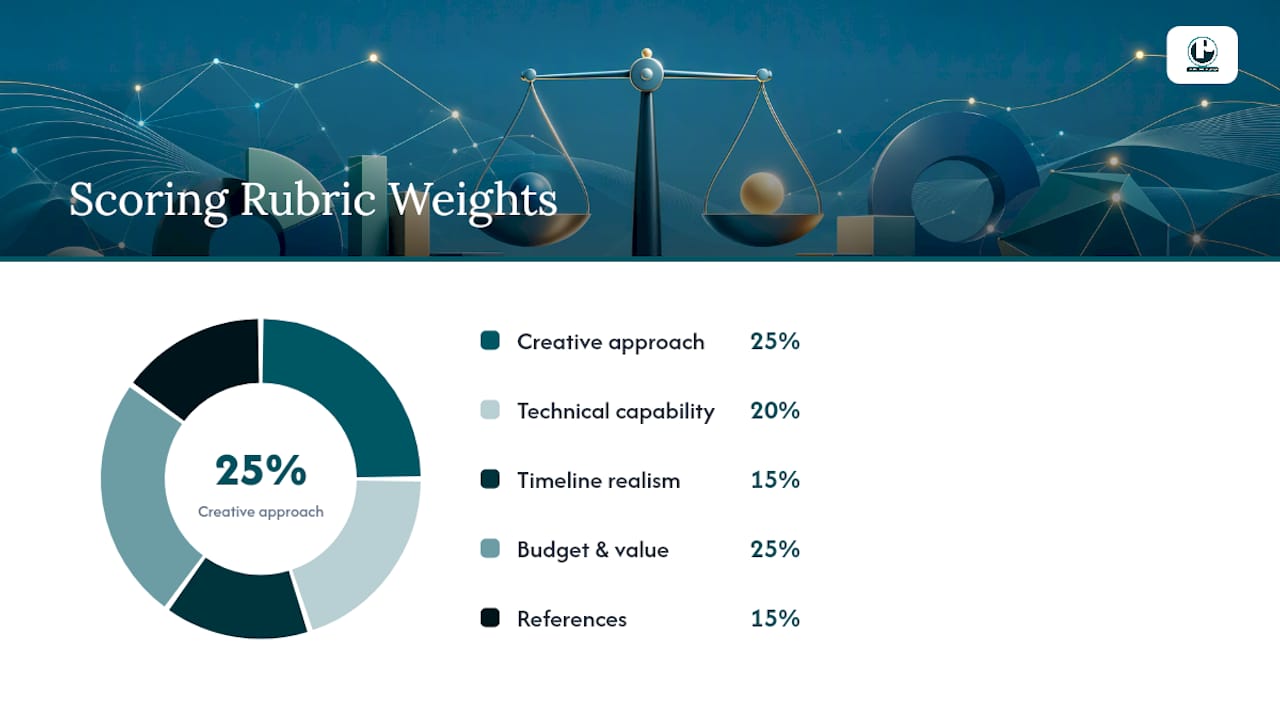
A small internal training video might weight budget and timeline heavier, while an enterprise product launch weights creative approach and references higher. Normalize vendor line items, some bundle revisions into their base price and some bill them separately, so you’re comparing total cost, not headline numbers. Templates like ClickUp’s build this evaluation structure directly into the document, which speeds up internal alignment before proposals even land.
How Should You Present Budget In A Video RFP?
You have three options: a firm ceiling, a range, or an open ask for vendors to propose their own number. A range like $20,000 to $35,000 tends to produce the most realistic bids because it filters out vendors wildly outside your tier without boxing anyone into padding a ceiling figure.
Pricing tiers roughly break down as entry level (single-camera, minimal post), mid tier (multi-day shoots, motion graphics, sound design), and enterprise (multi-location, broadcast-quality, extended usage rights). Ask vendors to disclose their assumptions on:
Talent buyouts and usage fees
Stock footage or music licensing
Revision rounds included
Travel and equipment costs
Vendors typically spend 20 to 38 hours preparing a single RFP response. Clear budget signals cut that time and get you sharper, less padded numbers.
What Mistakes Weaken A Video Production RFP?
The two most common failure modes sit at opposite ends: too vague, or too prescriptive. A vague RFP produces padded, inconsistent bids because vendors price their worst-case guess. An overly prescriptive one, dictating exact crew lists or proprietary editing workflows, blocks the creative problem-solving you’re paying for.
Do include style references, required formats, and sample assets. Don’t mandate specific software or crew composition unless there’s a genuine compliance reason.
Pro Tip: If you can’t decide whether a requirement is necessary, ask: “Does this change how the vendor prices the job?” If not, cut it.
Three fast fixes: attach real reference videos instead of describing tone in adjectives, state your hard constraints upfront (locations, talent availability, brand guidelines), and separate “must-have” from “nice-to-have” in your scope so vendors don’t price everything as mandatory.
What Questions And Attachments Should You Request?
Ask vendors directly about their team structure, creative process, cost breakdown assumptions, timeline dependencies, AI tool usage, and how they handle rights transfer. Insurance and compliance documentation matters more than most RFPs acknowledge, especially for on-location or public-facing shoots.
Require these attachments:
At least three relevant work samples matching your project type
Two or three client references
An itemized cost breakdown, not just a lump sum
Team bios or CVs for key creative roles
A technical capabilities list (equipment, editing software, delivery formats)
Run a defined Q&A window and share every clarification with all bidders simultaneously, not just the vendor who asked.
How Experienced Vendors Actually Read Your RFP
At Puritano, we can usually tell within the first page whether an RFP will produce a smooth project or a painful one. Missing technical specs, unrealistic four-day turnarounds for multi-location shoots, and no defined sign-off process are the three red flags that make us ask clarifying questions before we ever draft a quote.
What we want to see early: clear deliverables, defined usage rights, a real budget signal, and a decision timeline. When those four things are present, we can respond with a proposal that’s actually usable, not a placeholder guess.
The RFPs that get our sharpest, fastest bids are the ones that treat vendors as problem-solvers, not order-takers. Give us the constraint and the goal, and let us bring the creative solution.
Clear specs cut our internal estimating time significantly.
A defined review cycle count prevents scope creep before it starts.
Named decision dates keep our team’s calendar realistic for your launch.
What Separates A Strong Video RFP From A Weak One
The best RFPs balance constraint with room to think. State your goal and your non-negotiables clearly, then let vendors propose the creative path. Start drafting with the executive summary and the scoring rubric. Everything else builds outward from those two anchors.
Get A Production Partner To Respond To Your RFP
Puritano gives you a faster path to a usable quote than sending your RFP into a black hole of generic agency intake forms. With two decades producing corporate videos, nonprofit campaigns, government training content, and live event coverage across the DMV area and nationally, we respond to RFPs with real production experience behind every line item, not a sales template.
If you’re drafting a scope of work for a product launch video, a training series, or event coverage, we can review your draft RFP and flag gaps before you send it to other bidders. Browse our music video production work to see the range of creative execution we bring to a brief, or look at our virtual event case study if your project involves multi-format delivery. Reach out through our site to request a proposal or a quick RFP review before your deadline hits.
Sources
For a structured, field-ready starting point, ClickUp’s Video Production Services RFP template organizes scope, timeline, and evaluation fields for teams that want something ready to fill in immediately. If your team prefers a collaborative, living document multiple stakeholders can edit, Notion’s video production RFP template works well before release. Thrive Agency’s free template is a solid lightweight option for smaller projects.
Government and large-organization RFPs often carry extra documentation and formatting rules; check listings like Sam before adapting a standard template. For creative-brief language that feeds directly into your scope section, Minim’s video creative brief guide is a useful companion resource. Copy any of these and adapt the technical-spec checklist from this guide before sending it out.
Recommended
RFPs like this one are familiar territory on our side of the table. Our own federal track record runs from an Export-Import Bank program on selling overseas, through two films for the GSA's National Capital Region, to a three-part U.S. Commercial Service series on working international trade shows. Work like that is produced through an agency review process with named deliverables at every stage, which is exactly why templates that name scope and evaluation criteria up front produce bids a buyer can actually compare.


Comments