

What Is a Video Production Brief: Template for Project Owners
Updated: Aug 4

A video production brief is a single-written document that locks in your project’s job, audience, deliverables, technical specs, budget band, timeline, and approval chain before anyone schedules a shoot. Think of it as the project’s source of truth: every creative decision, vendor quote, and revision round traces back to it.
TL;DR checklist — your brief is ready when you can answer all six:
What job must this video do? (One sentence, measurable outcome)
Who is the primary audience, and where will they watch it?
What deliverables are needed? (Formats, aspect ratios, durations)
What is the budget band? (Floor and ceiling)
What is the hard deadline, and what are the key milestones?
Who has final approval authority, and what is their turnaround time?
Quick sanity check: Before you send the brief, write the project’s job in one sentence. If you cannot, the brief is not ready.
Why does a production brief matter so much?
A vague brief is expensive. When a production company receives incomplete information, they either guess or pad the quote to cover unknowns. Both outcomes cost you money and time.
A well-written brief delivers four immediate benefits:
Accurate vendor quotes: Producers can scope crew, equipment, locations, and post-production hours precisely when deliverables and specs are defined up front.
Fewer revision rounds: Written briefs can reduce revision rounds dramatically — for example, digital creative briefs for HTML5 banners that normally go through 3.2 rounds of revisions can often be completed in just one or zero rounds with the right brief.
Faster turnaround: A clear brief lets production move from quote to shoot without a discovery phase eating your schedule.
Aligned stakeholders: When the brief names the approval owner and revision rules, no one is surprised when a cut goes to legal instead of straight to the client.
The downside of skipping the brief is predictable: scope creep, reshoots, over-quoting on simple projects, under-quoting on complex ones, and deliverables that don’t meet platform specs. A social video delivered at 16:9 when the campaign runs in Instagram Stories is a reshoot, not a revision.
Pro Tip: Send the brief in writing and ask for written confirmation of receipt before the first quote call. Verbal briefings increase the risk of misinterpretation, and a confirmation email creates a shared record that protects both sides.
The importance of video briefs is most visible when something goes wrong. Productions that skip pre-production documentation tend to discover the gaps at the worst possible moment: on set, or in the first edit review.
Who writes the brief and who needs to be involved?
The project lead or marketing director owns the brief. That person is responsible for gathering input, resolving conflicts between stakeholders, and delivering a final document to the production company. Ownership matters because a brief written by committee without a single decision-maker tends to hedge every answer and commit to nothing.
The minimum contributors depend on project type, but most corporate and organizational video projects need input from:
Creative lead: Confirms tone, visual style, and reference videos
Legal or compliance: Flags restrictions on claims, talent releases, or regulated language
Distribution or paid media contact: Specifies platform requirements, ad-server specs, and aspect ratios
Finance or procurement: Confirms the budget band and any approval thresholds that trigger additional sign-off
Before you hand the brief to an external production company, ask the right questions internally. The production company expects to receive a written document, not a discovery call. They use the brief to build the quote, assign crew, and plan the shoot. Arriving at that first call without a brief shifts the burden of discovery onto the vendor’s time, which either delays the quote or gets billed as a pre-production consultation.
Role | Responsibility | Expected turnaround |
Project lead / marketing director | Owns and delivers the brief; resolves stakeholder conflicts | Before first vendor contact |
Creative lead | Provides tone, style references, and brand guidelines | 2–3 business days before brief is sent |
Legal / compliance | Reviews claims, talent restrictions, regulated language | 3–5 business days |
Distribution / paid media | Confirms platform specs, aspect ratios, ad formats | 2 business days |
Finance / procurement | Confirms budget band and approval thresholds | 2 business days |
Final approver | Signs off on script, rough cut, and final delivery | Named in brief with turnaround SLA |
What are the core sections every production brief needs?
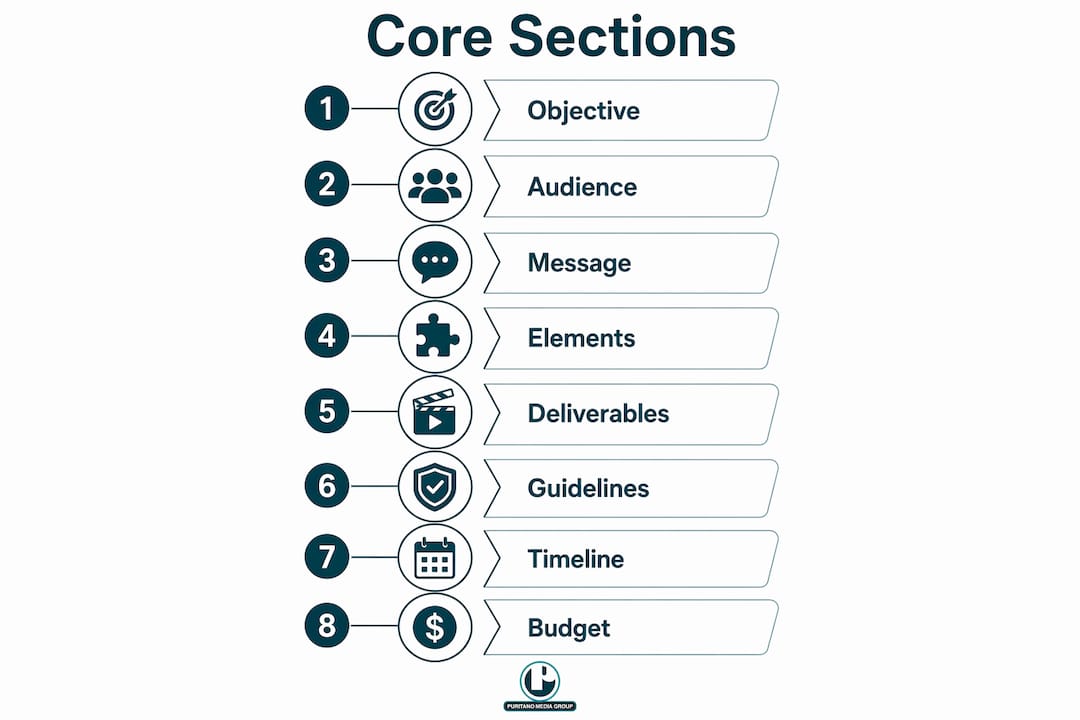
A high-quality production brief typically runs three to five pages and includes seven to eight core sections: project objective, target audience and viewing context, core message and proof points, mandatory and optional elements, detailed deliverables list (with formats, aspect ratios, durations), brand guidelines and reference videos, project timeline with milestones, budget range, and a clear approval chain. Here is each one, with what to write and a short example.
1. Project objective (one-sentence job) State the commercial outcome the video must produce. Avoid goals like “modernize our image.” Instead, write a measurable change: “Reduce new-hire onboarding time from six weeks to four by giving HR a self-paced video module.” This sentence drives every downstream decision.
2. Target audience and viewing context Name the audience segment and describe where and how they will watch. Platform and context determine aspect ratio, pacing, and caption requirements. Example: “Mid-level HR managers at companies with 200–500 employees; watching on desktop via internal LMS during onboarding sessions.”
3. Core message and key proof points Write the single idea the viewer should retain, plus two or three supporting facts. One message. If you list five, the video will have none. Example: “Our platform cuts manual data entry by 40%. Supporting points: integrates with existing HRIS, no IT involvement required, 15-minute setup.”
4. Mandatory and optional elements, plus non-goals List what must appear (logo, legal disclaimer, specific product name) and what must not. Non-goals are underused but critical: they give producers and editors permission to say no to beautiful ideas that are off-mission.
5. Deliverables list Every output format with aspect ratio, duration, subtitle requirements, and file format. This is the field that most directly determines the quote. See the technical specs section below for a copy-paste table format.
6. Brand guidelines and reference videos Attach the brand style guide or link to it. Include two or three reference videos that represent the desired tone, not necessarily the desired topic. A reference video tells a producer more about your expectations than a paragraph of adjectives.
7. Timeline and milestones List key dates working backwards from the delivery deadline: script approval, casting or talent confirmation, location sign-off, shoot date(s), rough cut, revisions, final approval, and delivery. The production timeline should be built from the delivery date backward, not from today forward.
8. Budget band and approval chain State a floor and ceiling. Name the final approver and any secondary approvers (legal, executive) with their expected turnaround times. Define how many revision rounds are included and what triggers a change order.
Field-by-field: mandatory vs. optional by project type
Field | Brand film | Social cutdowns | Livestream |
One-sentence job | Mandatory | Mandatory | Mandatory |
Audience and viewing context | Mandatory | Mandatory | Mandatory |
Core message | Mandatory | Mandatory | Recommended |
Non-goals | Recommended | Recommended | Optional |
Deliverables table | Mandatory | Mandatory | Mandatory |
Brand guidelines | Mandatory | Mandatory | Recommended |
Timeline and milestones | Mandatory | Mandatory | Mandatory |
Budget band | Mandatory | Mandatory | Mandatory |
Approval chain | Mandatory | Mandatory | Mandatory |
How do you write a brief that gets an accurate quote?
The workflow below moves from idea to “send to production” in a defined sequence. Skipping steps creates the gaps that cause scope problems later.
Lock the one-sentence job. Write it before anything else. If you cannot, stop and clarify the project’s purpose with stakeholders. This is not a creative exercise; it is a business decision.
Confirm audience and platforms. Research where the video will live. Platform determines aspect ratio, duration limits, caption requirements, and whether the video needs to work without sound.
Itemize deliverables and specs. List every output: the master file, each social cutdown, any broadcast or streaming version. Every deliverable needs an aspect ratio, target duration, subtitle requirement, and file format. Without this list, vendors cannot produce an accurate quote.
Set the budget band and non-negotiables. Give a floor and ceiling. Note any hard constraints: union talent only, specific location, licensed music, or a shoot date that cannot move.
Attach assets and references. Include the brand style guide, logo files, existing footage, and two or three reference videos. Missing assets at the quote stage delay production.
Assign approvers and turnaround times. Name the person who signs off at each milestone. A brief without named approvers produces approval delays that compress the post-production schedule.
Run the one-sentence sanity check. Re-read the job statement. Does it still describe what the video must accomplish? If the brief has grown and the job statement no longer fits, rewrite it.
Pro Tip: Mark any field you cannot yet answer as “TBD — required before quoting.” Do not leave it blank. A labeled TBD tells the production company exactly what is missing and prevents them from guessing. Fields that must be finalized before quoting include: deliverables list, budget band, and final approval owner.
Video projects most often fail in pre-production because planning fragments across unshared documents. The brief consolidates that planning into one place before concepting begins. And a brief that takes longer than 90 seconds to read may be hiding unresolved decisions — keep every sentence an instruction or a constraint, not a wish.
What technical specs should you include for each deliverable?
Specs are where briefs most commonly fall short. “A 30-second cut for social” is not a spec. A spec tells the production team and the post-production engineer exactly what to build.
List each deliverable as a row in a table with these four columns:
Deliverable | Aspect ratio | Duration | Subtitles / language | Final format |
Hero brand film (master) | 16:9 | 2:30 | English SRT | ProRes 4444, 4K |
YouTube pre-roll | 16:9 | 0:30 | English SRT | MP4, 1080p |
Instagram feed | 1:1 | 0:30 | English burned-in | MP4, 1080x1080 |
Instagram Stories / Reels | 9:16 | 0:15 | English burned-in | MP4, 1080x1920 |
LinkedIn sponsored | 16:9 | 0:30 | English SRT | MP4, 1080p |
Internal LMS module | 16:9 | 4 minutes | English SRT | MP4, 1080p |
A few additional points that prevent re-exports:
Designate the production master. The longest or highest-quality file (typically a ProRes master) is the source for all derivatives. State this explicitly so the editor does not export derivatives from a compressed file.
Name naming conventions. Example: ClientName_ProjectTitle_Deliverable_AspectRatio_Date.mp4. Consistent naming prevents version confusion during delivery.
Note platform-specific constraints. LinkedIn caps video files at 5 GB; Instagram Reels has a 90-second maximum; broadcast specs require specific audio loudness standards (typically -24 LKFS for broadcast, -14 LUFS for streaming). State these in the brief so the audio mix is done once, correctly.
Specify subtitle format. Burned-in captions cannot be turned off; SRT files give the platform control. The choice affects the edit.
For guidance on editing and deliverable best practices, the post-production phase is where spec errors become expensive. Catching them in the brief costs nothing.
How do you set a budget, build a timeline, and define approvals?
Stating the budget band
Give a floor and ceiling, not a blank field and not a single number. A range tells the production company what is possible without anchoring the quote artificially low. Also note any threshold that triggers a separate approval: for example, “up to $40,000 approved by marketing director; above $40,000 requires VP sign-off.” That one line prevents a quote from stalling in procurement.
An approximate band is more useful than “TBD.” Even a wide range ($25,000–$50,000) tells a producer whether to plan a one-day or three-day shoot, whether to budget for a professional voice-over artist, and whether motion graphics are in scope.
Building a backwards timeline
Work from the delivery deadline back to today. A sample milestone sequence for a corporate explainer with social cutdowns:
Delivery deadline: Fixed date (hard)
Final approval: 3 business days before delivery
Revisions window: 5 business days (one round included)
Rough cut delivered: 8 business days before delivery
Post-production begins: After shoot wrap
Shoot date(s): Confirmed after script and location approval
Location sign-off: 5 business days before shoot
Casting / talent confirmation: 7 business days before shoot
Script approval: 10 business days before shoot
Brief delivered to production: Starting point
Red flags producers watch for
A locked shoot date with no approved script
A delivery deadline that leaves fewer than five business days for revisions
A budget band that does not cover the deliverables list (e.g., six platform formats on a one-day shoot budget)
An approval chain with no named individual, only a department or committee
Managing video production projects well means naming a single approver at each milestone, not routing every decision through a group. Group approvals without a tiebreaker are where schedules slip.
A fillable video production brief template you can copy right now
Use the structure below as your starting point. Copy it into a Google Doc, Notion page, or your preferred brief tool. Share it with contributors before sending to production.
PROJECT TITLE:Date submitted:Project lead / brief owner:
One-sentence job:What must this video accomplish, for whom, and by when? Example: “Produce a 2:30 corporate explainer and three 30-second social cutdowns that drive demo requests from HR managers at mid-market companies, delivered by [date].”
Primary audience:Who are they, where will they watch, and what do they already know?
Core message (one sentence):The single idea the viewer must retain.
Key proof points (2–3 max):
Mandatory elements:Logo placement, legal disclaimer, specific product name, required talent, etc.
Non-goals:What should not appear or be filmed.
Deliverables table:(Copy the spec table format from the technical specs section above.)
Brand guidelines:Link to style guide, logo files, color palette, font files.
Reference videos (2–3 links):Videos that represent the desired tone, not necessarily the topic.
Budget band:Floor: $_____ / Ceiling: $_____ / Approval threshold: $_____
Timeline and milestones:(List dates working backwards from delivery deadline.)
Approval chain:Script approval: [Name, turnaround]Rough cut approval: [Name, turnaround]Final approval: [Name, turnaround]
Revision rounds included:Number of rounds; what triggers a change order.
Assets attached:List files included with this brief.
Completed example (corporate explainer + social cutdowns):
One-sentence job: Produce a 2:30 explainer video and three 30-second social cutdowns showing how our onboarding platform reduces new-hire ramp time, targeting HR managers at companies with 200–500 employees, for delivery by March 14.
Deliverables: 16:9 master at 2:30 (ProRes 4444, 4K); 16:9 YouTube cut at 0:30 (H.264, 1080p); 1:1 LinkedIn cut at 0:30 (H.264, 1080x1080); 9:16 Instagram Reels cut at 0:15 (H.264, 1080x1920). All cuts with English SRT files.
Budget band: $28,000–$38,000. Anything above $38,000 requires VP of Marketing approval.
Final approver: Jane Smith, Marketing Director. Turnaround: 2 business days per milestone.
Host the completed brief in a shared Google Drive folder or a project management tool like Asana or Monday.com, and link it in the first email to the production company. A brief that lives only on your desktop is not a shared document.
What mistakes do most briefs make, and how do you fix them?
Most brief problems fall into six categories. Each one has a direct fix.
Vague objective: “Raise brand awareness” tells a producer nothing. Fix: write a measurable commercial outcome. “Drive 500 demo requests from HR managers in Q2” is a brief-ready objective.
Missing deliverable specs: Listing “a social video” without aspect ratio, duration, or format forces the vendor to guess. Fix: use the four-column spec table and fill every cell before sending.
No approval chain: A brief that says “approved by the team” will stall at every milestone. Fix: name one person per milestone with a turnaround time in business days.
Undefined budget: A blank budget field produces a padded quote. Fix: provide a floor and ceiling, even if the range is wide.
Absent brand materials: Sending a brief without a style guide or logo files delays production. Fix: attach assets or link to them in the brief itself, not in a follow-up email.
Platform-ignorant specs: Delivering a 16:9 video for a campaign that runs in Instagram Stories is a reshoot. Fix: confirm distribution platforms with your paid media contact before writing the deliverables table.
Pro Tip: If a brief field is genuinely unknown, label it “TBD — required before quoting” and set a date by which it will be resolved. Do not send the brief until the one-sentence job, deliverables list, and budget band are complete. Those three fields are the minimum a production company needs to build a real quote.
The one-sentence sanity check is the fastest quality test available: if you cannot write the project’s job in one clear sentence, pause and clarify before sending anything to production.
How Puritano uses briefs to keep productions on track
At Puritano, a written brief is not optional. It is the document that makes everything else possible: the quote, the crew call, the shot list, the edit, and the delivery.
Here is a high-level example of how a clear brief changes the production experience. A nonprofit client came to us with a project to document a community health initiative. The first version of their brief listed the goal as “tell our story.” We sent back a one-page set of questions. The revised brief named a specific audience (community health board members and potential funders), a defined deliverable set (a 4-minute documentary master and a 90-second fundraising cut), a budget band, and a single approver. The result: one round of revisions on the rough cut, delivery on schedule, and a final product the client used at a national conference.
The fields Puritano requires in every incoming brief:
One-sentence job (measurable outcome, not a feeling)
Audience and viewing context (platform, device, setting)
Full deliverables table (aspect ratio, duration, subtitles, format)
Budget band with approval threshold
Named final approver and turnaround time
Brand guidelines and reference videos attached
Pro Tip: During the quote stage, Puritano flags every TBD field in the brief and returns a “pending items” list to the client before issuing a final number. This prevents a quote from becoming a contract before the scope is actually defined. If you are working with any production company, ask them to do the same.
You can see the range of deliverable formats and production styles Puritano handles across our video portfolio. For organizations planning virtual or hybrid events, the virtual events service page shows how brief-driven production applies to live and digital formats as well.
Understanding how to brief a video production team is the single most useful skill a marketing director or project owner can develop before engaging a production company.
Key Takeaways
A complete, written video production brief is the single most effective tool for getting accurate quotes, fewer revisions, and on-schedule delivery from any production company.
Point | Details |
Write the one-sentence job first | If you cannot state the project’s job in one sentence, the brief is not ready to send. |
Itemize every deliverable with four columns | Each output needs aspect ratio, duration, subtitle requirement, and file format before quoting can begin. |
Name one approver per milestone | A named approver with a turnaround time prevents schedule slippage at every review stage. |
Provide a budget band, not a blank field | A floor and ceiling, even a wide range, gives producers the information they need to scope crew and post-production. |
Deliver in writing and confirm receipt | Written briefs reduce misinterpretation; a confirmation email creates a shared record before the first quote call. |
Why specificity in a brief is the most underrated production skill
Most people treat the brief as a formality. Fill in the fields, send it over, and let the production company figure out the rest. That approach is how projects end up with three rounds of revisions on a rough cut that was never going to match the client’s expectations, because those expectations were never written down.
Here is what production teams actually do with a brief: they use it as a decision filter at every stage. During scripting, the one-sentence job tells the writer what to include and, just as importantly, what to cut. During the shoot, the deliverables table tells the director of photography which angles are mandatory and which are nice-to-have. During the edit, the core message and non-goals tell the editor which sequences serve the video and which are beautiful distractions. A brief that specifies non-goals gives the entire team permission to say no without a political conversation.
The projects that go over budget and over schedule almost always share one trait: the brief was vague on the objective and silent on the non-goals. When no one has written down what the video is not supposed to do, every creative idea feels equally valid. That ambiguity is expensive. A precise brief does not constrain creativity; it focuses it. The best creative work tends to come from the tightest constraints, because the team spends their energy solving the right problem instead of debating which problem to solve.
Aligning your video content to distribution and performance goals from the brief stage forward is what separates a video that performs from one that simply exists.
Useful sources, templates, and further reading
These resources are worth bookmarking if you want to go deeper on specific topics covered in this article.
Darb Productions: How to Brief a Production Team — Covers written brief best practices, the one-sentence job test, and recommended brief length (three to five pages). Good reference for marketing directors new to briefing external vendors.
DigiLakshya: How to Write a Production Brief — Includes a downloadable template and detailed guidance on itemizing deliverables with spec columns. Useful for anyone building their first deliverables table.
Storyblocks: The Complete Video Production Timeline — Free downloadable timeline templates for both six-week and two-week productions, with editable milestone markers. Recommended for building the backwards timeline in your brief.
Storyflow: How to Plan a Video Project from Start to Finish — Step-by-step workflow from brief to publish, including guidance on when to lock the script format based on brief completeness.
Brainiac Media: Video Marketing for Business — Covers platform-specific distribution considerations and campaign objectives; useful for readers planning multi-platform distribution strategies after the brief is written.
Puritano: Why Scripting Matters in Corporate Video Production — Explains when scripts must be locked before the shoot and when an interview or documentary approach is appropriate; directly relevant to the brief’s format and script-readiness fields.
Recommended


Comments