

How to Manage Client Video Production Projects
Updated: 3 days ago

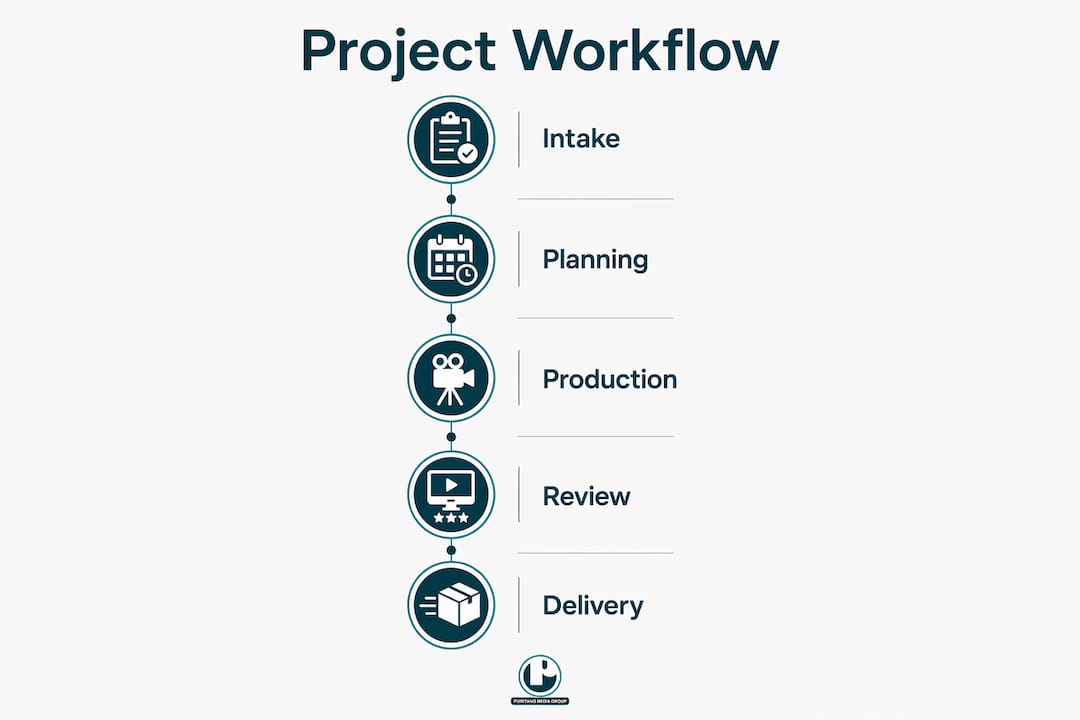
Managing client video production projects is the process of coordinating every phase, from initial briefing through final delivery, to produce high-quality video work on time and within budget. This guide covers the full video production process: scoping, scheduling, feedback control, file management, and payment collection. Whether you oversee a single corporate video or a national campaign, the same core disciplines apply. The difference between a smooth project and a chaotic one almost always comes down to process, not talent. Get the structure right from day one, and the creative work takes care of itself.
What are the essential preparations before starting a client video project?
Preparation is the single most important phase in any successful video project workflow. Skipping it costs more time than it saves. Before a single camera rolls, you need three things locked in: a defined scope, a signed contract, and a deposit in hand.
Start with a detailed intake questionnaire sent to the client before your kickoff call. Sending intake questionnaires early improves briefing efficiency because clients arrive with budget approvals, stakeholder input, and creative references already gathered. That means your kickoff call focuses on decisions, not discovery. You can also review Puritano’s guidance on questions to ask before starting a video project for a practical framework.
Your contract must define the project scope in writing. That includes deliverables, formats, lengths, revision rounds, and deadlines. Vague scope is the root cause of most budget overruns and client disputes.

Payment terms protect your cash flow and your leverage. Requiring a 50% deposit before pre-production begins is standard practice. It filters out uncommitted clients and covers your crew costs before you spend a dollar on production.
Key items to lock in before pre-production:
Signed contract with defined deliverables and revision limits
50% deposit received and cleared
Completed intake questionnaire with creative references and stakeholder approvals
Agreed shoot dates and location confirmations
Named client point of contact for all feedback and approvals
Pro Tip: Send the intake questionnaire at least five business days before the kickoff call. Clients who complete it in advance give you 30 to 60 minutes of meeting time back, and their answers reveal budget misalignments before they become problems.
How to organize video project workflows and file management
File chaos is a project killer. A disorganized folder structure or overwritten edit file can cost a full day of recovery work. The solution is a system you apply consistently across every project, not just the big ones.
Use cloud storage built for large video files rather than standard sync folders. The platform must support large file sizes, instant streaming for review, external sharing without requiring client logins, and version history. Standard cloud sync tools buffer constantly and frustrate clients during review.
Set your folder structure by project phase from the start. A clean structure looks like this:
01_Brief — intake questionnaire, creative brief, contract
02_Pre-Production — scripts, storyboards, shot lists, call sheets
03_Production — date-stamped footage folders (e.g., 2026-03-15_shoot)
04_Post-Production — edit versions, graphics, audio
05_Review — client-facing exports only, labeled by version
06_Delivery — final approved files, organized by format and aspect ratio
07_Archive — full project backup after delivery
Version control is non-negotiable. Every edit file and export gets a version number: v1, v2, v3. You never overwrite a previous version. Tracking active version and approval status by project is more reliable than generic task tracking because it tells you exactly where each deliverable stands in the review cycle.
Phase | File naming example | Purpose |
Rough cut export | client_project_v1_rough.mp4 | First client review |
Revised cut | client_project_v2_revised.mp4 | Post-feedback revision |
Final approved | acme_summer_9x16_15s_v1.mp4 | Delivery-ready master |
Pro Tip: Designate one review owner on the client side before the project starts. That person consolidates all internal feedback before it reaches your editor. One voice in, one voice out. This single rule prevents more revision chaos than any software tool.
What are the best practices for managing client feedback and revisions?
Revision management is where most video projects lose money. Clients often underestimate how much work a “small change” actually requires. Minor perceived changes can require extensive rendering and audio re-mixing. A single color grade adjustment on a 10-minute video can take three hours. Clients do not see that work. Your contract must account for it.
The industry standard is a rough cut plus two revision rounds. Additional revision rounds beyond that carry a flat fee, typically starting at $500 per round. State this clearly in your contract and repeat it in your kickoff call. Clients who know the cost of extra revisions give better, more consolidated feedback the first time.
Revision management best practices:
Conduct an internal review before sending any cut to the client. Catch obvious errors yourself first.
Require all feedback through one platform that supports time-stamped, frame-accurate comments. Email threads and Slack messages scatter notes and create confusion.
Never accept a casual message as approval. Explicit approval gates require documented sign-offs, either through your project tool or a formal email confirmation.
Define what counts as a revision in your contract. A color change is a revision. A complete script rewrite is a scope change with a new quote.
Set a feedback deadline for each review round. Open-ended review periods stall projects and push delivery dates.
“Controlling the feedback loop by consolidating all comments through a single review owner and platform is the most reliable way to reduce project failures and scope creep. Scattered feedback via email, Slack, or calls causes confusion and project delays.” — Industry best practice
The review owner rule deserves emphasis. When five stakeholders send feedback separately, your editor receives contradictory notes and spends hours reconciling them. One designated reviewer consolidates those notes before they reach production. That single process change protects your timeline and your team’s sanity.
How to handle final delivery, payment, and asset archiving
Final delivery is not just dropping files in a folder. It is a structured handoff that closes the project cleanly and protects your payment. Do both right, and you build the kind of client relationship that generates repeat work.
Organize final files by project, aspect ratio, duration, and version. A clear naming convention like acme_summer_9x16_15s_v1.mp4 tells anyone who opens the folder exactly what they are looking at. Delivering final files organized this way keeps the client’s asset library clean and positions you as a professional partner, not just a vendor.
Final delivery checklist:
All agreed deliverables present: main cut, social cuts, caption files, audio stems
Files named by the agreed convention and organized by format
Delivery folder shared via cloud link, not email attachment
Final payment collected and cleared before master files are released
Written confirmation of client approval on file
Payment timing is critical. Holding final masters until payment clears preserves your leverage. Linking file release to “receipt of payment confirmation” rather than “receipt of files” is the correct language. Once the client has the files, your leverage is gone.
After delivery, archive the full project. Store raw footage, project files, and all exports in a long-term backup location. Clients return months later asking for a social cut or a format change. Having the archive ready turns a potential headache into a quick upsell.
What common pitfalls occur in client video projects and how do you fix them?
Even well-run projects hit problems. The difference between a project that recovers and one that derails is how quickly you identify the issue and respond.
Common pitfalls and fixes:
Scope creep: Client requests additions not in the contract. Fix: refer to the signed scope document and issue a change order with a new quote before doing any additional work.
Feedback delays: Client goes silent during review rounds. Fix: set a feedback deadline in the contract. If the deadline passes, the project moves to the next phase or incurs a hold fee.
Scattered feedback: Notes arrive via email, text, and verbal calls. Fix: enforce a single review platform with time-stamped comments. Decline to act on feedback received outside that channel.
File version confusion: Editor works on the wrong version. Fix: enforce version numbering and never overwrite files. The active version field in your project tracker removes all ambiguity.
Unclear approvals: Client says “looks good” in a chat message. Fix: require written confirmation through your project tool or a formal email before moving to the next phase.
Pro Tip: Build a one-page project brief template that you complete with the client at kickoff. It covers scope, deliverables, revision rounds, deadlines, and the review owner’s name. Both parties sign it. That document resolves 90% of disputes before they start.
Early briefing prevents most of these problems. A thorough brief, as outlined in Puritano’s guide on briefing a production team, aligns expectations before production begins and leaves no room for scope ambiguity later.
Key Takeaways
Effective client video production management depends on locking in scope, controlling feedback channels, and enforcing payment terms before problems arise.
Point | Details |
Secure deposits upfront | Require a 50% deposit before pre-production to protect cash flow and filter uncommitted clients. |
Control the feedback loop | Designate one client review owner and use a single platform with time-stamped comments to prevent scattered notes. |
Enforce revision limits | Contract two revision rounds as standard; charge a flat fee for any additional rounds beyond that. |
Organize files by convention | Name and folder all deliverables by project, aspect ratio, duration, and version from day one. |
Hold masters until payment clears | Release final files only after the final payment is confirmed to preserve financial leverage. |
What I’ve learned from two decades of managing video projects
Here is the uncomfortable truth about video project management: most problems are not creative problems. They are process problems that show up wearing creative clothing.
I have watched talented production teams lose money on projects not because the work was bad, but because the feedback loop was out of control. Six stakeholders sending notes through six different channels. A client approving a cut verbally and then requesting changes after the master was delivered. An editor working on v3 while the client was still reviewing v2. None of those failures had anything to do with the quality of the video.
The fix is almost always the same: tighten the process before the project starts, not after it goes sideways. Send the intake questionnaire early. Name a review owner on day one. Put revision limits in the contract and say them out loud at the kickoff call. Collect the deposit before you book the crew.
The part that surprises most project managers is how well clients respond to structure. Clients do not want chaos any more than you do. When you present a clear process with defined milestones and review stages, they feel confident. That confidence translates into faster approvals, cleaner feedback, and fewer late-night messages asking where the project stands.
Archiving is the other habit that pays off quietly. We have had clients return two years after delivery asking for a social cut from a campaign we produced. Because the archive was organized, that request became a quick, profitable job instead of a frantic file recovery exercise.
Build the process. Protect the feedback loop. Collect the deposit. The creative work will follow.
Puritano’s video production services for marketing teams
Marketing professionals and project managers who want a production partner that already operates with this level of process discipline will find that Puritano brings that structure to every engagement. With over two decades of experience producing music videos and branded content for clients across the DMV area and nationally, Puritano applies the same scoping, feedback, and delivery controls described in this guide to every project. The team also handles virtual events production with the same structured approach, from pre-production briefing through final file delivery. Reach out through the Puritano website to review case studies and discuss your next video project.
FAQ
What is the standard number of revision rounds for a video project?
The industry standard is a rough cut plus two revision rounds. Additional rounds beyond that typically carry a flat fee starting at $500 per round.
When should I collect payment on a client video project?
Collect a 50% deposit before pre-production begins and the final balance before releasing master files. Releasing files before payment clears removes your leverage entirely.
How do I prevent scope creep in video production?
Define deliverables, formats, and revision limits in a signed contract before production starts. Issue a formal change order with a new quote for any work outside that scope.
What is the best way to manage client feedback on video edits?
Require all feedback through one platform that supports time-stamped, frame-accurate comments, and designate a single review owner on the client side to consolidate notes before they reach your editor.
How should I organize final video deliverables?
Name files by client, project, aspect ratio, duration, and version, for example acme_summer_9x16_15s_v1.mp4, and deliver them in a structured cloud folder organized by format.
Recommended
Process is the whole argument of this guide, and it is how we run productions. Charlie Puritano plans each project on paper first, settling the audience, the purpose of the piece, and the deliverables before anyone books a shoot day. He then directs on set and sits in the edit, so the person the client planned with is the person who answers for the final cut. Clients feel the difference as fewer surprises: scope questions get answered in pre-production, where they are cheap, instead of in the edit, where they are not.


Comments