

Annual Report Video Production Steps: A 2026 Guide
Updated: 3 days ago

Annual report video production is a structured communication process that transforms complex corporate data and leadership messages into an engaging visual story for stakeholders. Following proven annual report video production steps is the difference between a forgettable slide deck and a video that builds genuine trust. Video condenses lengthy reports into time-efficient overviews that improve stakeholder understanding and retention. The most effective productions treat the video as a companion piece to the written report, not a replacement for it. Puritano has spent over two decades producing corporate videos, and the workflow below reflects what actually works.
What are the essential annual report video production steps?
Every successful corporate video production workflow starts with clarity on what you need before a single camera rolls. Getting this wrong costs you time, money, and credibility with the executives you are trying to showcase.
Core team roles
A well-run annual report video requires a defined team. Each role carries specific responsibilities that cannot be doubled up without sacrificing quality.
Role | Responsibility |
Producer | Manages timeline, budget, and stakeholder coordination |
Videographer | Handles all camera work, lighting, and on-location filming |
Editor | Assembles footage, paces the narrative, and manages revision rounds |
Motion graphics designer | Creates data visualizations and animated sequences |
Compliance officer | Reviews content for accuracy, legal clearance, and confidentiality |
Equipment and software essentials
Professional cameras, broadcast-quality audio gear, and a controlled lighting setup are non-negotiable for executive interviews. On the software side, you need a professional non-linear editing platform, a motion graphics application for data animation, and encrypted file transfer tools for handling sensitive financial content before public release.
Pro Tip: Brief your compliance officer at the project kickoff, not after the edit is done. Catching a confidentiality issue in the script costs one hour. Catching it in the final cut costs a week.
Stakeholder coordination is its own workstream. You will need calendar access for senior leaders, approval from the finance or legal team on any figures shown on screen, and a clear chain of sign-off before distribution.
How to plan and structure your annual report video content
Planning is where most organizations lose the most time. The goal at this stage is to translate the written report’s key messages into a focused narrative structure that works on screen.
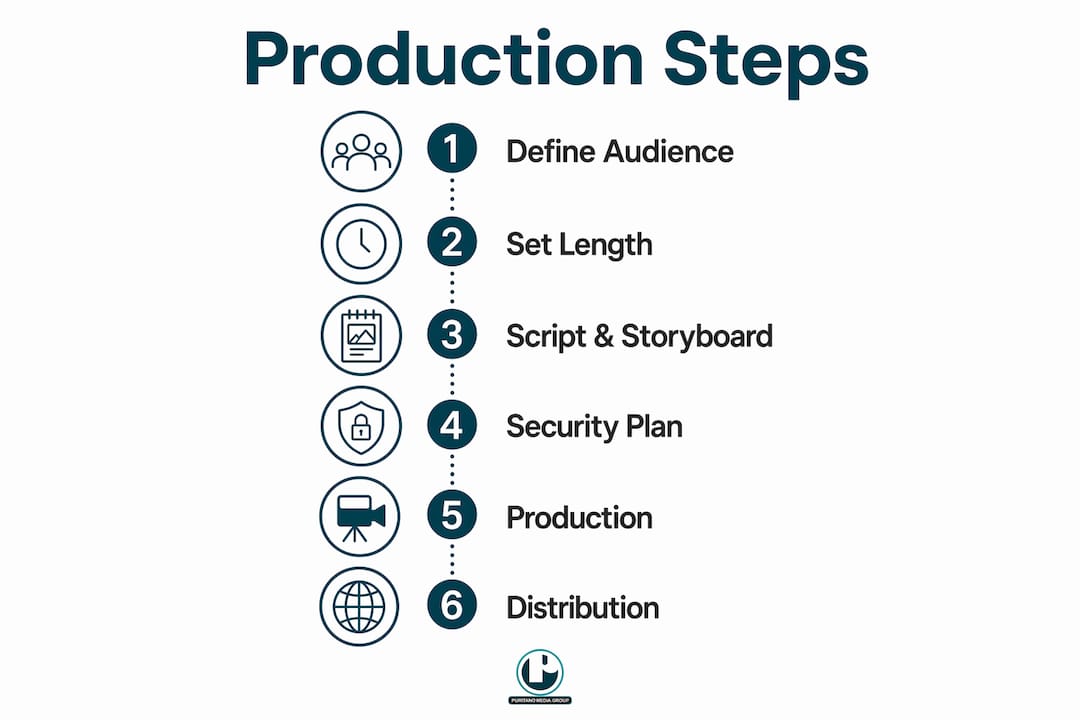
Step 1: Define your audience and core messages
Start by briefing all internal stakeholders together. Agree on the two or three messages the video must land. A video that tries to cover every section of the annual report ends up covering none of them well. The most effective annual report videos focus on selective stories or concepts rather than remaking the whole report. That focus is what makes the video worth watching.
Step 2: Set your video length targets
Video length is one of the most misunderstood decisions in annual video report planning. The benchmarks that work in practice are clear. Impact summaries run under 2 minutes. Executive messages run 3–5 minutes. Individual segments for specific topics run 30–90 seconds. These are not arbitrary numbers. They reflect how long stakeholders will actually watch before dropping off.
Step 3: Write the script and storyboard
Script before you storyboard. The narrative logic has to work on paper before you commit to visual sequences. A strong script for a corporate video production workflow leads with the human story, supports it with data, and closes with a forward-looking message from leadership. The storyboard then maps each script beat to a visual treatment, whether that is a talking head interview, an animated chart, or B-roll footage of your team at work.
Step 4: Plan for security and confidentiality
Annual reports contain pre-release financial data. That data is legally sensitive. Build your confidentiality plan before production starts, not after. This means NDAs for all crew members, restricted access to draft files, and a clear protocol for who can view rough cuts. Offline editing environments and encrypted delivery methods are the standard for handling this class of content.
Pro Tip: Treat your script like a financial document. Limit distribution to people who have signed an NDA and have a direct production role.
Storytelling in corporate video is not decoration. It is the mechanism that makes data memorable and leadership credible.
How to execute the production phase step by step
The production phase is where planning either pays off or falls apart. A realistic timeline starts 3–4 months before your AGM or publication date, with 4–6 weeks allocated to the active production phase including revision rounds. Build that buffer in from day one.
Filming leadership interviews
Executive interviews are the backbone of most annual report videos. Prep your on-camera leaders with talking points, not full scripts. Authentic delivery without a teleprompter builds the kind of trust that static graphs cannot replicate. Film in a controlled environment with consistent lighting and clean audio. Background choices matter: a branded office environment signals stability, while a generic conference room signals nothing.
Integrating data visualization and animation
Animated data sequences must serve a communication goal, not just fill screen time. Every chart, graph, or motion graphic should answer a specific question a stakeholder would ask. Animated elements must load quickly and be tested across devices, particularly mobile, where most stakeholders will first encounter the video. Animation that looks great on a desktop but stutters on a phone undermines the credibility of the entire production.
Managing revisions and executive schedules
Revision rounds are the most common source of timeline overruns. Set a fixed number of revision rounds in your production agreement before filming starts, typically two rounds for the rough cut and one for the fine cut. Executive schedules are the other variable. Book interview slots at least three weeks in advance and confirm 48 hours before. Cancellations at this stage push your entire delivery date.
Secure file handling during post-production:
Use encrypted cloud storage or air-gapped local drives for all draft files
Restrict rough cut access to named individuals only
Watermark all review copies with the reviewer’s name
Delete draft files from all shared systems after final delivery
Brief your production team thoroughly before the shoot day. A well-prepared crew moves faster and makes your executives more comfortable on camera.
What are the best practices for distributing your annual report video?
Finishing the edit is not the finish line. Distribution determines whether the video reaches the stakeholders it was made for.
The standard modern deliverable set is one master film running 3–6 minutes, plus 3–5 shorter cutdowns running 60–90 seconds each, formatted for specific platforms. That means one version for LinkedIn, one for internal email, one for the investor relations page, and one for embedding alongside the PDF report. Each cutdown should be edited for its platform, not just trimmed from the master.
Distribution checklist:
Host the master video on your own domain, not a third-party platform, to maintain control and compliance
Add metadata, titles, and descriptions to support search visibility
Include closed captions on every version for accessibility and SEO
Embed the video directly in your digital annual report PDF where the format supports it
Send a dedicated email to your investor list with the video linked prominently
Post platform-specific cutdowns to LinkedIn with native video upload for maximum reach
Hosting on your own domain with captions and metadata improves search visibility and keeps you in control of the viewing experience. Third-party platforms can change their terms, remove content, or add competing recommendations around your video.
“The video should not recap all report details but bring life to complex data and human stories for stronger stakeholder engagement.”
Measure performance after distribution. Track completion rates, click-through rates from email, and time-on-page for the investor relations section. Those numbers tell you what resonated and what to do differently next year.
Key takeaways
Annual report video production succeeds when you combine a narrative-first script, a realistic timeline starting 3–4 months out, strict confidentiality protocols, and a multi-format distribution plan built for each stakeholder channel.
Point | Details |
Start planning early | Begin production 3–4 months before your AGM to allow time for revisions and approvals. |
Focus the narrative | Build the video around one or two key stories, not a full recap of the written report. |
Respect video length | Keep impact summaries under 2 minutes and executive messages to 3–5 minutes maximum. |
Secure sensitive content | Use NDAs, encrypted file handling, and restricted draft access throughout production. |
Distribute across formats | Produce one master film plus 3–5 platform-specific cutdowns for maximum stakeholder reach. |
What I’ve learned about annual report videos after two decades of production
The biggest mistake I see organizations make is treating the annual report video as a checklist item rather than a communication decision. They approve a script that covers every section of the written report, film a CEO reading from a teleprompter, and wonder why nobody watches past the two-minute mark.
The videos that actually move stakeholders are the ones that pick one or two moments from the year and tell those stories with honesty and specificity. A manufacturing company that reduced its carbon footprint by a measurable amount does not need a montage of stock footage and buzzwords. It needs thirty seconds of the plant manager explaining what changed and why it was hard. That is the kind of visual storytelling that builds trust with investors, employees, and the public simultaneously.
Security is the other area where I see organizations cut corners and regret it. Pre-release financial data is legally sensitive. One rough cut sent to the wrong email address can create a serious compliance problem. The protocols are not complicated, but they have to be built into the workflow from day one, not added as an afterthought after the edit is locked.
The last thing I will say is this: animation is a tool, not a style. Every motion graphic in your annual report video should answer a question a stakeholder would actually ask. If you cannot name the question, cut the animation.
Puritano Media Group and your annual report video
Puritano brings over two decades of corporate video production experience to annual report projects, working with organizations across the Washington D.C. area and nationally. The team manages the full production workflow, from initial stakeholder briefing and script development through filming, post-production, and multi-format delivery. If you want to see the level of craft and storytelling Puritano applies to video projects, the production portfolio shows the range and quality of work across formats. For organizations that need a production partner who understands both the creative and compliance demands of annual report video, Puritano is built for exactly that kind of project. Reach out through the contact page to start the conversation.
FAQ
What is the ideal length for an annual report video?
Impact summary videos should run under 2 minutes, executive messages 3–5 minutes, and individual topic segments 30–90 seconds. Keeping to these benchmarks significantly improves stakeholder completion rates.
How far in advance should you start annual report video production?
Start planning 3–4 months before your AGM or publication date. The active production phase, including filming and revision rounds, typically takes 4–6 weeks.
How do you handle confidential financial data during video production?
Require NDAs from all crew members, use encrypted file storage for all draft materials, and restrict rough cut access to named individuals only. Offline editing environments add an additional layer of security for pre-release financial content.
What deliverables should an annual report video production include?
The standard deliverable set is one master film running 3–6 minutes plus 3–5 shorter cutdowns of 60–90 seconds each, formatted for LinkedIn, email, internal use, and the investor relations page.
Should you host your annual report video on a third-party platform?
Host the video on your own domain with metadata and closed captions. This maintains compliance control, supports search visibility, and prevents third-party platforms from placing competing content around your video.
Recommended
An annual report video ultimately plays in one room, the one where stakeholders decide whether they still believe in the organization. Charlie Puritano's test for work like this is whether it holds up in that room. It is why we build these pieces from interviews with the people who did the work, prepared carefully and never scripted, rather than from narration recorded over slides. Data earns a hearing when a credible person delivers it, and a report film that respects the audience's intelligence is the one executives are willing to put their names beside.


Comments