

Video Style Guide for Brand Consistency: 2026 Guide
Updated: 4 days ago

A video style guide for brand consistency is a documented framework that governs how every piece of video content visually and tonally represents your brand, ensuring all videos align with your identity and messaging across every platform. Without one, even well-produced videos drift apart over time. Colors shift, fonts change, voiceover tone varies, and your audience stops recognizing you. Think of it as the constitution for your video content. It does not dictate every creative decision, but it defines the non-negotiables. Tools like Adobe Premiere, After Effects, and Rev.com make it easier than ever to apply these standards at scale, and accessibility frameworks like WCAG 2.1 AA are now part of what defines a professional, inclusive brand. This guide walks you through every layer of building and maintaining one.
What core elements should a video style guide include?
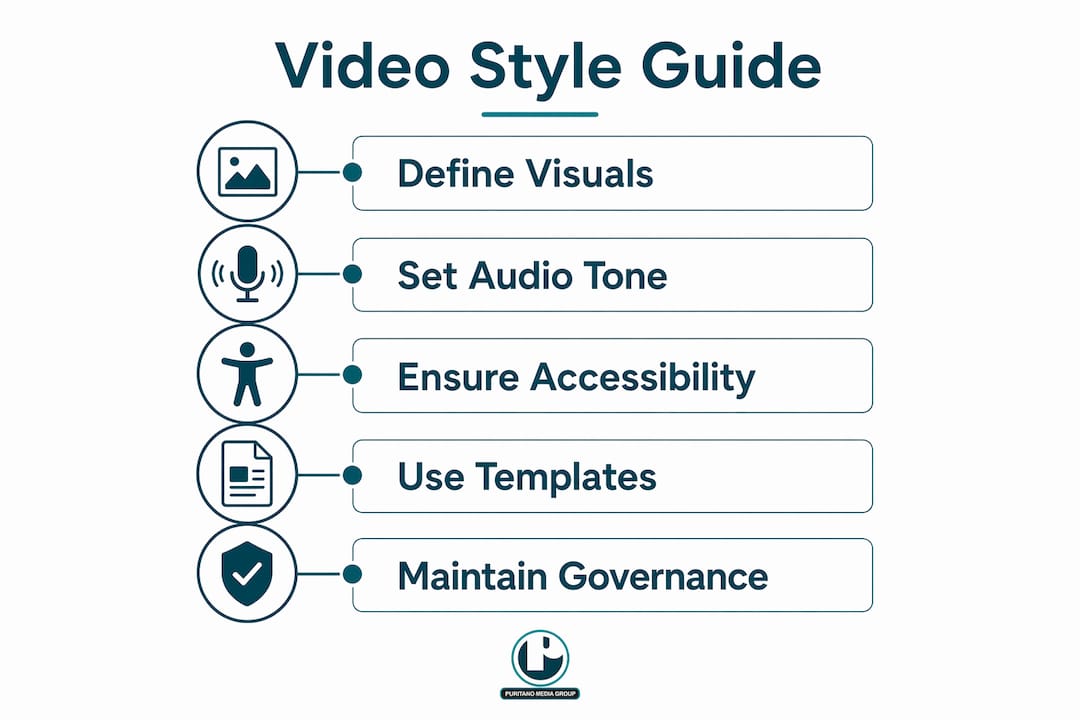
A strong video style guide covers visual identity, audio standards, narrative tone, accessibility requirements, and governance. Each layer reinforces the others. Miss one, and the whole framework develops cracks.
Visual identity elements
Your visual identity layer defines what viewers see in every frame. This includes your logo placement rules, color palette, typography, and motion graphics standards. Autodesk’s video brand guidelines, for example, specify that the logo appears in the lower-right corner during content playback but never during titles or transitions. That level of specificity prevents the small inconsistencies that accumulate into a fragmented brand. Your color palette should reference exact hex codes or Pantone values, not approximations. For on-screen text and captions, sans-serif fonts like URW Grotesk or Arial with sufficient background contrast meet both readability and accessibility standards.
Audio and narrative tone
Audio is the half of video branding that most organizations underinvest in. Your guide should define the voiceover style (conversational, authoritative, warm), acceptable background music genres and tempo ranges, and how sound levels should be mixed. Narrative tone guidance tells your production team and external vendors how the brand sounds, not just how it looks. A nonprofit association sounds different from a government agency, and your guide should make that distinction explicit with examples.
Accessibility and inclusivity standards
All video content should meet WCAG 2.1 AA standards, including closed captions, audio descriptions for visual-only content, and full transcripts. This is not optional for organizations that care about reaching diverse audiences. Captions and audio descriptions also expand engagement beyond accessibility needs. Viewers watching on mute, in loud environments, or in a second language all benefit. Captions, transcripts, and audio descriptions are among the highest-return additions you can make to any video.
Templates, governance, and reusable assets
Your guide should include ready-to-use templates for intro and outro animations, lower thirds, and title cards. These are the workhorses of consistent video production. Governance means defining who approves videos before publication, who owns the style guide, and what the creative brief process looks like. Without clear approval roles, brand standards erode quietly over time.
Pro Tip: Build your intro and outro animations as locked After Effects templates. Distribute them to every internal team and external vendor. This single step eliminates the most common source of visual inconsistency across video outputs.
What tools and systems do you need to build a video style guide?
Before you write a single guideline, you need the right infrastructure. The tools and governance systems you choose determine whether your guide gets used or ignored.
Tool / System | Purpose | Example |
Adobe Premiere | Primary editing and color grading | Apply brand color LUTs across all footage |
After Effects | Motion graphics and template creation | Locked intro/outro animations |
Captions and translation services | Accurate closed captions at scale | |
Creative brief template | Align vendors and internal teams before production | Standardized intake form with brand requirements |
Brand asset library | Centralized logos, color swatches, fonts | Shared cloud folder with version-controlled assets |
GitLab recommends Adobe Premiere and Rev.com as the standard tools for brand video production and accessibility services. That combination covers editing consistency and caption accuracy in one workflow. The creative brief template is equally critical. UCSF and GitLab both emphasize governance and creative brief templates to make sure video outputs follow brand and quality standards regardless of which vendor or internal team produces them.
Your brand asset library should live in a shared, version-controlled environment. Google Drive, Dropbox, or a dedicated digital asset management platform all work. The key is that every person touching video production can access the current, approved versions of every asset. Outdated logos and off-brand color swatches are the most preventable source of inconsistency in video content.
Pro Tip: Create a one-page “quick reference card” that summarizes your most critical brand video guidelines: logo placement, approved fonts, color hex codes, and caption requirements. Attach it to every creative brief you send to vendors. It takes ten minutes to make and saves hours of revision.
How to create a video style guide that balances consistency with creative flexibility
The biggest fear most marketing teams have is that a style guide will box them in. Done right, it does the opposite. Here is a practical process for building one that holds the brand together without strangling creativity.
Define your goal and audience. Start by identifying what your videos need to accomplish and who they are for. A corporate explainer for a B2B audience has different requirements than a social media campaign for consumers. Your guide should reflect those distinctions, not flatten them.
Separate mandatory elements from flexible zones. Mandatory elements include logo placement, color palette, caption standards, and approved fonts. Flexible zones include shot style, music selection within a defined genre range, and narrative structure. Creative briefs and video style guides that leave room for authentic storytelling produce more engaging branded content. The guide provides guardrails, not a script.
Build your templates and safe zones. Develop locked templates for every repeating element: intros, outros, lower thirds, title cards, and end screens. Define safe zones so that critical visual elements never get cropped on mobile or widescreen formats. Understanding aspect ratio decisions before you build templates prevents costly rework later.
Incorporate accessibility from the start. Accessibility requirements built into the production workflow cost far less than retrofitting them after the fact. Define caption style, font size, background contrast, and audio description protocols in the guide itself. Treat them as design decisions, not compliance checkboxes.
Test across devices before publishing. Quality checks on readability and audio clarity across devices are a required step before any video goes live. A lower third that reads clearly on a desktop monitor may be illegible on a phone screen. Test on mobile, tablet, and desktop as standard practice.
Approach | Rigid scripting | Templates with guardrails |
Creative output | Formulaic, low engagement | Authentic, on-brand storytelling |
Production speed | Slow due to constant approvals | Faster with pre-approved assets |
Brand consistency | High but brittle | High and adaptable |
Accessibility compliance | Often missed | Built into the template |
What are the most common mistakes in video branding standards?
Most video branding failures are not creative failures. They are process failures. Here is what to watch for.
Overly rigid guidelines that kill creativity. A guide that scripts every moment produces content that feels corporate and flat. Audiences disengage. The fix is to define what must stay consistent and give your team genuine freedom everywhere else.
Treating accessibility as an afterthought. Organizations that add captions and audio descriptions at the end of production spend more money and get worse results. Neglecting accessibility, overly strict guidelines, and inconsistent governance are the three most common causes of video brand failure. Build accessibility into your production checklist from day one.
Inconsistent governance. When no one owns the approval process, brand standards drift. Different teams make different judgment calls, and the cumulative effect is a video library that looks like it came from five different organizations. Centralized approval processes and detailed briefs are the structural fix. Assign a named owner for every stage of the approval workflow.
Ignoring platform-specific requirements. A video optimized for YouTube performs differently on LinkedIn or Instagram. Safe zones, aspect ratios, caption placement, and even audio mix standards vary by platform. Your guide should address these differences explicitly, not leave them to individual producers.
Failing to update the guide as the brand evolves. A style guide that reflects your brand from three years ago is worse than no guide at all. Schedule a formal review every 12 months and update templates, assets, and standards to match your current brand direction.
Pro Tip: Assign a “brand video steward,” a specific person responsible for maintaining the style guide, fielding questions from vendors, and running the annual review. Without a named owner, the guide becomes a document that everyone references and no one maintains.
Why your style guide is only as good as the culture behind it
Here is what I have learned after two decades of producing video content for organizations of every size: the style guide itself is rarely the problem. The problem is what happens after it gets written.
I have seen beautifully designed brand video guidelines sit in a shared folder, untouched, while production teams make decisions based on habit and personal preference. The guide existed. The culture to use it did not. The organizations that get the most value from their video identity guidelines are the ones that treat the guide as a living document, not a one-time deliverable. They brief every vendor against it. They run internal training when it updates. They build the approval workflow around it, not around individual taste.
Accessibility is the clearest example of this gap. Meeting WCAG 2.1 AA standards significantly improves video success and viewership, but only if the team actually applies those standards during production, not as a final check before publishing. I have also found that the best guides are the ones that trust the creative team. A practical style guide provides templates and guardrails rather than strict scripts, and that distinction matters enormously for the quality of the final product. When your team feels trusted within a clear framework, they produce better work. When they feel micromanaged by a document, they produce work that technically complies but lacks the authenticity that makes branded video actually connect with an audience.
If you are briefing a video production team for the first time, share the style guide on day one. Make it part of the kickoff conversation, not a footnote in the contract.
— Charlie
How Puritano can help you build and apply your video style guide
Puritano Media Group has spent over two decades helping organizations across the Washington D.C. area and nationally produce video content that holds together as a brand. Whether you need corporate video production that reflects your brand standards across every deliverable, or you are building out a virtual events program that needs consistent visual identity across live and recorded content, Puritano brings both the production expertise and the brand discipline to make it work. Every project starts with a detailed creative brief process that aligns your video identity guidelines with the final output. If you want video content that looks and sounds like your brand every single time, that conversation starts here.
FAQ
What is a video style guide for brand consistency?
A video style guide for brand consistency is a documented set of rules governing the visual, audio, and narrative standards for all video content a brand produces. It covers elements like logo placement, color palette, typography, caption standards, and voiceover tone.
How long does it take to create a video style guide?
Most organizations can build a functional video style guide in two to four weeks, assuming brand assets like logos, color palettes, and fonts are already defined. The process takes longer when governance structures and approval workflows need to be established from scratch.
What accessibility standards should a video style guide include?
Video style guides should require compliance with WCAG 2.1 AA standards, including closed captions, audio descriptions for visual-only content, and full transcripts. These requirements apply to all published video content, not just content on public-facing websites.
How often should a video style guide be updated?
A video style guide should be reviewed and updated at least once per year, or whenever a significant brand refresh occurs. Outdated guidelines cause more inconsistency than no guidelines at all, because teams follow the document without realizing it no longer reflects the current brand.
Can a video style guide work for small teams or solo marketers?
Yes. A simplified one-page version covering logo placement, approved fonts, color codes, and caption requirements gives small teams the structure they need without the overhead of a full enterprise guide. The key is having something documented and shared, regardless of team size.
Key takeaways
A video style guide for brand consistency works because it separates non-negotiable brand standards from flexible creative zones, giving teams structure without sacrificing authentic storytelling.
Point | Details |
Define mandatory vs. flexible elements | Lock down logo placement, colors, and captions; give creative teams freedom everywhere else. |
Build accessibility into production | Apply WCAG 2.1 AA standards during production, not as a final check, to save time and cost. |
Use standardized tools | Adobe Premiere, After Effects, and Rev.com create a consistent, scalable production workflow. |
Assign a named governance owner | A dedicated brand video steward prevents standards from drifting between projects and vendors. |
Test across devices before publishing | Check readability and audio clarity on mobile, tablet, and desktop before every video goes live. |
Recommended
Style guides stop being abstract when a catalog depends on one. PMG created the graphics and editing style guide for The Great Courses and produced The Teaching Company's identity film, work that set the visual standard across its course catalog and won a Telly Award. Hundreds of lectures could pass through different hands and still look like one company, because the decisions had been made once and written down. That is the quiet value of a video style guide: consistency that survives staff changes and deadlines.


Comments