

How to Repurpose Corporate Video Across Platforms

Cross-platform video repurposing is defined as the practice of converting one high-fidelity master video into multiple platform-optimized assets, each tailored to the format, audience, and content culture of a specific channel. Marketing teams that produce 20+ derivative assets from a single 30-minute corporate video consistently outperform teams that treat each platform as a separate production project. Tools like Opus Clip, Descript, and FlexClip have made this systematic approach accessible to organizations of any size. The result is a cross-platform video marketing engine that multiplies reach without multiplying production costs.
What is the modern workflow to repurpose corporate video across platforms?
The 2026 standard workflow for video repurposing starts with one principle: decouple production from distribution. When you separate the creative act of filming from the mechanical act of formatting, your team can focus its energy on producing one exceptional master asset rather than scrambling to produce mediocre content for every channel individually. This shift alone changes the economics of video marketing.
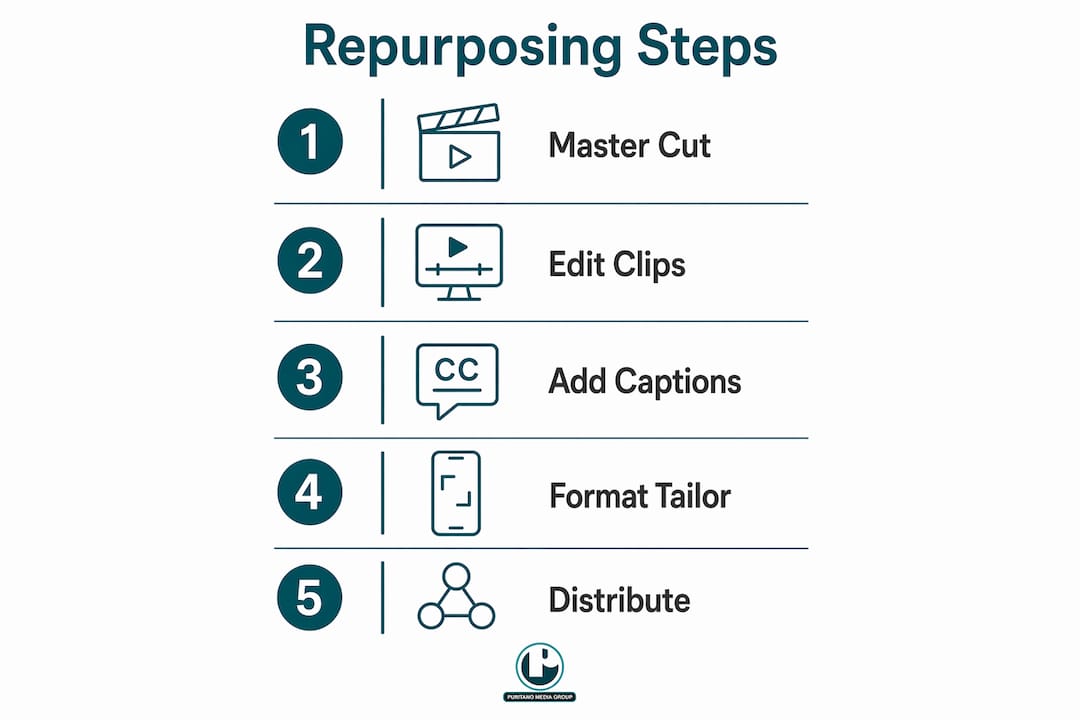
Here is the step-by-step workflow we recommend:
Create a clean, unbranded master cut. Film and edit a high-fidelity long-form video with no platform-specific graphics, lower thirds, or aspect ratio constraints. This master file becomes your single source of truth for all downstream assets.
Run AI-powered highlight detection. Feed the master cut into a tool like Opus Clip or FlexClip to automatically identify the most engaging segments. FlexClip’s AI Long to Shorts feature detects highlights and scores viral potential, giving your team a ranked list of clip candidates before a human editor touches the timeline.
Generate and review captions. Export AI-generated transcripts from tools like Descript or VOCAP, then conduct a manual review pass. Technical terms, proper nouns, and multi-speaker segments require human correction that no AI tool currently handles reliably.
Format for each platform using a centralized composer. A tool like MydropAI lets you manage thumbnails, aspect ratios, and caption files from one interface rather than logging into five separate platforms.
Batch schedule and publish. Use automated reposting tools to queue platform-specific versions and publish on a consistent schedule without manual uploads.
Systematic repurposing workflows reduce editing time from 8 to 12 hours down to roughly 20 to 30 minutes while producing more than 20 tailored assets. That is not a marginal efficiency gain. It is a structural change in how your content team operates.
Pro Tip: Save your master cut with version-controlled captions and a layered project file. When you update messaging six months later, you will re-export platform cuts in minutes rather than rebuilding from scratch.
How to tailor your corporate video content for different platforms
The single biggest mistake in cross-platform video marketing is uploading the same clip everywhere and calling it a strategy. Platform-native content culture drives engagement. A clip that performs well on LinkedIn will often fall flat on TikTok, not because the content is weak, but because the hook, pacing, and format are wrong for the audience.
Here is how each major platform demands a different approach:
Platform | Ideal length | Format | Content focus |
1 to 3 minutes | Landscape or square | B2B thought leadership, case studies, executive commentary | |
TikTok | 15 to 60 seconds | Vertical (9:16) | Fast hooks, personality-driven, trend-aware |
YouTube Shorts | 30 to 60 seconds | Vertical (9:16) | SEO-optimized, educational, searchable topics |
Instagram Reels | 15 to 90 seconds | Vertical (9:16) | Visual storytelling, brand culture, behind-the-scenes |
Email / Blog | 60 to 90 seconds | Landscape or square | Product demos, testimonials, explainer content |
Beyond format, each platform requires a unique hook in the first three seconds. LinkedIn audiences respond to a direct professional claim: “Here is what we learned after 200 client interviews.” TikTok audiences need pattern interruption: an unexpected visual or a provocative question before the first cut. YouTube Shorts rewards keyword-rich spoken openers that align with search intent. Tailoring hooks per platform rather than reusing the same vertical clip everywhere is what separates high-performing repurposing programs from ones that generate views but no engagement.
A few additional practices that consistently improve performance across channels:
Write platform-specific captions and hashtags. A LinkedIn caption reads like a professional observation. A TikTok caption reads like a conversation starter.
Adjust your CTA per channel. “Download the report” works on LinkedIn. “Follow for part two” works on TikTok.
Trim ruthlessly for short-form. The best short clips survive reframing to shorter formats because they contain strong content density and clear pacing, not because they are simply cut shorter.
If you want a deeper look at how short-form video performs across social channels, short-form video strategy is worth reviewing before you finalize your platform mix.
What tools and technologies can automate cross-platform repurposing?
The right tool stack turns a labor-intensive process into a repeatable system. No single tool does everything well, so the best workflows combine specialized tools in a layered approach.
Tool | Primary function | Best for |
MydropAI | Central composer and distribution management | Managing multi-platform formatting from one dashboard |
FlexClip AI Long to Shorts | AI clipping, highlight detection, viral scoring | Converting long interviews and demos into short-form assets |
Opus Clip | AI-powered clip selection and reframing | Identifying high-engagement moments automatically |
Descript | Transcript editing and caption generation | Multi-speaker content and technical terminology review |
Repostify | Automated cross-platform scheduling | Batch publishing without manual uploads via official APIs |
MydropAI addresses the core problem that treating each platform as a separate project creates. By centralizing your composer, you manage one asset library rather than five disconnected folders. FlexClip’s AI-driven highlight detection and viral scoring removes the guesswork from clip selection, particularly useful when working with long interviews or conference recordings where the best moments are buried. Descript earns its place in the stack specifically for caption quality. Its transcript editor lets you correct errors in a text interface rather than scrubbing through a timeline, which saves significant time on technical content.
For distribution, automated reposting tools like Repostify allow you to post once and republish across platforms through official APIs, eliminating the manual upload loop that consumes hours each week. This matters more than most teams realize. The manual overhead of cross-platform posting is often what causes repurposing programs to stall after the first month.
Pro Tip: Do not try to replace your entire workflow with one tool. Use FlexClip or Opus Clip for clipping, Descript for captions, and MydropAI or Repostify for distribution. Each tool does one thing exceptionally well.
How to ensure your repurposed videos meet accessibility and captioning standards
Accessibility is not optional. WCAG 2.2 and the European Accessibility Act (EAA) set specific requirements for video captions that most platform auto-captions do not meet. Understanding the difference between basic subtitles and accessible subtitles is the starting point.
Accessible subtitles, also called SDH (Subtitles for the Deaf and Hard of Hearing), require more than transcribed speech. Accessible subtitles require speaker identification, sound descriptions for non-speech audio, contrast compliance, and the ability for users to toggle captions on and off. Platform auto-captions typically provide none of these features reliably.
“Manual review and enrichment after AI transcription is necessary for full compliance and accessibility.” — VOCAP, Accessible Subtitles WCAG 2.2 and EAA: 2026 Guide
Key practices for compliant captioning:
Use SRT or WebVTT files. Most platforms including YouTube and Vimeo accept these formats for uploaded caption files. Burned-in captions are not compliant with accessibility standards because they remove user control over display.
Add speaker IDs for multi-speaker content. Label each speaker clearly so viewers who cannot hear the audio can follow the conversation.
Include sound descriptions. Relevant non-speech audio such as applause, music, or ambient sound should be noted in brackets.
Budget time for human QA. AI transcription accuracy degrades on technical terminology, accents, and overlapping speech. A human reviewer catches errors that would otherwise create compliance gaps and damage credibility.
Do not rely on platform auto-captions as your only solution. They are a convenience feature, not a compliance tool. Treat them as a first draft at best.
The caption editing process is where most repurposing programs cut corners. That is a mistake both legally and strategically. Accurate captions improve SEO, increase watch time among viewers in sound-off environments, and demonstrate that your organization takes its audience seriously.
What common mistakes should marketers avoid when repurposing corporate videos?
Most repurposing programs fail not because of bad content but because of bad systems. Here are the mistakes we see most often, and what to do instead.
Treating each platform as a separate editing project. This is the root cause of repurposing fatigue. When there is no master asset and no centralized workflow, every platform version requires a full editing pass. Build the system once around a clean master cut and the rest follows.
Using the same raw clip everywhere without adjusting hooks or length. Uploading one vertical video to TikTok, LinkedIn, Instagram, and YouTube Shorts is not repurposing. It is lazy distribution. Each platform needs a unique opening three seconds and a length appropriate to its audience’s attention span.
Neglecting caption accuracy. Captions that misquote speakers, drop sentences, or fail to identify speakers create a poor viewer experience and potential compliance liability. This is especially true for government agencies, nonprofits, and publicly traded companies with formal accessibility obligations.
Failing to centralize assets and metadata. When clip files, caption files, thumbnails, and platform-specific versions live in different folders across different team members’ drives, errors multiply. A centralized asset library with consistent naming conventions prevents the version confusion that causes teams to re-edit content they already produced.
Ignoring performance data. Repurposing without tracking is guessing. Monitor watch time, completion rate, and engagement per platform per clip. The data tells you which moments from your master asset resonate most, which directly informs your next production. If you want to understand why video drives engagement at a fundamental level, that context helps you make smarter decisions about which clips to prioritize.
Key takeaways
Effective cross-platform video repurposing requires one high-fidelity master asset, platform-specific tailoring for hooks and formats, AI-powered tools for clipping and captioning, and a centralized distribution system to eliminate manual rework.
Point | Details |
Start with a clean master cut | An unbranded, high-fidelity master file is the foundation for all platform-specific derivatives. |
Tailor hooks and length per platform | LinkedIn, TikTok, YouTube Shorts, and Instagram Reels each require unique opening seconds and clip durations. |
Use a layered tool stack | Combine FlexClip or Opus Clip for clipping, Descript for captions, and Repostify or MydropAI for distribution. |
Prioritize accessible captions | Upload SRT or WebVTT files with speaker IDs and sound descriptions to meet WCAG 2.2 standards. |
Track performance per platform | Watch time and completion rate data reveal which master asset moments drive the most engagement. |
What I’ve learned after years of producing corporate video for multi-platform distribution
Here is something I have noticed working in video production for over two decades: the organizations that struggle most with repurposing are not the ones with bad content. They are the ones that never planned for repurposing at the point of production.
When a corporate video is shot with distribution in mind, everything downstream gets easier. That means capturing clean b-roll that works in vertical and landscape formats. It means recording clean audio without music beds that would create licensing problems on social platforms. It means shooting interviews with enough visual variety that a 90-second LinkedIn cut and a 30-second TikTok clip can both feel complete rather than truncated.
The AI tools available in 2026 are genuinely impressive. FlexClip’s viral scoring and Opus Clip’s auto-reframing remove real friction from the workflow. But no tool compensates for a master asset that was not built with flexibility in mind. A poorly lit, single-angle interview with a music bed baked into the audio is a difficult animal to repurpose regardless of how good your clipping software is.
The accessibility piece is the one I feel most strongly about. I have seen organizations treat captions as an afterthought and then face real consequences, both reputational and legal. Accessible captions are not a technical checkbox. They are how you communicate to a significant portion of your audience who watches video without sound, who has hearing loss, or who simply prefers to read along. Getting this right is both the right thing to do and a measurable engagement win.
My honest advice: invest in the master asset, build the system once, and let the tools do the repetitive work. The organizations that do this consistently are the ones that show up everywhere their audience is, without burning out their content teams.
How Puritano can support your corporate video repurposing strategy
At Puritano, we have spent more than two decades producing corporate videos for organizations across the Washington D.C. area and nationally. We understand that a great video is only as valuable as the reach it achieves. That is why our production process is built with multi-platform distribution in mind from day one, capturing clean masters, flexible b-roll, and format-ready footage that makes downstream repurposing straightforward. Whether you need a full corporate video production package or support adapting existing assets for LinkedIn, YouTube, and beyond, we can help. Explore our virtual events production work to see how we approach scalable, multi-format video for organizations with real distribution goals.
FAQ
What does it mean to repurpose corporate video across platforms?
Repurposing corporate video across platforms means converting one master video into multiple format-specific assets tailored for channels like LinkedIn, TikTok, YouTube Shorts, and Instagram Reels. Each version is optimized for that platform’s ideal length, aspect ratio, hook style, and audience expectations.
How many assets can you create from one corporate video?
A single 30-minute corporate video can generate more than 20 derivative assets, including short clips, highlight reels, blog embeds, email thumbnails, and social posts. The exact number depends on content density and how many platforms you are targeting.
What is the fastest way to repurpose long corporate videos into short clips?
AI-powered tools like FlexClip’s Long to Shorts feature and Opus Clip automatically detect highlights, reframe footage for vertical formats, and score clips for viral potential. This reduces manual editing time from several hours to under 30 minutes for a full asset set.
Do repurposed videos need separate captions for each platform?
Yes. Each platform has different caption file requirements and viewer behaviors. Upload SRT or WebVTT files where supported, and avoid relying solely on platform auto-captions, which typically do not meet WCAG 2.2 accessibility standards for speaker identification and sound descriptions.
What is the most common reason repurposing programs fail?
The most common failure is treating each platform as an independent production project rather than building one centralized workflow around a single master asset. Without a system, repurposing becomes unsustainable and teams revert to producing one-off content per channel.
Recommended
Comments