

Microlearning Video Production: A Practical Guide for L&D Teams
Updated: 3 days ago
A microlearning video is a short instructional clip built around a single learning objective, typically running two to five minutes, and designed for on-demand viewing at the moment a learner needs it. The core production rule: front-load your key message in the first fifteen seconds, then close with a brief knowledge check that forces retrieval. Cognitive load theory explains why shorter wins: working memory can only hold so much before comprehension drops, so a tight, single-objective video protects retention better than a bloated one. The testing effect, backed by research on learning and retention, shows that even a low-stakes quiz after the video measurably boosts recall days later. Puritano Media Group has built training content around this same principle for corporate and government clients for over two decades.
What this means for your next video:
Pick a single clear objective
Target 2 to 5 minutes, per Coursera’s microlearning guidelines
Put your main point in the opening seconds
End with a quiz question, poll, or practice prompt
Key Takeaways
Microlearning video works because it matches a single objective to a short runtime and closes the loop with a retrieval check, which together protect attention and lock in retention.
Point | Details |
Keep one objective per video | A single learning objective per 2 to 5 minute clip prevents cognitive overload and keeps completion rates high. |
Front-load the key message | State the main point in the first 10 to 15 seconds instead of building up to it. |
Add a knowledge check | A brief quiz after the video activates the testing effect and strengthens long-term recall. |
Match format to objective | Use screencasts for procedures, branching scenarios for decisions, and microlectures for concepts. |
Bring in Puritano for high-stakes videos | Puritano Media Group handles scripting through QA for executive-facing, compliance, or high-distribution training content. |
What Is a Microlearning Video, and When Should You Use One?
A microlearning video isolates one skill, concept, or procedure and delivers it in a compact, standalone clip a learner can watch without prior setup. It’s not a chopped-up version of a longer course. It’s built from the ground up to stand alone, which means the script, visuals, and pacing all serve a single objective rather than a broader curriculum.
Three traits define the format: a single learning objective, a short runtime, and on-demand accessibility, usually through an LMS, mobile app, or shared link that doesn’t require a scheduled session.
That makes it a strong fit for specific situations:
Onboarding, where new hires need bite-sized orientation to policies, tools, and workflows without sitting through a half-day session
Compliance refreshers, where annual retraining on a narrow topic (data privacy, safety protocol) doesn’t need a full course rebuild
Just-in-time performance support, where someone mid-task needs a 90-second answer, not a manual
Soft-skill nudges, like a two-minute video on giving feedback before a manager’s first review cycle
Microlearning has real limits. It’s poor at building the kind of layered, interconnected understanding that comes from a structured curriculum with practice, feedback loops, and instructor interaction. Complex leadership development or deep technical certification still needs a longer learning journey. Think of microlearning as the scalpel, not the whole surgical kit.
Why Microlearning Video Outperforms Long-Form Training
Shorter videos get watched to the end far more often than long ones, and that completion gap is the single strongest argument for microlearning in a budget meeting, highlighting key audience engagement strategies for business growth. Benchmarks from production research show that videos under two minutes tend to post the highest finish rates, while the 2 to 5 minute range still balances engagement with enough depth to teach something real.
The Evidence Behind the Format: Cognitive load theory explains the mechanism. Working memory holds a handful of new information chunks before overload sets in, so a video scoped to one objective avoids competing for the same mental bandwidth. Layer in the testing effect, documented in learning-retention research, and a short quiz embedded right after the clip measurably strengthens what sticks days or weeks later. Neither mechanism is exotic. Both are decades old. Microlearning video just happens to be the delivery format that applies them well.
The business case follows from the mechanism. Gartner survey data found that nearly half of digital workers struggle to find the information they need to do their jobs, which is exactly the gap a searchable library of short videos closes. Enterprise examples compiled by Udemy Business show organizations cutting total training time while improving performance, provided the videos are paired with some form of reinforcement rather than watched once and forgotten.
Microlearning Video Formats You Can Copy Today
Not every objective calls for the same format. Matching the format to the goal is the single biggest lever you have over whether a video actually teaches anything, and industry examples consistently show format mismatch as the reason otherwise well-produced videos underperform.
Microlecture. A talking-head or narrated-slide explainer for a single concept. Example: “What is a fiduciary duty?” in 90 seconds, aimed at new financial services hires.
Screencast or demo. Screen recording with voiceover, built for procedural tasks. Example: “How to submit an expense report in three clicks.”
Whiteboard or text animation. Simple animated graphics that build a concept visually. Example: a 60 second explainer on how your commission structure calculates.
Branching scenario. The viewer makes a choice mid-video and sees the consequence play out. Best for decision-making skills, like a manager choosing how to respond to a conflict between two team members.
Checklist plus micro-quiz. A short walkthrough of steps followed immediately by three quiz questions. Ideal for compliance and safety procedures where you need a retention record.
“What’s new” update. A 60 to 90 second video announcing a policy or product change, replacing the all-staff email nobody reads.
Pro Tip: Match the format to the objective, not the other way around. If you’re teaching a decision (should I escalate this or not?), a branching scenario beats a lecture every time, because the learner practices the judgment call instead of just hearing about it.
The Five-Step Production Workflow for 2–5 Minute Videos
A repeatable workflow is what separates a training library that scales from one where every video is a bespoke project. Production guidance points to five stages that keep quality consistent whether you’re producing three videos or thirty.
Define the objective and the metric. Write one sentence: “After watching, the learner will be able to X.” Then decide how you’ll know it worked, whether that’s a quiz score, a completion rate, or a drop in help-desk tickets on that topic.
Script to the duration. A 2 minute video runs roughly 260 to 300 spoken words. A 4 minute video runs 500 to 600. Put your main point in the first line of the script, not the third paragraph.
Storyboard and pick the format. Sketch the visual sequence, even roughly, and choose from the format catalogue above based on what you’re actually teaching. This is also where you decide on-screen text, b-roll, or animation needs.
Produce. Choose your production route based on stakes and volume (covered in the next section), then run a short QA pass before publishing:
Does the video open with the key message, not a slow intro?
Is there exactly one objective, with no scope creep?
Are captions accurate and synced?
Is the knowledge check present and testing the right thing?
Does the file meet your LMS’s format and size requirements?
Publish and schedule reinforcement. Push the video into your LMS or internal comms flow, tag it for mobile access, and set a reminder for a spaced-repetition touchpoint, whether that’s a follow-up quiz at 30 days or a linked refresher video. For teams building a full series rather than a one-off, pre-production planning upfront saves rework later, since a shared brief format keeps every video in the library consistent.
How Long Should a Microlearning Video Run?
Duration should follow the task, not a fixed rule. Procedural how-tos often work best under two minutes. Concept explainers usually need the full 2 to 3 minute window. Scenario-based or branching content, where a learner needs to absorb context before making a choice, can justify 3 to 5 minutes without losing them.
A workable script structure holds up across all three:
Opener (first 10 to 15 seconds): state the key message directly, no throat-clearing
Two to three supporting points: the actual content, kept tight
A rapid example: show it in action, don’t just describe it
A call to action or practice prompt: what should the learner do differently now?
Benchmarks from production research show under-2-minute videos post the strongest completion rates, while the 2 to 5 minute range still holds attention well when the script earns its length. As a rough word-count guide, budget 130 to 150 words per minute of finished video. When editing down, cut examples before you cut the core explanation. Practitioner guidance consistently recommends skipping the long intro entirely and getting to the point in the first sentence.
Choosing Your Production Approach: DIY, AI-Assisted, or Professional
Three routes exist, and the right one depends on volume, risk, and how often the content changes.
DIY, in-house. Fastest and cheapest per video. Best for low-stakes internal updates, informal how-tos, or a single team’s process documentation.
AI-assisted, templated workflows. Faster than DIY for high volume with frequent updates, since a template handles the visual structure while you swap in new script and screen recordings. Good fit for product update videos or recurring “what’s new” content.
Professional production. Slower and costlier per video, but the right call when accuracy, brand consistency, or executive presence matters.
Run a quick decision checklist before choosing: How many videos per year? How often does the content change? What’s the compliance or accuracy risk if something’s wrong? How much is brand perception riding on this? Compliance and high-risk procedural content generally warrants tighter QA regardless of which route you pick.
Measuring Impact: A Minimal ROI Plan
You don’t need a data science team to prove a microlearning pilot worked. A three-video pilot with a simple before-and-after design gives you enough signal to justify scaling.
Track four things: completion rate, embedded knowledge-check scores, time-to-competency for new hires, and a downstream behavior KPI, like fewer help-desk tickets or faster task completion. Where possible, run a control group that gets the old training method against a group that gets the new microlearning videos, with a pre- and post-check on both.
Metric | What It Tells You |
Completion rate | Whether the format itself is holding attention |
Knowledge-check score | Whether the testing effect is producing retention gains |
Time-to-competency | Whether onboarding or task ramp-up sped up |
Behavior KPI | Whether the training changed actual on-the-job performance |
Enterprise case studies show measurable time and performance improvements when microlearning is paired with reinforcement rather than treated as a one-time watch.
When to Bring in a Video Production Partner
Some videos are worth outsourcing, and knowing which ones saves you from a costly reshoot. Bring in a partner when the video is executive-facing, when it covers a compliance-sensitive procedure where accuracy has legal weight, when the scenario is complex enough to need real branching logic, or when the video needs to go to a wide, external-facing audience where production quality reflects on the brand.
A brief that gets a strong result includes:
The learning objective and success metric
The intended audience and where they’ll watch it
Visual references or existing brand guidelines
The distribution plan (LMS, mobile app, intranet)
Puritano Media Group has produced training and e-learning content for corporate, nonprofit, and government clients for over two decades, and a well-scoped brief is consistently what separates a smooth production from a stalled one. For a template you can reuse, see how to brief a video production team.
What Actually Changes When You Iterate on This
The teams that get the most out of microlearning aren’t the ones with the biggest budget. They’re the ones who ship a small pilot, look honestly at the completion and quiz data, and rework the script before scaling up. Most of the failures I’ve seen traced back to skipping that step and producing twenty videos off one untested assumption.
Get Production-Grade Microlearning Videos Without the Guesswork
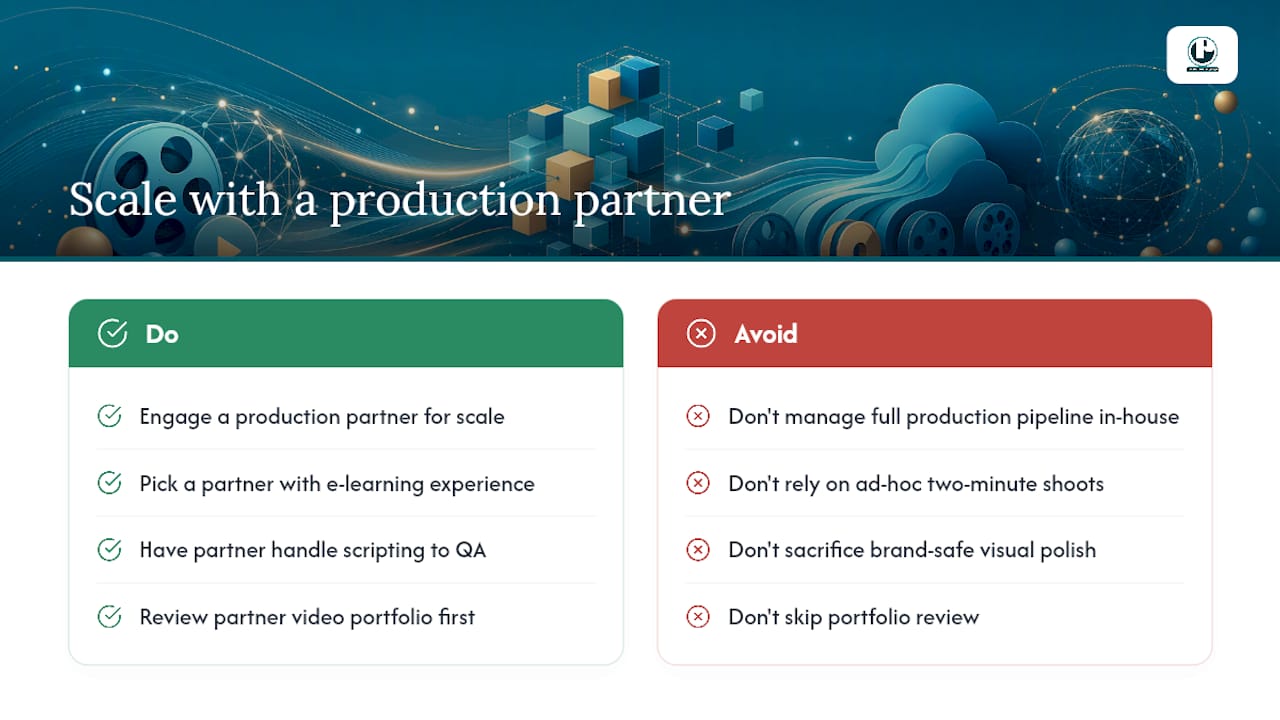
Scripting and shooting a handful of two-minute videos in-house is manageable. Scaling that into a consistent, brand-safe library across onboarding, compliance, and performance support is a different project, and it’s where a dedicated production partner earns its keep. Puritano Media Group brings two decades of experience producing e-learning modules and training content for corporate, nonprofit, and government clients, handling everything from scripting to final QA so your L&D team isn’t managing a production pipeline on top of everything else. If your training library needs the kind of visual polish that holds attention on a first watch and a tenth, look through Puritano’s video portfolio and reach out to scope your next microlearning series.
Sources
Recommended
Single-objective design is exactly how we build clinical education. For the American College of Obstetricians and Gynecologists, we produced a provider video paired with an interactive e-module on early onset breast cancer, each element carrying one defined teaching point and reviewed by named clinical experts at every stage. The same discipline runs through our other ACOG programs, from a maternal immunization program produced with the CDC to the ECO course videos. When the learner has minutes rather than hours, the module has to respect that limit in its structure, not just its runtime. The largest proof of that trust is a series PMG produced for the CDC and ACOG on gynecological cancers, work that ran to more than $1.2 million over three years.


Comments