

HR Onboarding Playbook: 10 Video Examples and a One Page Brief
Two formats do most of the heavy lifting in employee onboarding: a short manager or founder welcome video and a screen-recorded tools walkthrough. Both are cheap to produce, easy to update, and hit new hires in the window when they’re deciding whether this job feels like the right call. This guide walks through concrete onboarding video examples, three production routes with real budget ranges, where to place each clip across the first 90 days, and a one-page brief you can hand straight to a production partner.
Onboarding Video Examples You Can Copy This Week
You don’t need a script department or a soundstage to build a solid onboarding library. Most of the formats below can be shot on a laptop webcam or assembled from footage you already have sitting in a shared drive. Here are ten formats worth stealing, organized by what they’re for.
Manager welcome video. Goal: make the new hire feel expected, not processed. Ideal length: 90 seconds to 2 minutes. Shortcut: record on a webcam, no B-roll needed. Works for every audience, every department.
Culture montage. Goal: show, not tell, what a normal day feels like. Ideal length: 2 to 3 minutes. Shortcut: repurpose clips from company events, all-hands meetings, or past marketing footage. Best for larger cohorts joining companies with a strong in-office culture.
Day-in-the-life. Goal: set realistic expectations for a specific role. Ideal length: 2 minutes. Shortcut: have one employee narrate their own routine on their phone. Best paired with role walkthroughs for hourly or field staff.
Role-specific walkthrough. Goal: connect the new hire’s actual job to team goals. Ideal length: 3 to 4 minutes. Shortcut: interview the hiring manager instead of scripting a formal narration. Targets individual contributors starting a specialized function.
Tools screencast. Goal: reduce first-week help desk tickets. Ideal length: under 3 minutes per tool. Shortcut: screen-record with a tool like Camtasia or Clipchamp and narrate live. Works for any hire touching internal software.
Compliance explainer. Goal: cover mandatory policy without a 40-slide deck. Ideal length: 3 to 5 minutes, split into chapters. Shortcut: build once with a template editor and swap only the policy text as regulations change. Necessary for regulated industries and larger headcounts.
Buddy introduction. Goal: put a face to the person the new hire will actually ask questions. Ideal length: 60 seconds. Shortcut: a single unscripted selfie-style clip. Best for remote or hybrid teams.
Cohort montage. Goal: signal that the new hire isn’t onboarding alone. Ideal length: 90 seconds. Shortcut: stitch short intro clips from each cohort member. Fits companies that hire in batches or classes.
Personalized preboarding clip. Goal: build excitement before day one and cut no-show risk. Ideal length: 60 to 90 seconds. Shortcut: a templated video with the hire’s name and start date dropped in. Works especially well for high-volume or seasonal hiring.
Manager checklist video. Goal: coach managers on their own onboarding responsibilities. Ideal length: 2 minutes. Shortcut: record once per year and reuse across every new manager. Aimed at people leaders, not new hires directly.
Notice the pattern: the highest-value clips are also the cheapest to make. A webcam and a decent microphone cover most of this list.
What Makes These Onboarding Videos Actually Work?
The best onboarding videos share three traits: a real person on camera, a tight runtime, and one clear thing to do next. Biteable recommends keeping first-week clips to two to four minutes and scoping each one narrowly rather than trying to cover an entire job in a single video. A generic corporate voiceover reading policy off a slide does the opposite of what onboarding needs to accomplish.
The data backs the human-first approach. HiBob’s onboarding research found that 38% of new hires felt most welcomed when included in a group of other new employees, and 31% preferred intro meetings and interactive onboarding groups over passive formats like a welcome lunch. Video works best when it points people toward those live touchpoints rather than replacing them.
That connects directly to a separate finding from SHRM: new hires paired with an onboarding buddy reported 36% higher satisfaction, and frequent manager check-ins in the first weeks correlated with faster time-to-productivity. A video introducing that buddy by name, before the new hire ever meets them in person, gives the relationship a head start.
Three editing rules to apply immediately:
Open with a named person on screen in the first five seconds. No logo animation, no stock music intro.
Cut anything that isn’t the single message the clip exists to deliver.
End every clip with one specific next step: a link, a person to message, a form to fill out.
When Should You Send Each Onboarding Video?
Sequencing matters as much as content. TechSmith’s modular video onboarding strategy recommends building short, focused modules around culture, role training, and compliance rather than one long orientation reel, since focused modules are far easier to update later.
Offer stage: send the personalized preboarding clip to confirm the hire made the right call and reduce dropout before day one.
Day one: deliver the manager welcome video and buddy introduction, ideally queued in a calendar invite or the first onboarding email.
Week one: roll out the tools screencast and culture montage so the new hire can start functioning without waiting on a live walkthrough.
30 days: introduce the role-specific walkthrough once the new hire has enough context to connect it to real tasks.
60 to 90 days: layer in compliance explainers and manager checklist videos as policy and performance conversations come due.
Front-load the welcome and tools content. Compliance and deep role training land better once someone has already found their footing.
Which Production Route Fits Your Budget and Timeline?
Three routes cover almost every onboarding video need, and picking the right one comes down to how often the content changes and how much authenticity the moment demands.
Route A: Filmed flagship. A short crew shoot for a culture piece or CEO welcome typically runs days to a few weeks from planning to delivery, with budgets that scale with crew size, locations, and edit complexity. Worth it for a video that will run for a year or more without changes, like a company-wide culture piece.
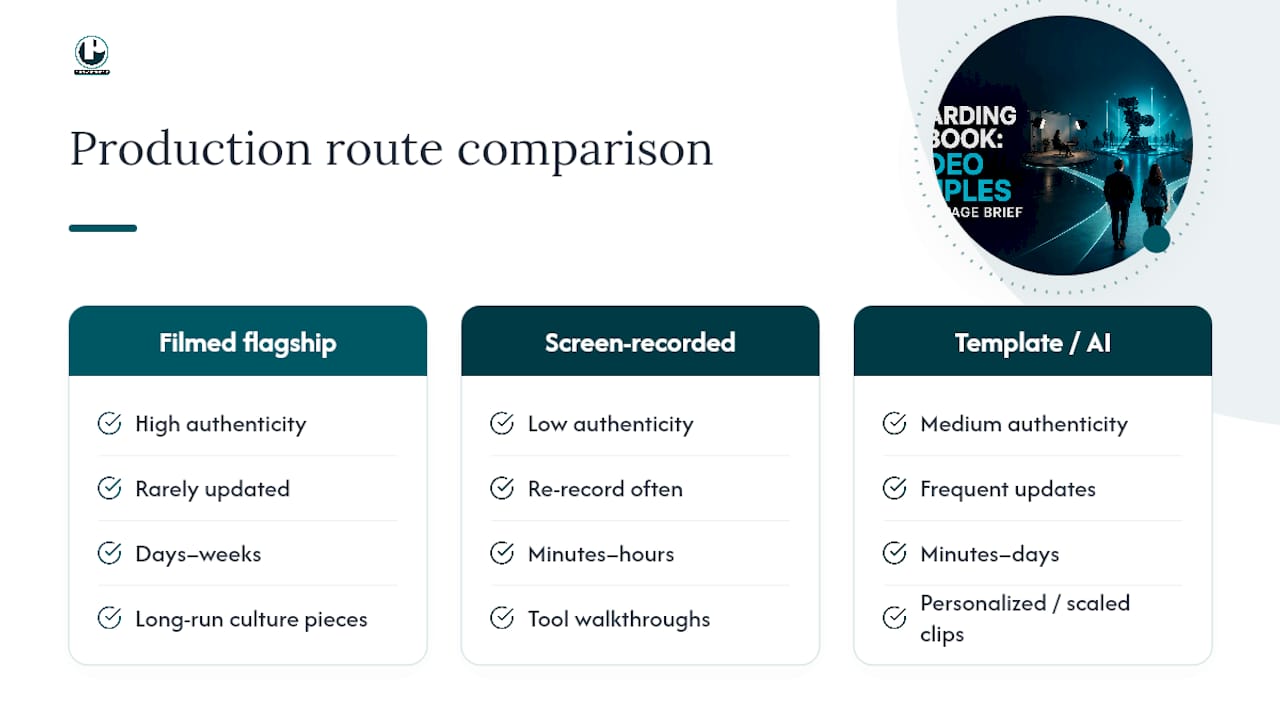
Route B: Screen-recorded. The fastest and cheapest route for anything tool-related. Record the walkthrough yourself with software, narrate live, and expect to re-record within minutes when the interface changes. The tradeoff is upkeep: outdated screenshots are worse than no video at all.
Route C: Template or AI-assisted generation. Best for content that needs frequent personalization or scale, like preboarding clips with a new hire’s name inserted, or AI-assisted workflows for compliance modules that get updated every time policy shifts.
Pro Tip: Match production quality to shelf life. A flagship culture video you’ll run for two years earns a real film crew. A tools screencast you’ll re-record next quarter doesn’t.
Run through a quick checklist before choosing: how much authenticity does this moment need, how often will it require updates, and does your team have in-house editing skill? Answer those three questions honestly and the right route usually becomes obvious.
Where to Host Onboarding Videos So New Hires Watch Them
Placement determines whether a well-made video actually gets watched. Drop the preboarding clip into the offer email, queue the welcome video in the day-one calendar invite, and house the tools screencasts and compliance modules inside the LMS or team wiki where they’re searchable later. A cohort montage belongs in the Slack channel or group chat the new hires already check.
Accessibility isn’t optional. TechSmith’s onboarding guidance calls for captions and transcripts on every clip, along with basic WCAG practices like sufficient color contrast and keyboard-navigable players.
Caption every video, even short ones. Auto-generated captions need a human pass for names and jargon.
Provide a text transcript alongside the video for accessibility and quick reference.
Host in a format that plays cleanly on mobile, since many new hires will watch preboarding content on a phone.
Keep file sizes reasonable so videos load fast on a company VPN or a slower home connection.
How Do You Measure Whether Onboarding Videos Work?
Three numbers tell you most of what you need to know. Track completion rate, a single usefulness rating collected around day 30, and cohort-level time-to-productivity compared against hires who joined before the videos existed.
Two experiments are worth running in the first quarter:
Welcome speaker A/B test. Send half your incoming cohort a video welcome from the direct manager and half a version from a senior leader. Compare day-30 usefulness ratings.
Clip length A/B test. Cut your tools screencast into a 90-second version and a 3-minute version. Watch completion rate and help desk ticket volume for each group.
Review the numbers monthly for the first two quarters after launch, then quarterly. If completion drops below your target, the fix is almost always trimming length before it’s reshooting content. Pairing this measurement approach with solid video SEO and hosting practices also makes it easier to see accurate view and completion data in the first place.
How to Brief a Video Production Team for Onboarding Content
A one-page brief keeps every clip consistent even when different people are producing them across quarters. Fill in these fields before any camera turns on:
Objective: what the new hire should know or feel after watching.
Audience: which role, department, or cohort this clip targets.
Three key messages: no more, no fewer. If you can’t cut it to three, the clip is trying to do too much.
Visuals: who’s on camera, what B-roll exists already, what needs to be shot new.
Deliverables: final length, file format, caption file, and where it will be hosted.
Deadline: production and review dates, with buffer for a second edit pass.
Run every finished clip through a quality checklist before publishing: Does a real person appear on camera in the first five seconds? Are captions accurate? Does it match your brand kit? Is there an update owner assigned for next year? For a deeper walkthrough of scripting and briefing, Puritano’s guide on how to brief a video production team covers the process step by step, and its collection of company culture video examples is worth a look before you script your own culture montage.
Pro Tip: Assign an “update owner” to every video at the moment it’s briefed, not after it goes stale. Nobody remembers to revisit a tools screencast from 18 months ago unless someone’s name is attached to it.
When It Makes Sense to Bring in Puritano
In-house production works well for screen recordings and quick manager welcomes. It starts to strain once you need a flagship culture video, a multi-location shoot, or a library of role-specific modules that all need to look and sound consistent. That’s the gap Puritano Media Group exists to fill.
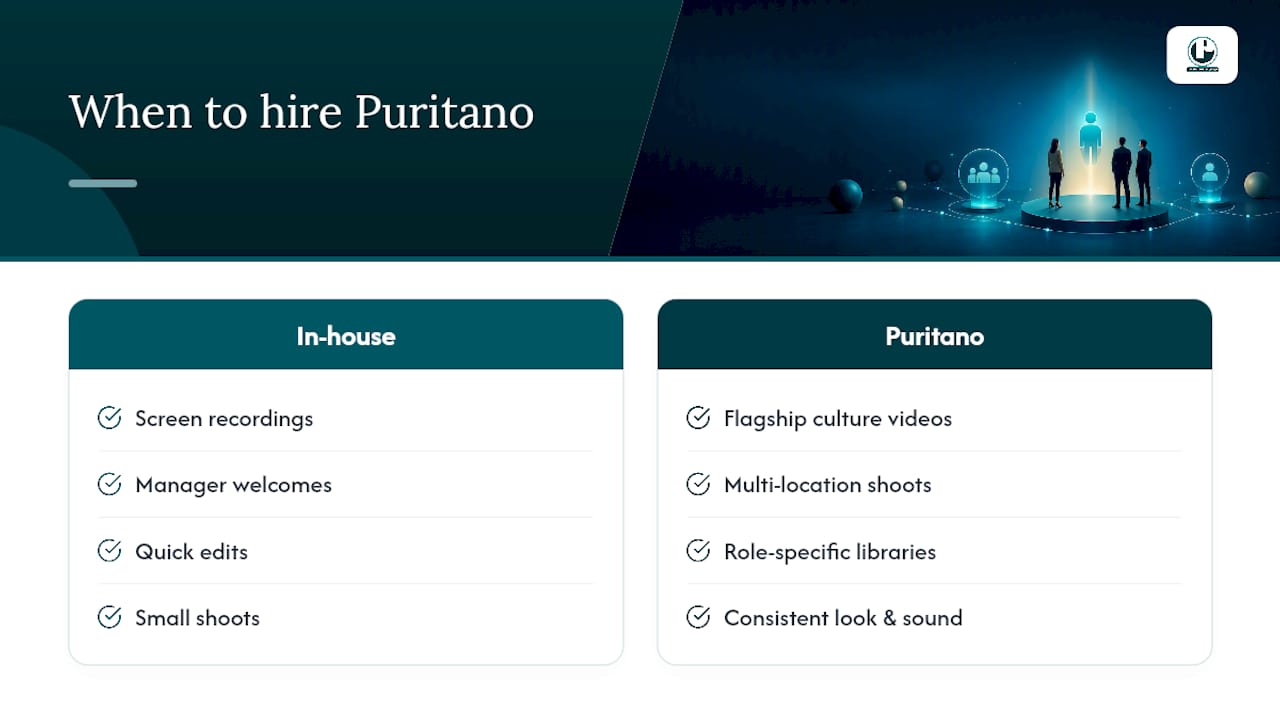
A well-established video production company has spent over two decades producing corporate video, e-learning modules, and branded content for organizations across the D.C. metro area and nationally, and onboarding content sits squarely inside that range. If your compliance explainer needs multiple location shoots, or your culture montage needs an actual production crew rather than a stitched-together phone clip, that’s the point where a full-service partner pays for itself instead of eating a week of an internal team’s time. Before scripting your next flagship piece, take a look at a video production company’s music video and branded content portfolio for a sense of production quality and storytelling range, then reach out to scope your onboarding video library against real timelines and a real budget.
Sources
FAQ
What Is an Onboarding Video?
An onboarding video is a short, purpose-built clip that helps a new hire understand a company’s culture, tools, role expectations, or policies, usually delivered between the offer stage and the first 90 days of employment.
What Are the 5 C’s of Effective Onboarding?
Definitions vary across HR sources, but the concept generally points to compliance, clarification, culture, connection, and check-back as the pillars a full onboarding program should cover, with video supporting each pillar rather than replacing it.
What Is the 30-60-90 Onboarding Rule?
It’s a framework for pacing onboarding content and goals across a new hire’s first 30, 60, and 90 days, starting with orientation and tools, moving into role-specific training, and ending with full performance expectations.
What Are Some Examples of Onboarding Videos?
Common examples include a manager welcome clip, a tools screencast, a culture montage, a buddy introduction, a role-specific walkthrough, and a compliance explainer, each scoped to a single goal rather than covering everything at once.
Recommended

Comments