

Audience Targeting in Video Ads: A Marketer's Guide
- Charlie Puritano
- 1 day ago
- 13 min read

Audience targeting is the single most controllable lever you have in video advertising. It determines whether your ad reaches someone who will act or someone who will skip. Done well, it improves relevance, reduces wasted spend, and produces measurable lift across every funnel stage. Done poorly, it either restricts reach so severely that the algorithm can’t learn, or it papers over creative that was never going to work in the first place.
Here are three things you can do right now:
Audit your current segments. Pull your last 90 days of video campaign data and check whether your audience layers are narrowing reach below a useful threshold. If your weekly impressions are too low to generate statistical signal, you’re over-segmented.
Run a targeting experiment. Duplicate your best-performing video campaign and remove one targeting layer. Let both run for two weeks with identical creative and compare view-through rate and cost per view.
Test one creative variant per audience. Pick your top two audience segments and write a different opening hook for each. The same 30-second video with a different first three seconds is a different ad to that viewer.
Key Takeaways
Audience targeting in video advertising works when the creative is built for the audience, not retrofitted to it after the media plan is set.
Point | Details |
First-party data is the priority | Build remarketing and lookalike audiences from your own pixel, CRM, and video engagement data before using platform-inferred signals. |
Align creative to audience stage | Cold prospecting needs a full Hook → Problem → Benefit → CTA arc; retargeting audiences respond better to a compressed benefit-plus-CTA. |
Avoid over-segmentation | Layering too many targeting constraints starves the algorithm; start with one primary audience layer and add constraints only when data supports it. |
Measure incrementality, not just attribution | Last-click attribution overstates retargeting’s contribution; use brand lift studies or holdout tests to measure true incremental impact. |
Puritano builds modular creative for targeting | Puritano’s production process maps audience segments to hook variants and asset formats in a single shoot, reducing creative fatigue across campaigns. |
What does audience targeting actually mean for video ads?
Audience targeting in video advertising means controlling who sees your ad based on signals about that person, not just where your ad appears. That distinction matters more in video than in almost any other format, because a video ad demands attention in a way a banner never does.
Content targeting (also called contextual targeting) places your ad next to relevant content. A running shoe brand targets fitness videos. That’s a placement decision. Audience targeting goes further: it reaches a specific person based on what they’ve searched, what they’ve bought, what they’ve watched, or who they are demographically, regardless of what content they’re currently viewing.
Combining audience targeting with content targeting can concentrate your reach on the users most likely to engage, creating a synergistic effect that neither method achieves alone. Google’s video targeting documentation classifies video audience segments into five categories: Affinity, In-market, Detailed Demographics, Life Events, and Your data (remarketing).
The practical implication: when you layer audience signals on top of placement, you’re not just buying eyeballs on relevant content. You’re buying attention from a specific person at a specific moment in their decision process. That’s a fundamentally different media buy, and it requires a fundamentally different creative approach.
Platform classification matters because each category signals a different relationship between the viewer and your brand:
Affinity audiences have demonstrated sustained interest in a topic over time.
In-market audiences are actively researching a purchase right now.
Detailed Demographics let you reach people by life stage (homeowner, parent, college student).
Life Events capture people at high-intent transitions (moving, getting married, graduating).
Your data segments include your own CRM lists, site visitors, and video viewers.
Core audience types for video campaigns and when to use each
Google Ads documents four primary audience categories for digital video: demographic, geographic, interest/affinity, and behavioral/intent. In practice, most platforms support a wider set. Here’s how each one maps to a campaign objective:
Demographic (age, gender, parental status, household income): broad by nature, best used as a filter rather than a primary targeting method. Useful for eliminating audiences who can’t buy your product, not for finding your best prospects.
Geographic: essential for any brand with a defined service area. Layer it with behavioral signals rather than using it alone.
Interest/Affinity: reaches people with long-term category interest. Best for awareness campaigns where you want scale with some relevance. Affinity audiences tend to be large, which helps with reach and frequency goals.
Behavioral/Intent (In-market): reaches people actively researching a purchase. Much narrower than affinity, but higher purchase intent. Best for consideration and conversion campaigns.
Custom segments (keywords, URLs, apps): you define the audience by entering search terms they’ve used, websites they’ve visited, or apps they’ve used. This is one of the most precise prospecting tools available on Google/YouTube and works well for mid-funnel campaigns.
Remarketing/first-party lists: your own data, uploaded or pixel-generated. The highest-intent audience you can reach. Best for conversion campaigns and sequential messaging.
Lookalike/similar audiences: platform-generated audiences that resemble your existing customers or converters. Useful for scaling prospecting while maintaining some behavioral relevance.
Pro Tip: Combining more than two or three targeting layers on a single ad group often restricts reach to the point where the platform’s algorithm can’t optimize. Start with one primary audience type and add a second layer only after you have enough data to see performance differences.
Where does your audience data actually come from?
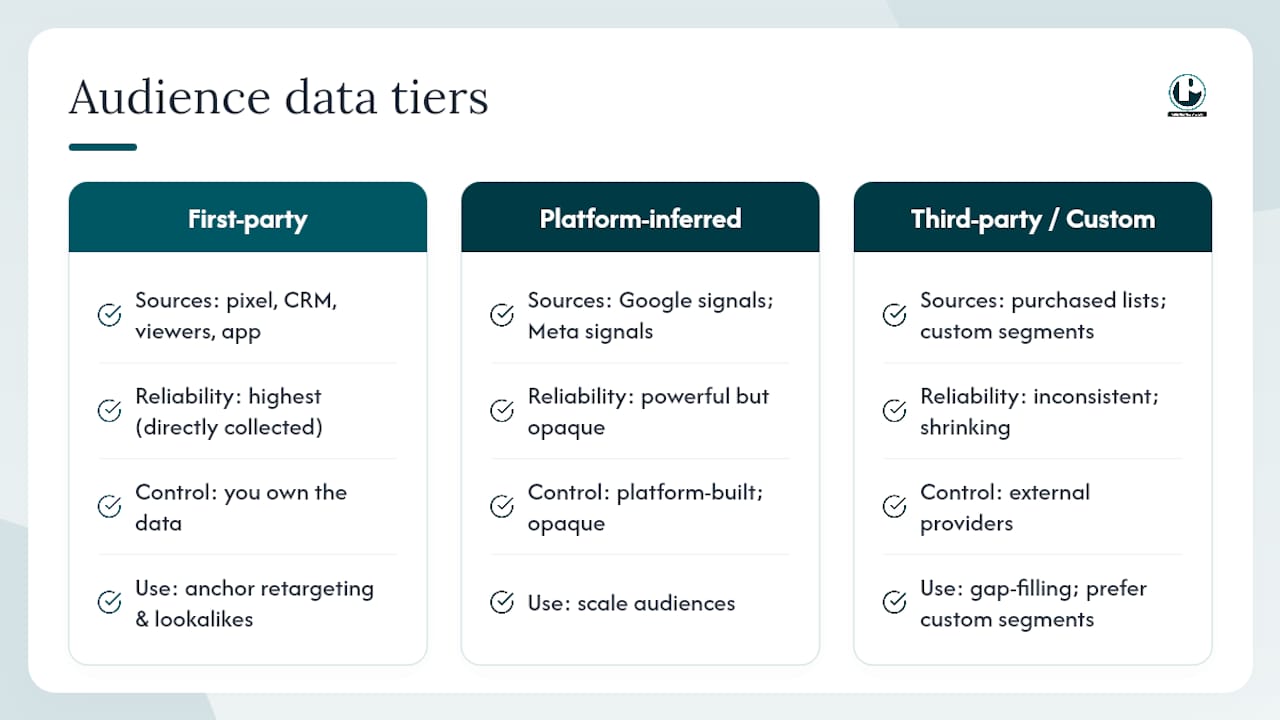
The quality of your targeting is only as good as the signals feeding it. There are three tiers, and they’re not equal.
First-party data is what you own: site visitors tracked by your pixel, CRM email lists, video viewers who watched a certain percentage of your content, and app users. This is your most reliable signal because you collected it directly. The IAB’s data-driven video best practices recommend a cascading data strategy: prioritize first-party signals for retargeting, then fall back to broader contextual signals when first-party reach is insufficient. First-party data should anchor your retargeting and lookalike audiences before you touch anything else.
Platform-inferred signals are what Google, Meta, and other platforms build from their own ecosystems. Google infers interests from Search queries, YouTube watch history, Maps usage, and Gmail activity. Meta builds behavioral profiles from on-platform engagement, app activity, and off-platform browsing via the Meta Pixel. These signals are powerful at scale but opaque. You don’t control how they’re built, and their accuracy varies by category.
Third-party and custom segments fill gaps but carry the most risk. Third-party data quality is inconsistent, and its availability is shrinking as browsers phase out third-party cookies and privacy regulations tighten. Custom segments on Google (built from keywords and URLs) are a better alternative because they’re based on observed behavior rather than purchased lists.
The privacy picture is shifting fast. Cookieless environments reduce the reliability of third-party signals and make first-party data collection a genuine competitive advantage. If you’re not building a first-party data strategy now, you’re going to feel that gap in your targeting within the next few years. For a deeper look at how audience targeting concepts connect to broader digital marketing strategy, that’s a useful external reference.
How targeting affects outcomes by objective and which KPIs matter
The role of audience targeting in video ads shifts depending on what you’re trying to accomplish. Awareness, consideration, and conversion campaigns each call for a different targeting posture.
Campaign Objective | Suggested Audience Approach | Primary KPIs | Measurement Method |
Awareness | Broad affinity or demographic; content targeting for context | Reach, frequency, CPM, brand lift | Brand lift study, reach reports |
Consideration | In-market, custom segments, interest-based | View-through rate, watch time, site visits | Conversion tracking, audience insights |
Conversion/Action | First-party remarketing, lookalikes; keep broad for prospecting | Click-through rate, conversions, CPA | Conversion tracking, incrementality test |
One counterintuitive point worth understanding: for conversion-focused video campaigns, Google explicitly recommends keeping targeting broader rather than layering on content targeting. The reason is that adding too many targeting constraints limits the machine-learning algorithm’s ability to find users who will actually convert. Narrow targeting feels precise, but it can starve the algorithm of the signal volume it needs to optimize.
For awareness campaigns, the calculus flips. Scale matters more than precision, and contextual targeting helps you reach relevant audiences without requiring behavioral data. Brand lift studies are the right measurement tool here because standard conversion metrics won’t capture the awareness effect.
Video’s performance advantages over static formats are well-documented, but those advantages only materialize when the targeting and the creative are aligned to the same objective. A beautifully produced brand film shown to a cold audience at the wrong frequency won’t move conversion metrics. Matching the audience stage to the creative message is where the real efficiency lives.
How Google/YouTube and Meta implement video audience targeting
Google and YouTube
Google’s video targeting options sit inside Google Ads and apply across YouTube, Display, and Demand Gen campaigns. The main categories:
Affinity and In-market segments: pre-built by Google based on search and browsing behavior. Available across all video campaign types.
Detailed Demographics: life stage targeting (college students, homeowners, new parents). Useful as a filter layer.
Custom segments: you build these yourself by entering keywords (search terms your audience uses), URLs (websites they visit), or apps. This is the most flexible prospecting tool for reaching people who haven’t interacted with your brand yet.
Your data segments: remarketing lists built from your YouTube channel viewers, site visitors, customer lists, and app users. Available in Video, Display, and Demand Gen.
A practical custom segment example: a B2B software company targeting IT decision-makers could build a custom segment using competitor product URLs and relevant industry search terms. That segment reaches people actively researching solutions in the category, without requiring them to have visited the brand’s own site.
Google’s ABCDs framework (Attention, Branding, Connection, Direction) provides a useful creative lens alongside these targeting options. Each element maps to a stage: Attention in the first few seconds, Branding early and often, Connection through relevant storytelling, and Direction with a clear call to action. When you’re building creative variants for different audience segments, the ABCDs give you a consistent structure to work within. For more on how brand storytelling best practices apply to this framework, that’s worth reading alongside the platform docs.
Meta (Facebook and Instagram)
Facebook Business organizes its targeting into three tiers:
Core Audiences: defined by demographics, location, interests, and behaviors. This is the broadest prospecting layer and the starting point for most new campaigns.
Custom Audiences: built from your own data, including website visitors (via Meta Pixel), customer lists, app activity, and video viewers on Facebook or Instagram.
Lookalike Audiences: Meta generates these from your Custom Audiences, finding people who share behavioral and demographic characteristics with your existing customers.
For video placements specifically, Meta’s video view Custom Audiences are particularly useful. You can build segments of people who watched 25%, 50%, 75%, or 95% of a specific video, then serve them a follow-up ad. That’s a sequential messaging strategy built entirely on engagement behavior, with no third-party data required.
One practical difference between Google and Meta: Meta’s audience review process for Custom Audiences can add a day or two before a new list is usable in campaigns. Build your audiences before you need them, not the day you launch.
A setup checklist for audience targeting in video campaigns
Getting the structure right before launch saves you from chasing problems mid-flight. Work through these steps in order:
Define the campaign objective clearly. Awareness, consideration, and conversion campaigns need different audience strategies. Don’t mix objectives within a single campaign.
Audit your first-party assets. List every audience you can build from owned data: site visitors, CRM segments, video viewers, app users. These are your highest-priority segments.
Choose base audience sizes. For prospecting, start with audiences large enough to generate at least a few hundred impressions per day. For remarketing, smaller is fine.
Set exclusions. Exclude recent converters from conversion campaigns. Exclude audiences who’ve seen a specific creative more than your frequency cap allows.
Set frequency caps. For awareness campaigns, three to five impressions per week per user is a reasonable starting point. For remarketing, tighter caps prevent fatigue.
Create creative variants per audience stage. Cold prospecting audiences need a different hook than warm retargeting audiences. Plan at least two variants.
Define your measurement plan before launch. Decide whether you’re running a brand lift study, a conversion tracking setup, or an incrementality test. Each requires different campaign structures.
For testing, run A/B tests for a minimum of two weeks before drawing conclusions. Compare one variable at a time: either the audience or the creative, not both simultaneously. Track view-through rate, watch time, and conversion rate as your primary signals.
Sovran’s video ad structure benchmarks identify Hook → Problem → Benefit → CTA as the most common high-performing sequence for cold prospecting. For retargeting audiences who already know the brand, a shorter version with a direct CTA often outperforms the full narrative arc.
Pro Tip: When you’re unsure whether to broaden or narrow your targeting, check your weekly impression volume first. If you’re not hitting enough impressions to generate statistically meaningful data within two weeks, broaden before you optimize.
Common targeting mistakes that waste budget
Most targeting errors fall into a small number of patterns. Recognizing them early saves real money.
Over-segmentation: layering demographic, interest, behavioral, and content targeting simultaneously. Quick fix: remove all but your primary audience layer and add constraints back one at a time only when data justifies it.
Using targeting to hide weak creative: a precisely targeted ad with a weak hook still gets skipped. Search Engine Land’s analysis of why video ads fail is direct on this point: the first 1–3 seconds are decisive, and no amount of targeting precision rescues an ad that loses attention immediately. Quick fix: test your hook in isolation before scaling any campaign.
Ignoring frequency and creative fatigue: the same ad shown to the same person too many times drives up CPMs and drives down engagement. Quick fix: set frequency caps and rotate creative on a defined schedule.
Failing to measure incrementality: last-click attribution overstates the contribution of retargeting and understates the contribution of upper-funnel video. Quick fix: run a holdout test or brand lift study to measure true incremental impact.
Adding content targeting on top of audience segments for conversion campaigns: as noted above, this restricts reach and limits algorithmic learning. Quick fix: for conversion campaigns, let the audience targeting do the work and remove content targeting constraints.
When performance drops, the instinct is often to tighten targeting. More often, the right move is to test a new creative variant. Common video ad production mistakes like burying the hook, missing captions for sound-off viewing, and wrong aspect ratios independently reduce performance regardless of how well-targeted the campaign is.
How Puritano aligns creative and targeting from the start
Most production companies receive a brief after the media plan is already set. At Puritano, we push for the opposite: the targeting strategy informs the creative brief, not the other way around. When we know which audience segments a campaign will reach, we can build the hook, the narrative arc, and the asset variants to match each stage.
Here’s the production brief template we use when a client comes in with a video campaign that includes defined audience segments:
Campaign objective: awareness / consideration / conversion (one per campaign)
Primary audience: segment type, estimated size, platform
Secondary audience: retargeting or lookalike segment for follow-up
Key message per audience: what does this specific viewer need to hear?
Hook options: at least two opening lines or visuals to test against each other
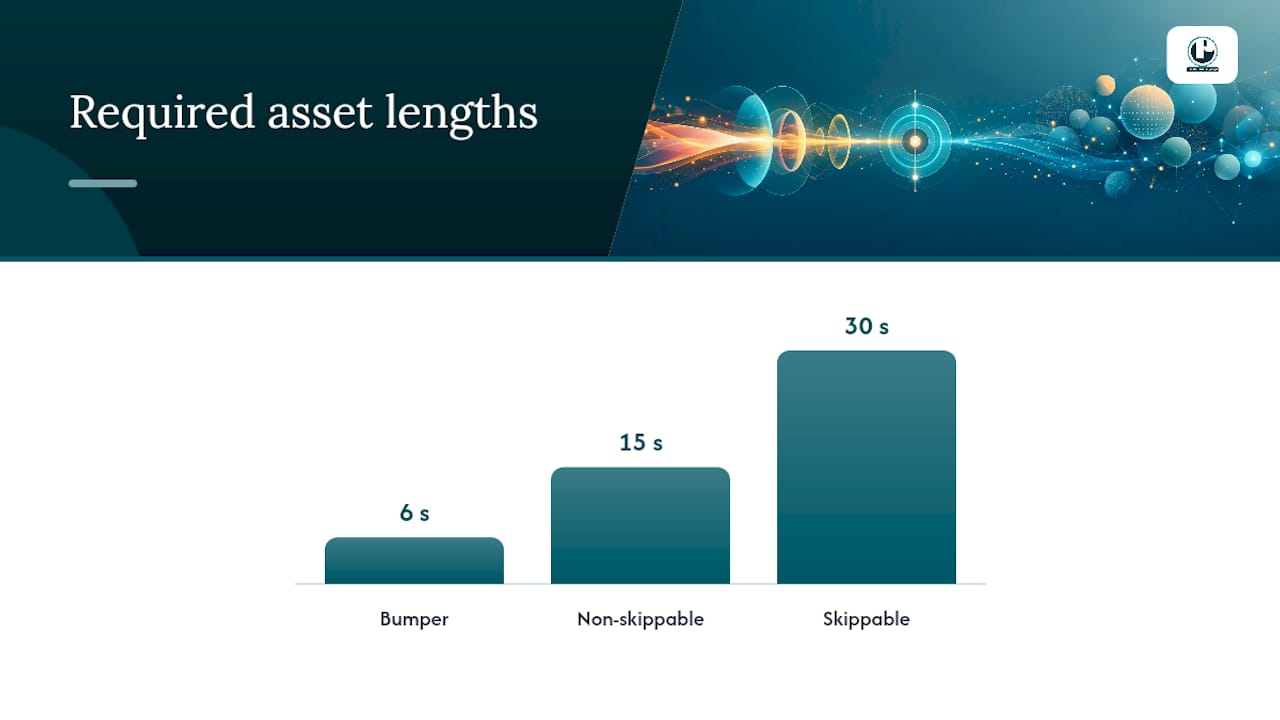
Required asset lengths and formats: 6-second bumper, 15-second non-skippable, 30-second skippable, vertical 9:16 for Reels/Shorts
Measurement plan: lift study, conversion tracking, or holdout test
The modular approach matters here. Shooting multiple hooks and middles in a single production session is the most cost-effective way to generate the creative variety that audience testing requires. You get five testable variants from one shoot day instead of five separate shoots.
The production brief is where targeting strategy and creative strategy become the same document. When those two things are written separately, you end up with a well-targeted ad that says the wrong thing to the right person.
For clients running sequential campaigns, we map the Hook → Problem → Benefit → CTA structure to the audience stage: a full narrative for cold prospecting, a compressed benefit-plus-CTA for warm retargeting. That structure, combined with first-party audience data from the client’s CRM or pixel, gives us a production plan that’s built to perform across the funnel.
Pro Tip: Plan your modular shoot before you finalize your media plan. Knowing which audience segments you’ll target tells you exactly which hook variants you need, and shooting them together is a fraction of the cost of returning to set.
How we operationalize targeting inside production timelines
In discovery, we ask clients to share their existing audience data before we write a single line of script. That means CRM segment sizes, pixel audience counts, and any historical video engagement data from previous campaigns. Those numbers tell us whether we’re building for scale or precision, and they shape every creative decision that follows.
From there, our process looks like this:
Discovery to brief: audience data reviewed, segments prioritized, creative territories mapped to each segment
Pre-production: asset list built around required formats and audience variants; hook options written and reviewed before shoot
Production: modular shoot capturing multiple hooks and middles in a single session
Post-production: assets cut to required lengths and formats per platform spec
Delivery: assets handed off with a measurement plan and recommended testing structure
What clients should expect from us on the campaign side:
Two to four creative variants per primary audience segment
A defined testing cadence (two-week minimum per variant)
Clear KPIs agreed before launch, matched to campaign objective
A measurement partnership recommendation (brand lift, conversion tracking, or incrementality test) based on budget and objective
Puritano produces video built for the audiences you’re targeting
Knowing your audience segments is only half the equation. The other half is producing creative that actually speaks to each one. Puritano’s production work spans social video, OTT, corporate, and branded content, and every project starts with the same question: who is watching this, and what do they need to hear in the first three seconds?
For marketing teams running audience-targeted campaigns, here’s how to start a conversation with us:
Share your current audience segments and any historical performance data you have.
Define your campaign objective and the platforms you’re running on.
Request examples of relevant work from our production portfolio.
From there, we’ll put together a production brief that maps your targeting strategy to a concrete asset plan. Reach out through Puritano to start the conversation.
Platform docs and resources worth bookmarking
These are the primary sources used to build this guide. Each one serves a different purpose in your day-to-day campaign work:
About targeting for Video campaigns (YouTube Help): the authoritative reference for YouTube audience segment types and how combining audience and content targeting works. Use it for setup and policy questions.
About audience segments (Google Ads Help): explains how Google estimates and applies audience segments across campaign types. Use it when building custom or in-market segments.
Add targeting to your Video campaigns (Google Ads Help): covers the practical mechanics of adding targeting layers and includes Google’s guidance on keeping targeting broad for conversion campaigns.
ABCDs of effective video ads (Google): Google’s creative framework for video. Use it when briefing creative teams or reviewing scripts against campaign objectives.
Ad Targeting: Options to Reach Your Audience Online (Facebook Business): Meta’s overview of Core, Custom, and Lookalike audiences. The starting point for any Meta video campaign setup.
IAB Data Driven Video Best Practices: industry-level guidance on data strategy for video, including the cascading first-party-to-contextual approach. Useful for planning your data infrastructure.
Video Ad Structure Benchmarks (Sovran): first-party benchmark data on hook timing, creative sequences, and modular structure. Use it when planning creative variants for different audience stages.
Why video ads fail metrics (Search Engine Land): a frank analysis of the creative failures that targeting can’t fix. Worth reading before any campaign launch.
Visual storytelling tips for brand impact: a practical external resource on storytelling techniques that complement the creative-targeting alignment approach covered in this guide.
Sources
Recommended
Comments