

One Page Corporate Video Length Planner for Marketing and Comms Teams
Keep social clips under one minute, LinkedIn posts between 30 and 90 seconds, homepage hero videos between one and two minutes, brand and explainer videos typically between 1.5 and 3 minutes, YouTube demos around 7 to 15 minutes, and webinars from 15 minutes upward to half an hour or more. Wistia and HubSpot both point to the same governing rule: purpose determines audience intent, and intent determines the platform’s tolerance for runtime. A three-minute demo can outperform a 30-second teaser when the viewer chose to click play.
What Is the Ideal Corporate Video Length by Platform?
There’s no single correct answer to “how long should a corporate video be,” because a LinkedIn ad and a training module are solving completely different problems for completely different viewers. What matters is matching runtime to where the video lives and what job it’s doing.
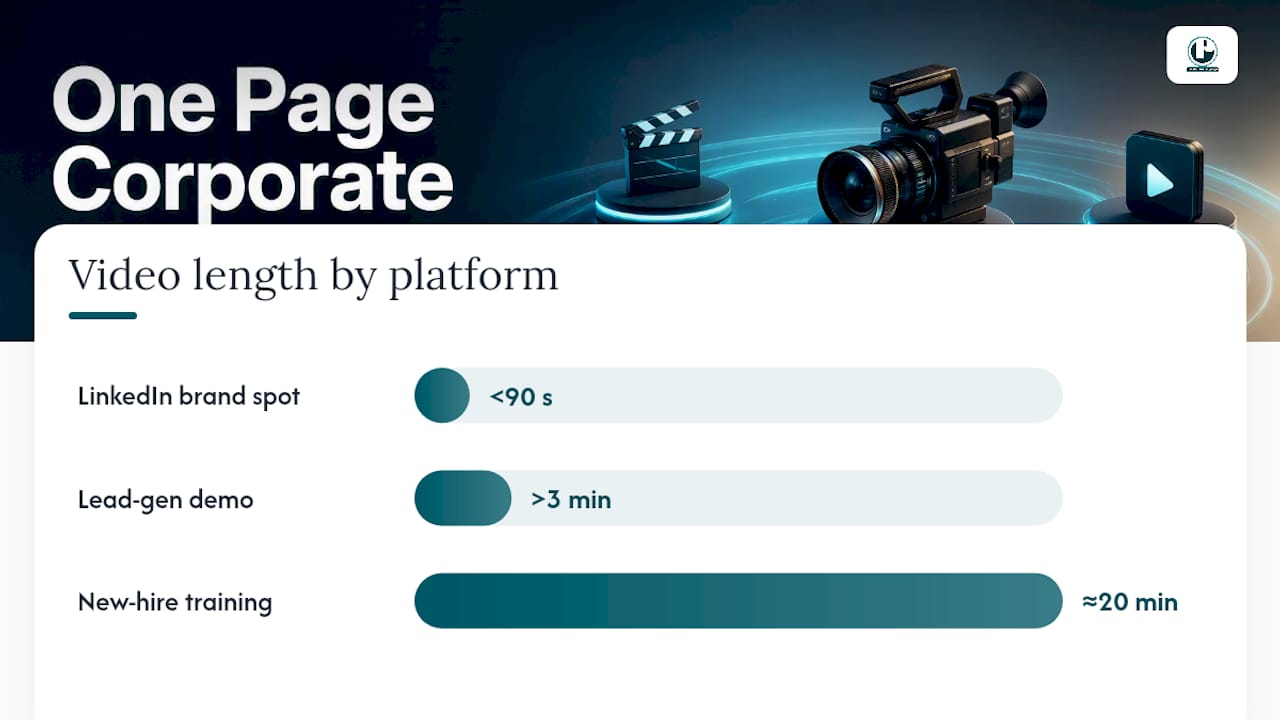
A few examples make this concrete. For example, a brand awareness spot for a trade show LinkedIn feed performs well when kept under 90 seconds. A lead-gen demo aimed at someone who just requested a quote can run past three minutes, because that viewer already decided they want detail, a pattern also confirmed for B2B explainer videos. A new-hire training module may extend to around 20 minutes appropriately, given that the audience is actively onboarding rather than casually viewing.
The smartest approach isn’t picking one length and forcing every channel to use it. It’s producing one long, well-structured master asset and cutting shorter, platform-appropriate versions from the same shoot. A 12-minute case study interview can yield a 90-second LinkedIn cut, a 30-second Instagram teaser, and the full-length version for the resource hub, all without a second production day.
Why Does Viewer Intent Matter More Than a Runtime Rule?
Because the same six-minute video can be a disaster on Instagram and a win on your resource page, depending entirely on what the viewer expected when they clicked. A scrolling social user has almost no patience budget. Someone who navigated to a “How It Works” page, downloaded a spec sheet, or clicked a link from a sales email has already invested effort, and that effort buys you time.
Wistia’s research frames this as the core variable behind video performance: intent, not length, decides whether a viewer sticks around. On-site and resource-hub audiences tolerate significantly longer runtimes than social audiences, and HubSpot’s 2026 data backs that up. Educational videos under five minutes hold about half their viewers, but longer webinar replays and on-demand pieces perform well precisely because the people watching them chose to be there.
The practical rule for briefing any project: define the single job of the video and the expected intent of the person watching it before you settle on a runtime. Length is a downstream decision, not an upfront one.
How Do You Structure a Longer Video So People Actually Watch It?
Longer runtime is a privilege you earn, not a default you’re entitled to. Wistia’s practitioner guidance calls this “earned length”: padding a video to hit an arbitrary time target does more damage than a tight edit ever could, because drop-off tanks both viewer trust and platform distribution.
A few structural moves make longer videos hold attention instead of losing it:
Open with a hook in the first 5 to 10 seconds. State the payoff or the problem immediately. Don’t build up to it.
Use visible chapters and timestamps on anything past four minutes. Viewers who can see where the content is going are far more willing to stay for it.
Keep one idea per short-form asset. A 30-second cut trying to cover three points will land none of them.
Promise a milestone early in long-form content. “In the next two minutes, you’ll see exactly how this integrates with your CRM” gives viewers a reason to keep going.
Place interactive CTAs in the later third of lead-gen videos, after the value has landed, rather than forcing a form fill in the opening seconds of a low-intent placement.
Pro Tip: Script your longest asset first, then mark natural cut points at 30 seconds, 90 seconds, and 3 minutes during the edit. Those become your repurposed clips without a second shoot.
What Metrics Tell You If Your Video Length Is Working?
The right KPI depends entirely on what the video was built to do. Awareness content lives or dies on play rate and percent viewed. Conversion-focused videos care more about average view duration and how many conversions come specifically from viewers who watched past the halfway mark. Training content should be judged on completion rate by module, not raw watch time.
Two numbers matter more than most teams realize: absolute watch time and percent retained. A 12-minute video with 40% retention delivers nearly five minutes of watch time, often more valuable to a distribution algorithm than a 90-second clip with 70% retention. Both figures feed how platforms rank and recommend your content, so optimizing for one at the expense of the other is a mistake.
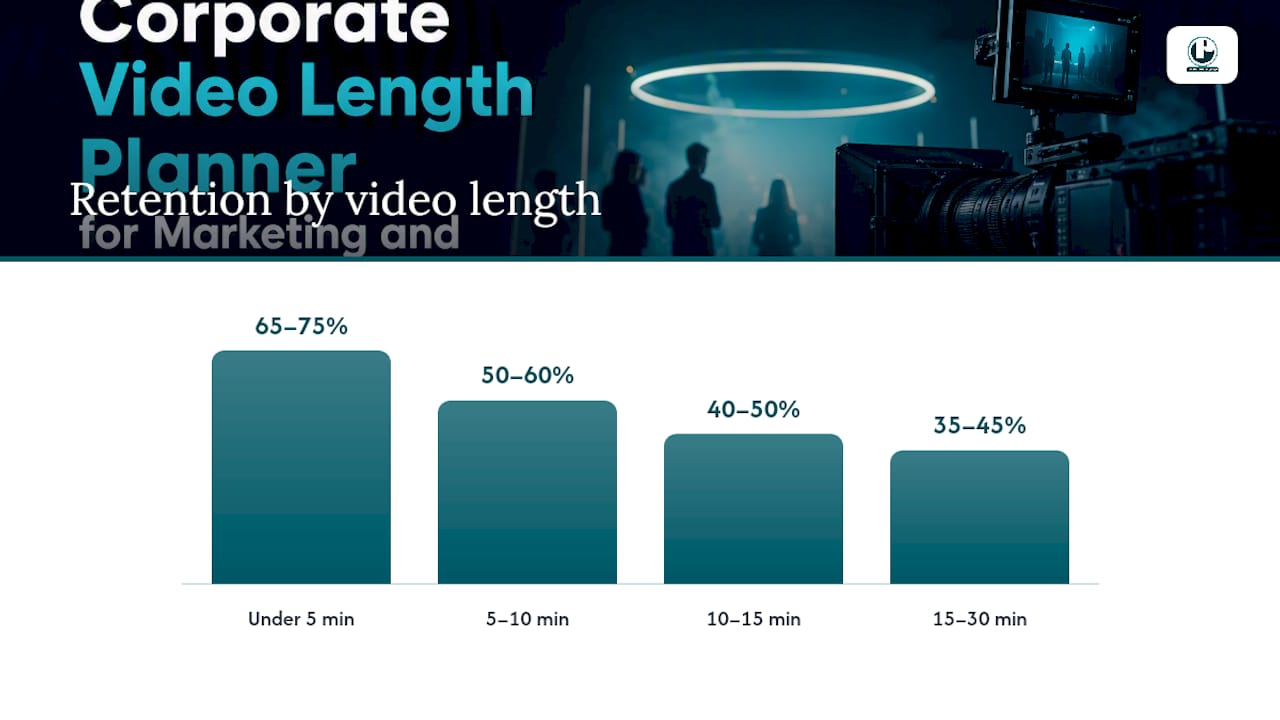
Retention by length, according to PrePublish’s YouTube benchmark aggregation: under 5 minutes, 65 to 75% retention; 5 to 10 minutes, 50 to 60%; 10 to 15 minutes, 40 to 50%; 15 to 30 minutes, 35 to 45%.
Simple experiments reveal a lot fast:
Run a length A/B test on the same message, one cut at 90 seconds and one at 3 minutes.
Build a teaser-to-long-form funnel and track how many teaser viewers click through.
Compare a chaptered long-form video against the same content split into standalone assets.
Segment every result by traffic source. A demo pulling 45% retention from organic search and 20% from a cold paid ad isn’t a length problem, it’s an intent mismatch.
What Should Be Locked Down Before You Start Filming?
Every runtime decision made in the edit bay should trace back to a decision made before the camera rolled. Skipping this step is how videos end up padded with B-roll nobody asked for.
Define the single job and the audience first. A recruitment video and a CEO town hall message have nothing in common structurally, even if both run three minutes.
List must-have shots separately from optional B-roll. Only the must-haves get scripted time; everything else is a bonus if the edit needs breathing room.
Capture extra soundbites and permissioned B-roll during the shoot, even if you’re not sure you’ll use them, but treat every extra second in the final script as something that has to earn its place.
Estimate approval rounds based on target length. A 20-minute training module needs more stakeholder review and more accessibility work, including captions, than a 60-second teaser.
Build a checklist for the final brief: core message, must-have visual proof points, target run time, captioning and accessibility needs, chapter markers, and any scoring or voiceover requirements.
Common production mistakes almost always trace back to skipping this planning step, not a weak script or bad lighting.
Getting the Length Right Starts With the Brief, Not the Edit
We build the runtime into the plan before a single shot is scheduled. Whether it’s a corporate overview, a training module, a homepage hero video, or a set of social cuts pulled from one production day, we align length to purpose from the first conversation, not as an afterthought in editing. That’s the difference between a video that gets watched and one that gets skipped past.
If you’re scoping a project and aren’t sure whether you need a 90-second explainer or a 12-minute deep cut, that’s exactly the conversation worth having before you write a script. We’ll help you figure out the right runtime for the platform, the audience, and the goal, then build a production plan around it. Request a brief on your project scope and we’ll walk through recommended lengths, deliverables, and timeline together.
Sources
These recommendations draw on Wistia’s optimal-length research and its “intent over length” framing, HubSpot’s 2026 State of Video Marketing data on webinar and on-demand engagement, and PrePublish’s YouTube retention benchmarks by length bracket. For platform-specific SEO context, Baby Love Growth’s video SEO guide covers how runtime and metadata affect organic discovery.
FAQ
Is a 3-Minute Video Too Long for LinkedIn?
For an organic feed post, yes, it’s on the long side. LinkedIn organic content performs best between 30 and 90 seconds, though a 3-minute video can work on a company page or resource tab where viewers arrive with higher intent.
Can a 10-Second Video Be Monetized?
Video length itself doesn’t determine monetization eligibility on most platforms, which typically weigh total watch time, audience size, and platform-specific program rules instead. A 10-second clip can technically qualify under some ad programs, but it won’t generate meaningful revenue on its own.
Can I Post a 10-Minute Video on LinkedIn?
Yes, LinkedIn allows videos far longer than 10 minutes, but retention drops sharply past the first 90 seconds for feed content. A 10-minute video works better as a native upload to a company page, an event recording, or a link to a hosted training module rather than a standard feed post.
Is a 9-Minute Educational Video Too Long?
Not necessarily. PrePublish’s YouTube benchmarks show videos in the 5 to 10 minute range typically hold 50 to 60% retention, which is solid for educational content with a self-selecting audience. The 7 to 15 minute window is often the target for B2B explainer and training content precisely because it allows room for a proper walkthrough without padding.
Recommended
Comments