

Save Shoot Days: 6 Step Corporate Video Script Template in AV Format
Updated: 3 days ago

A corporate video script is an audio-visual blueprint pairing exactly what viewers hear with exactly what they see, and the single most important habit is writing it in a two-column AV format so every line of dialogue has a matching visual next to it. Get that pairing right, and everything else, timing, tone, revisions, tends to fall into place. Some production teams have built entire productions around this discipline, finding it makes the difference between a shoot day that runs smoothly and one that runs long.
TL;DR:
Using a two-column AV script format ensures clear pairing of visuals and audio, minimizing misunderstandings during production and editing.
Keeping each row to one or two sentences facilitates efficient on-set filming and smoother post-production workflows.
Planning for 125 to 150 words per minute helps achieve the desired video length while maintaining natural speech flow.
Crafting a single, focused message per video, with a strong hook and specific CTA, enhances viewer engagement and effectiveness.
Early stakeholder involvement and clear version control reduce revision cycles and prevent costly reshoots or delays.
How Do You Write a Corporate Video Script Step by Step?
Most scripting problems trace back to skipping a step, not writing the wrong words. Here’s the sequence we walk clients through before a camera ever gets scheduled.
Define the goal and audience first. Before you type a single line, write down who is watching and what you want them to do or feel afterward. Then compress the entire video’s purpose into one sentence. StudioBinder’s guidance on corporate scripting makes this point directly: if you cannot state the core message in a single sentence, the script is probably trying to do too much.
Sketch a 3 to 5 beat scene outline. Map the story in broad strokes: hook, promise, proof, call to action. This is the skeleton. Don’t write dialogue yet, just name what happens in each beat and why it earns its place.
Write the audio in short, spoken sentences. Draft the voiceover or dialogue column first, and write it the way people actually talk. Contractions, shorter clauses, natural pauses. A sentence that looks fine on the page often sounds stiff coming out of a narrator’s mouth.
Pair visuals to every audio line. This is where the AV format earns its keep. For each line of narration, note the shot size, the setting, and any on-screen text or graphic. If a line doesn’t have a clear visual partner, either cut the line or invent the shot.
Read it aloud and time it. Run through the draft at a natural conversational pace, roughly 125 to 150 words per minute, and clock it against your target runtime, a rule detailed in StudioBinder’s corporate video script template guide. Cut ruthlessly if you’re over.
Lock the draft and version it. Once stakeholders sign off, label the file with a version number and date, then distribute it as a PDF to the entire production team so everyone is working from the same page, literally.
This workflow mirrors what other scripting guides recommend, outlining goal, message, scenes, dialogue, and timing in sequence, and it works because each step catches a different kind of mistake before it becomes an expensive one on set.
Which Script Format Should You Use: AV, Single-Column, or Outline?
The format you choose depends on how far along the project is and who needs to read the script.
The AV two-column format is the industry standard for corporate work, and for good reason. The left column carries visuals, shot descriptions, on-screen text, graphics cues, while the right column carries audio, dialogue, voiceover, sound effects. Reading across a single row tells you exactly what the audience sees and hears at that moment. Boords notes that this layout is standard specifically because it forces picture and sound to be planned together, which cuts down on the back-and-forth confusion that slows other formats.
Single-column or bullet outlines work better in two situations: early ideation, when you’re still figuring out the story, and simple talking-head videos where there’s no complex visual choreography to track.
A few formatting habits keep an AV script usable on set:
Keep both columns in a table so rows stay aligned as you edit.
Number each scene or row for easy reference during shoot-day conversations.
Never let one column run three times longer than the other in the same row.
Pro Tip: Keep each row to one or two spoken sentences. Long rows make it hard for an editor to tell which visual matches which phrase, and that ambiguity costs time in the edit bay, not just on set.
What Does an Annotated Corporate Video Script Template Look Like?
Here’s a compact three-scene example you can adapt. Each row pairs a visual instruction with its matching audio line.
Scene 1 (Hook, 0:00 to 0:08): Visual: close-up of a frustrated employee staring at a cluttered spreadsheet. VO: “Every week, your team loses hours chasing information that should already be at their fingertips.”
Scene 2 (Problem/Impact, 0:08 to 0:20): Visual: wide shot of a busy office, quick cuts between three different software tabs. SFX: subtle notification chimes layered under the VO to suggest overload. VO: “Scattered tools mean scattered attention, and every handoff is a chance for something to fall through.”
Scene 3 (Solution/CTA, 0:20 to 0:30): Visual: clean dashboard screen, single confident click. On-screen text: “See it in action.” VO: “One dashboard. One click. Get started today.”
Runtime targets scale predictably once you know your pace:
Plan for about 125 to 150 words per minute of spoken script, adjusting pacing as needed for natural delivery and pauses.
What Are the Most Common Corporate Video Script Mistakes?
Most scripts don’t fail because the idea was bad. They fail because of habits that are easy to fix once you know to look for them.
Jargon overload. Internal shorthand and acronyms confuse outside viewers, and research on workplace communication confirms that jargon reduces comprehension rather than signaling expertise. Say it the way you’d explain it to a new hire.
Trying to cover every feature. One message per video. If you can’t state it in a sentence, you’re writing two videos and calling it one.
Writing for the eye instead of the ear. Read every line aloud before you call it done. Phrasing that looks clean on a page often trips over itself out loud.
Vague visual notes. “Show product” isn’t a shot. Name the shot size, the setting, and the on-screen text.
A CTA bolted on at the end. If the call to action doesn’t connect to what came before it, viewers feel the seam. For more on how these missteps play out in real projects, our post on common corporate video mistakes walks through specific client examples.
How Many Words Per Minute Should a Corporate Video Script Run?
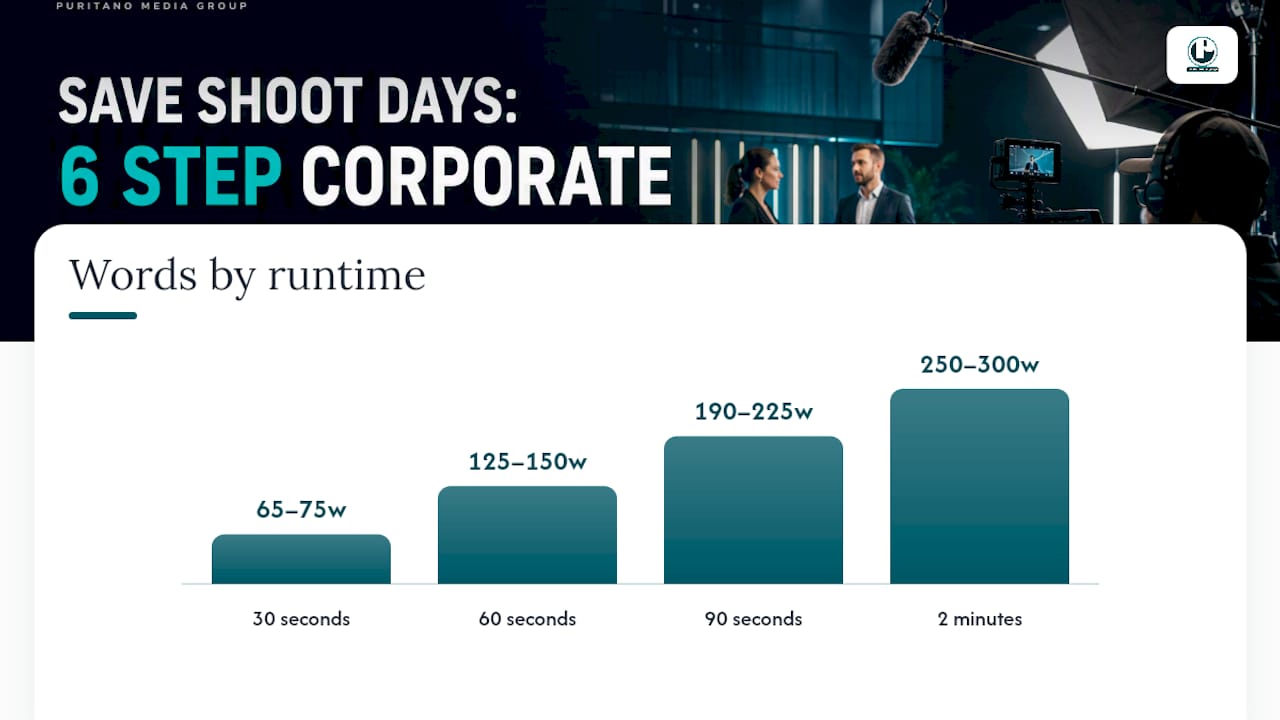
Plan for 125 to 150 words per minute, the working range most production teams rely on, as detailed in StudioBinder’s timing guidance. Use it to hit these targets: 30 seconds runs roughly 65 to 75 words, 60 seconds runs 125 to 150 words, 90 seconds runs 190 to 225 words, and a 2 minute video runs about 250 to 300 words.
Don’t trust the math alone. Record yourself reading the draft once, note where you naturally pause or where a phrase catches, then adjust the script, not your reading speed, to match the target.
How Do You Finalize and Lock a Corporate Video Script for Production?
Before you send a script to the crew, cut every line that doesn’t move the story forward. Shorter almost always plays stronger.
Label the file with a version number and lock date so nobody shoots from an outdated draft.
Distribute a PDF version to the full production team, not just the director.
Include editor notes, caption timing, on-screen text cues, and a contact for creative approvals.
Our piece on why scripting matters in corporate video production goes deeper into why this handoff step gets skipped so often, and what it costs when it does.
What Makes a Corporate Video Script Actually Engaging?
Engagement rarely comes from clever wordplay. It comes from structure decisions made early.
Open with a hook that names a real problem in the first eight seconds, not a slow company introduction. Viewers decide whether to keep watching almost immediately, and a generic opening line burns that window. Write dialogue the way a person would actually explain the idea to a colleague over coffee, not the way it reads in a brochure.
Vary your sentence rhythm inside the script itself. A string of short, punchy VO lines followed by one slightly longer line that lands the point creates a natural cadence that holds attention better than uniform sentence lengths.
When you’re scripting employee or customer testimonials, resist the urge to write full lines for them to recite. Prepare structured prompts and key message beats instead, so responses stay authentic while still hitting the proof points you need, an approach outlined in Moonb’s corporate scripting guide. Scripted-sounding testimonials undercut the credibility they’re supposed to build.
Finally, respect the story beats you outlined in your scene structure. A hook that isn’t paid off by a proof point later in the script feels like a broken promise, even at 60 seconds.
How Do You Match Brand Voice and Tone in a Video Script?
Brand voice in a video script isn’t about repeating taglines. It’s about matching the vocabulary, pacing, and formality your audience already associates with the brand across every other channel.
Pull actual phrases from existing brand materials, website copy, sales decks, internal comms, and notice the rhythm. Does the brand favor short, declarative sentences or more measured, technical ones? A script that suddenly sounds punchier or more casual than the brand’s website creates a jarring mismatch for anyone who encounters both.
Tone should also flex with context without breaking character. An internal training video and an external product launch video can both sound like the same company while adjusting formality up or down. What stays constant is vocabulary choice and sentence rhythm, not just a logo at the end.
One practical test: read the script aloud and ask whether it sounds like something the brand’s actual spokesperson would say in a meeting. If it sounds like generic marketing copy that could belong to any competitor, the voice has slipped. Building scripts specifically for internal audiences, like HR communications, requires an even tighter tone match, since employees notice inconsistency faster than external viewers do. Our breakdown of internal corporate communications video covers how tone shifts for that specific audience.
What Are Best Practices for Writing a Video Script Call to Action?
A weak CTA is almost never a wording problem. It’s a structure problem, the ask shows up disconnected from everything before it.
The fix starts earlier in the script, not at the final line. Every beat leading up to the CTA should build toward the specific action you want, so the ask feels like the obvious next step rather than an interruption. If your proof point in scene three demonstrates ease of use, your CTA should point toward trying it, not toward a generic “learn more.”
Keep the CTA line itself short and specific. “Get your free estimate today” outperforms “Contact us to find out how we can help transform your business” almost every time, because specificity signals exactly what happens next. Pair the spoken CTA with matching on-screen text, since some viewers will have sound off entirely, especially on social platforms.
Avoid stacking multiple asks into one CTA. “Visit our website, follow us on social, and sign up for our newsletter” dilutes all three. Pick the single action that matters most for this video’s goal and let the others live elsewhere.
Timing matters too. A CTA that arrives with several seconds of breathing room, rather than cramming in right as the video cuts to black, gives viewers a moment to actually register the ask before they click away.
How Do You Collaborate With Stakeholders on a Video Script?
Script development rarely happens in isolation, and the two-column AV format exists partly because it’s a better alignment tool than a single-column draft. Boords points out that visual tools like AV scripts speed up approvals precisely because they reduce the back-and-forth confusion that happens when stakeholders are picturing different things while reading the same paragraph.
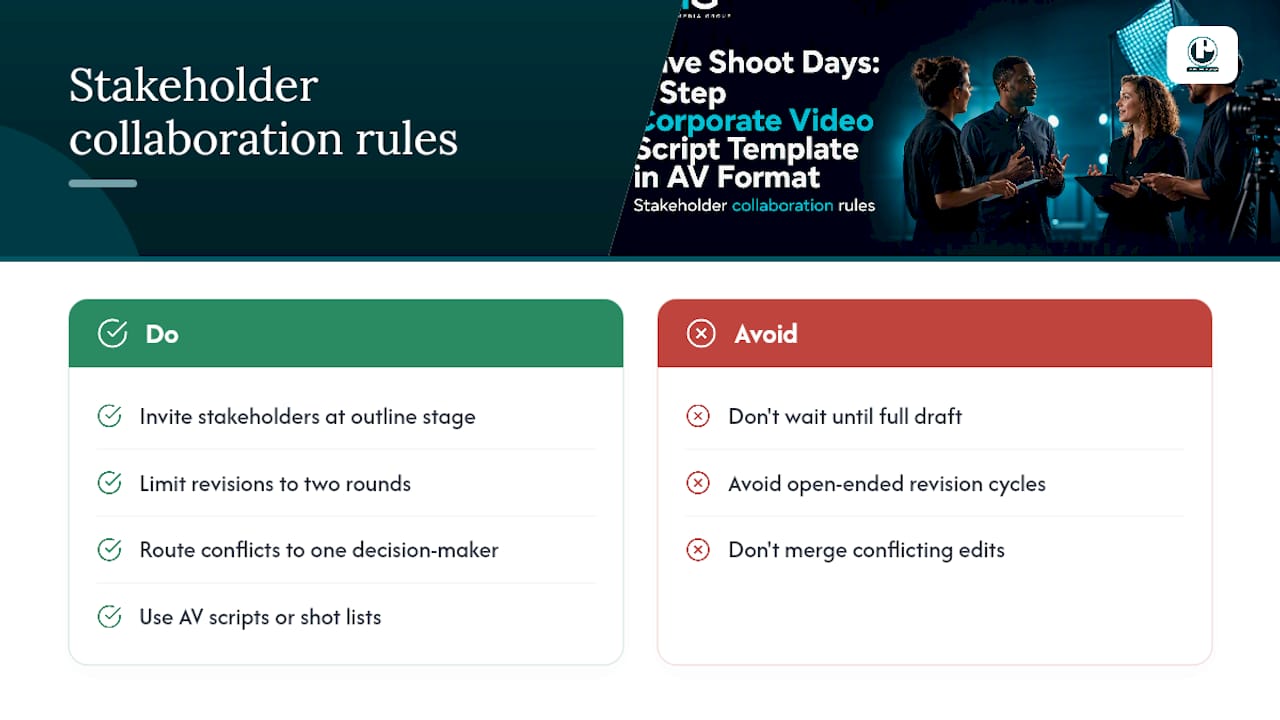
Bring stakeholders in at the outline stage, not after a full draft exists. Sharing a beat-by-beat outline before writing full dialogue lets marketing, legal, and leadership weigh in on structure while changes are still cheap. Restructuring a locked script costs far more time than restructuring five bullet points.
Set a clear revision limit up front, two rounds of feedback is reasonable for most corporate projects. Open-ended revision cycles are how simple 60 second scripts stretch into month-long approval chains. When feedback conflicts between departments, route it through a single decision-maker rather than trying to satisfy every voice in the same draft.
Visual storytelling tools that let non-writers react to a shot list rather than prose can also shorten this cycle considerably, a point echoed in broader guidance on visual storytelling for brand impact. Showing rather than describing cuts down on the “I’ll know it when I see it” feedback loop that stalls so many corporate projects.
Why Good Scripts Save Shoot Days, Not Just Word Count
Many video production teams push clients toward story-first scripts because loose, jargon-heavy drafts are a leading cause of wasted shoot days and bloated editing hours. A tight, visually mapped script means the crew shows up knowing exactly what they’re capturing, and that discipline pays for itself in the edit bay. Our post on managing client video production projects covers how we structure that handoff in practice.
— Charlie
Ready to Turn Your Script Into a Finished Video?
A video production company can be the alternative to guessing your way through a corporate video project. If you’ve already drafted a script using the steps above, a professional team can review it against production reality, catching visual gaps, pacing issues, and CTA problems before they turn into reshoot costs. If you’re starting from a blank page, some video production teams offer end-to-end scripting, shooting, and editing of corporate videos, e-learning modules, and branded content, without you needing to master AV formatting yourself.
Our music video production portfolio shows the range of storytelling and technical execution we bring to a project once a script is locked. If you’d rather start with a virtual event or hybrid production, our virtual events case study breaks down how that scripting and delivery process works in practice.
To request a script review or production estimate, send us your brief, your current draft, and a rough budget range. That’s enough for us to tell you what’s working, what needs tightening, and what it’ll take to get your video into production.
Sources
These sources informed the timing rules, formatting standards, and workflow steps covered above:
Recommended
A script template only saves shoot days if the thinking happens before the template gets filled in. Director Charlie Puritano plans every PMG project on paper first: the audience, the job the piece has to do, and the full deliverables list are settled before production begins. That is why the two-column format works here. Each line of audio already has its visual assigned, every stakeholder has approved the same document, and the shoot day becomes execution instead of improvisation.


Comments