

Event Planners: 30–60s Conference Opener Video with AV Ready Checklist
A conference opener video is a short film played at the top of an event to focus the room, announce the theme, and set the emotional tone before the first speaker takes the stage. The best approach for most events is a story-driven piece running 30 to 60 seconds, though a tight 15-second intro animation works when your schedule or AV setup calls for something leaner. Either way, brief your producer with a clear runtime, a theme, and a reference video before anything else happens.
What Does a Conference Opener Video Actually Do?
An opener has three jobs, and none of them is decoration. It focuses attention, it announces the theme, and it primes the room emotionally before a single word is spoken from the stage. Skip it, and you get a room full of people checking phones while a countdown clock ticks down in silence. Run a well-built opener, and you get applause, phones going up to record, and a room that’s already leaning forward when your emcee walks out.
Creative directors who work in event design put it plainly: the biggest mistake organizers make is treating the opener as filler. It should function as a narrative foundation that uses metaphor and symbolism to connect the audience to the theme, not a placeholder while the AV team checks mics.
Compare that to a static “Welcome” slide or a bare countdown timer. Neither does any emotional work. A themed countdown paired with music and narration, on the other hand, reliably gets attendees into their seats and focused on the stage at showtime, because it gives people a reason to stop talking and watch.
How do you know it worked? Watch for these signals during and after the show:
Seats fill faster once the video starts, instead of during the emcee’s first remarks
The room applauds or reacts audibly at the video’s final beat
The transition from video to first speaker happens with no dead air or awkward house-light fumbling
Attendees mention the opener in post-event surveys or social posts without being prompted
If your opener doesn’t produce at least the first two, the format or pacing needs a rework, not a bigger budget.
How Long Should a Conference Opener Video Be?
Runtime should match your event’s scale and your AV team’s patience for cueing video. There’s no single correct length, but there is a correct length for your situation.
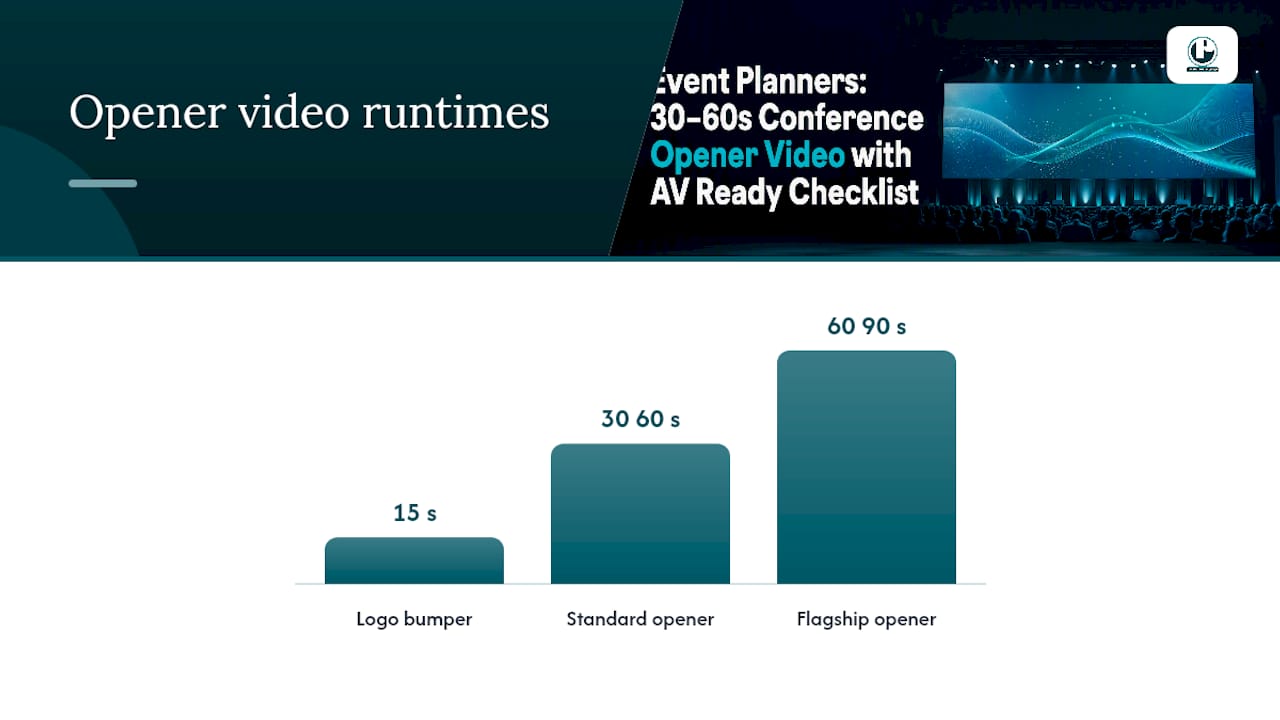
15 seconds. A logo bumper with a speaker name or session title. Long enough to register, short enough that nobody loses interest before it ends. This length is a standard working timeframe for intros that play between sessions or ahead of a keynote on a tight schedule.
30 to 60 seconds. The workhorse length for a general session opener. Enough time for a mini narrative arc, a music build, and a theme reveal without testing anyone’s patience.
60 to 90 seconds. Reserved for flagship general sessions or a conference’s single biggest moment. Agencies recommend this longer, high-energy format specifically for large conferences where the goal is building momentum, not for breakout rooms or smaller sessions where a brief intro serves better.
Format follows length. A 15-second piece is usually an animated logo intro. A 30 to 60 second opener often becomes a montage of attendee footage, brand visuals, and motion graphics. A 60 to 90 second piece can carry a cinematic mini-film with an actual story beat, or a themed countdown layered with narration and sound design.
Screen size and venue logistics matter more than planners expect. A ballroom with a single center screen supports a cinematic, slow-build piece. A room with multiple side screens or a lower-resolution LED wall needs bolder graphics and less fine detail, since text and logos that read fine on a laptop can turn to mush at 40 feet wide.
Creative Concepts You Can Actually Pitch to Stakeholders
Getting buy-in for an opener video is easier when you can hand stakeholders a concrete concept instead of an abstract pitch. Here are four models worth adapting, each built around a different tone and runtime.
The 15-second logo intro. Your brand mark assembles from geometric shapes in time with a musical sting, then holds on the conference name and date. Clean, safe, works for any theme, and doubles as a stinger between breakout sessions.
The 45-second montage. Cut together stock or custom footage of past attendees, speakers, and venue shots against an upbeat music bed, building to a title card reveal. This is the format most planners land on because it balances production cost against visual impact.
The 60-second mini-narrative. A single visual metaphor carries the whole piece, such as a seed growing into a tree to represent a growth-themed conference, or a compass spinning to rest on the event’s host city for a navigation or leadership theme. This is where narrative-first thinking pays off, since a strong metaphor gives the whole event a visual through-line that speakers and slide decks can echo later.
The countdown-and-narration opener. A voiced countdown layered over rising music and rhythmic cuts, ending exactly as house lights dim. This format leans hardest on the “get people in their seats” job, and it works especially well for conferences with a hard start time and a habit of late arrivals.
Pacing and music direction should match the emotional register you’re going for. An energetic sales kickoff wants fast cuts, a driving beat, and a music build that peaks right as the logo lands. A reflective nonprofit gala or memorial-adjacent event wants slower cuts, a simpler score, and more negative space between beats. A formal government or association conference usually wants restrained motion graphics, a measured voiceover, and music that supports rather than dominates.
Templates make sense when your budget or timeline is tight and your theme is straightforward. Bespoke production earns its cost when the conference has a distinctive theme, a flagship general session, or a brand story worth telling in a way no template can replicate.
Production Checklist: What to Hand Your AV Team
Nothing kills an opener faster than a file that stutters, pixelates, or won’t play through the house system. Handing your production partner and AV team a precise spec sheet up front avoids almost every last-minute fire.
Start with clean source assets. That means vector logos (not screenshots), named and organized layers in the working file, licensed fonts, and exact brand color codes. Skipping this step is the single most common reason openers get delayed, because a producer working from a blurry PNG logo has to rebuild it from scratch.
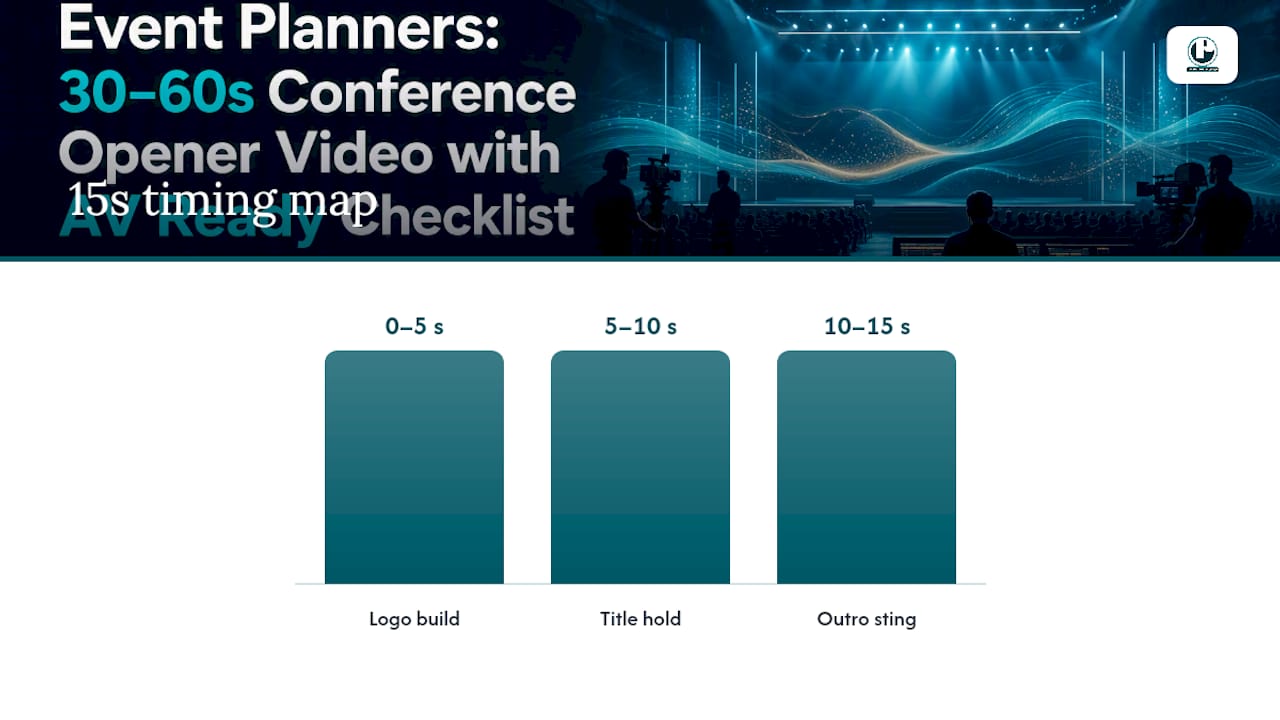
Next, build a timing map. Break the runtime into beats, each with a duration, so editors and stakeholders share a common reference point when giving feedback. A 15-second intro, for example, typically breaks into a logo build (0 to 5 seconds), a hold with title text (5 to 10 seconds), and an outro sting (10 to 15 seconds).
Pro Tip: Lock your timing map before anyone touches final animation. Changing a beat’s length after motion graphics are built usually means re-rendering the whole sequence, not just trimming a clip.
Export standards matter as much as the creative. For projection, export H.264 MP4 at a constant bitrate of no less than 20 Mbps; anything lower risks visible compression artifacts on a large screen. For a livestream or hybrid feed, a separate encode at 8 to 10 Mbps keeps file sizes and bandwidth reasonable without a visible quality hit on a laptop or phone screen. Match resolution to the venue’s native projector or LED wall specs rather than defaulting to a generic 1080p export.
Finally, build in playback redundancy:
Keep a backup file on a second laptop, not just a USB drive
Use a clear, consistent naming convention (event name, version number, date) so nobody plays an outdated cut
Store a cloud copy accessible from a phone in case a physical drive fails
Test playback on the actual house system during rehearsal, never for the first time on show day
How to Brief and Manage a Video Production Partner
A vague brief produces a vague video. Give your producer these specifics up front, and you’ll spend less time in revision rounds:
Objective. What should the audience feel or understand by the time the video ends?
Audience. Who’s in the room, roughly how many, and what’s their relationship to the brand or organization?
Runtime. Pick a target length from the ranges above and state it as a hard requirement, not a suggestion.
Deliverables. Projection file, streaming file, and any social cutdowns you want for pre-event promotion or post-event recap content.
References. Two or three videos you like, with a note on what specifically works about each one.
AV limits. Screen dimensions, projector or LED specs, and playback software the venue uses.
Once the brief is locked, expect the project to move through four review milestones: script or concept treatment, storyboard or animatic, first cut, and a final licensing and quality-assurance pass before delivery. Push for a sign-off at each stage rather than waiting until the final cut to give feedback, since a script-stage note is a five-minute fix and a final-cut note can mean re-animating an entire sequence.
Watch for red flags when vetting a vendor: no vector assets requested, vague delivery specs, or no mention of a backup plan for playback. Any of those suggests a producer who hasn’t run this process enough times to know where it breaks.
Pro Tip: Get final sign-off from every stakeholder who can say no, including legal and executive approvers, before the animatic stage. A last-minute objection after final render forces a rushed re-export, and rushed re-exports are where compression mistakes creep in.
What Should You Budget, and How Far Ahead Should You Plan?
Budget and timeline scale together, and matching your ambition to both up front saves you from a painful renegotiation two weeks before the event.
Template or lightly customized motion graphics: the fastest, most affordable route, often built from editable video templates and ready in one to two weeks.
Custom animation: a bespoke 15 to 60 second animated piece with your brand assets, typically requiring three to four weeks of lead time.
Live-action or cinematic production: the highest cost and longest lead time, involving a shoot day, editing, color, and sound design, usually needing six to eight weeks minimum.
A sample six to eight week schedule for a custom or live-action opener looks like this: weeks one and two for briefing and concept treatment, week three for storyboard or animatic approval, weeks four and five for production and editing, week six for revisions, and the final week reserved for technical QA and delivery to AV.
Cost-saving tactics worth considering: lean on templates for lower-stakes sessions, license stock footage instead of shooting original b-roll where the theme allows it, and limit live shoots to your single flagship moment rather than every video asset on the event calendar. A short film built for your opener can also be repurposed at multiple points across a multi-day conference, including between-track reorientations and closing remarks, which stretches one production budget across several moments on the agenda.
Puritano’s Approach to Conference Openers
A well-established video production company has extensive experience producing video for corporate, nonprofit, government, and association clients across the DMV region and nationally; conference openers form a regular service category because the format rewards a production team that treats the brief seriously from day one.
Our process runs in a straightforward sequence: briefing, concept treatment, asset collection, animatic, and final delivery. Each stage gets a client review before we move to the next, which is how we avoid the late-stage surprises that derail most opener projects.
A few things we’ve learned matter more than clients expect going in:
A clear visual metaphor, established during the concept treatment stage, saves more revision time than any other single decision
Locking the music bed before final animation prevents pacing mismatches between cuts and beats
Delivering both a projection file and a streaming encode as standard practice avoids a scramble on hybrid event day
You can see examples of narrative-driven short-form work in our music video portfolio, which reflects the same pacing and storytelling discipline we bring to event openers.
Ready to Hire a Production Partner for Your Next Event?
If you’ve read this far, you already know a template can get you a serviceable 15-second logo bumper, and a DIY countdown graphic can technically fill the screen before your emcee walks out. What neither gives you is a story-first opener built around your actual theme, tested against your venue’s AV specs, and delivered with a backup plan that doesn’t depend on one laptop working correctly on show day. That’s the gap Puritano fills for planners who need the opener to actually land, not just play.
Puritano handles conference openers as part of a broader live event and virtual event production practice, covering everything from the opening video itself to full show coverage and hybrid streaming. Our virtual events case study walks through how we’ve structured production for streamed and hybrid conferences, including the same technical checklist principles covered above.
When you reach out, come with a runtime target, your event date, your theme or working title, and any reference videos you like. That’s enough for us to scope an accurate quote without back-and-forth. You can also browse additional portfolio work to see production quality across formats before you submit an inquiry. Start with a quote request through the company’s site to receive a concept direction within the planning window.
Sources
FAQ
What Is a Conference Opener Video?
It’s a short film played at the start of a conference or general session to focus the audience, introduce the event theme, and set the emotional tone before the first speaker begins.
How Long Should a Conference Opener Video Be?
Most general sessions work best with a 30 to 60 second story-driven piece, while a 15-second animated intro suits tighter schedules or between-session use, and 60 to 90 seconds fits a single flagship moment at a large conference.
What File Format Should I Deliver for Projection?
Export H.264 MP4 at a constant bitrate of at least 20 Mbps for projection, and prepare a separate 8 to 10 Mbps encode for any streaming or hybrid feed.
How Much Does a Conference Opener Video Cost?
Template-based or lightly customized motion graphics are the most affordable option, custom animation sits in the middle, and live-action or cinematic production carries the highest cost and the longest lead time, generally six to eight weeks.
Can I Reuse a Conference Opener Video After the Event?
Yes. A well-produced opener can be repurposed for between-track reorientation videos, closing remarks, and post-event promotion, which stretches its value well past the opening moment. Puritano builds this kind of reuse into project scoping when clients mention a multi-day agenda upfront.
What’s the Biggest Mistake Planners Make With Openers?
Treating the video as filler rather than a narrative foundation for the event, which results in generic countdowns or stock montages that do nothing to connect the audience to the theme.
Recommended
Comments