

HR Teams: 5–15 Minute Compliance Training Videos That Pass Audits
Short, role-specific modules between 5 and 15 minutes, each mapped to a single policy or regulation, are the most effective way to deliver compliance training. Videos need scenario-based scripting, sign-off from subject-matter experts and legal counsel, and packaging for LMS tracking through SCORM or xAPI. Use AI-assisted or animated production to scale across topics and updates, and save live-action filming for sensitive scenarios like harassment or whistleblower reporting.
Where to Find Compliance Training Videos and Curated Libraries
Before you build anything, check whether it already exists. Government agencies, universities, and commercial vendors publish libraries you can adapt or license, which saves budget on topics that don’t need a proprietary angle.
The HHS Office of Inspector General maintains a HEAT provider compliance video series covering fraud, physician self-referral law, and False Claims Act obligations. It’s a solid model for structure even if healthcare isn’t your industry. Ohio State University publishes 5-minute microlearning videos built around single conflict-of-interest or reporting topics, proving that short really does work at scale.
Before adopting any library, run it through a quick checklist:
Does it cover your actual regulatory jurisdiction, or just general best practices?
How often is content updated when laws change?
Can it export completion data your LMS actually needs?
Does the licensing let you rebrand or edit for your workforce?
Licensed content works for generic topics like data privacy basics. Custom production earns its cost when the policy is company-specific, high-risk, or tied to your actual workplace culture.
How to Create a Compliance Training Video, Step by Step
Building a compliance training video isn’t a creative project first. It’s a documentation project that happens to use video. Follow this sequence and you’ll end up with something legally defensible, not just watchable.
Define the objective. Tie the module to one specific policy or regulation, not a general theme. “Recognize and report conflicts of interest under Section 4.2” beats “ethics awareness.”
Script the scenario. Open with a realistic workplace situation, force the viewer to make a choice, show the consequence, then reinforce the correct action. This scenario-first structure, recommended by production guides, drives better retention than a narrator reading policy text.
Get SME and legal eyes on the draft early. Bring in your subject-matter expert and legal reviewer at the script stage, not after filming. Catching a wording problem in a Google Doc costs nothing; catching it after production means reshoots.
Lock version control. Assign a version number and date to every script revision so you can prove which language was live on any given day.
Choose your production style and localization plan. Decide before you shoot, not during editing.
Add captions, transcripts, and run quality control. Check audio sync, on-screen text readability, and caption accuracy against the final cut.
Package for your LMS. Export as SCORM or xAPI, set completion rules, and confirm the fields you need for audit exports (score, timestamp, version, user ID) actually populate correctly.
Pro Tip: Run your first module as a pilot on a single high-priority policy before building your full library. It’s the fastest way to test whether your review, packaging, and reporting workflow actually holds up before you scale to twenty topics.
Knowledge checks belong every few minutes, not just at the end. A short forced-choice question after each scenario segment does more for retention than a ten-question quiz tacked onto the final frame.
Live Action, Animation, or AI: Choosing the Right Production Method
There’s no single “best” format for compliance video. There’s a best format for each topic, budget, and update cycle, and picking wrong usually shows up later as either wasted money or content that ages badly.
Live action delivers the emotional realism that harassment, discrimination, and whistleblower scenarios need. Actors, tone, and body language matter when the stakes are personal. It’s also the slowest and most expensive to revise when policy changes.
Animation handles abstract or dry topics well, like data classification rules or financial reporting thresholds, without the cost of casting and location filming.
AI-assisted production is the workhorse of scalable compliance content. It converts policy documents into draft video quickly and makes localization across languages far cheaper, though it still requires SME and legal review before anything goes live.
Internal recordings work fine for a CEO’s quarterly ethics message or a low-stakes policy update. Save your production budget for content that needs to persuade or protect, not just inform.
Frequency of update matters as much as topic sensitivity. Guidance on format selection consistently points toward AI and animation for anything you’ll need to revise every time a regulation shifts, and toward live action for the handful of modules where a real human face changes how seriously employees take the message.
Deploying and Tracking Compliance Training Videos in Your LMS
A great video that no one can prove was completed is a liability, not an asset. Packaging and tracking decisions matter as much as the script.
SCORM or xAPI packaging is the standard for a reason: both formats let your LMS capture completion status, quiz scores, timestamps, and content version automatically, which is exactly what an auditor asks for first.
Set up your deployment with these pieces in place:
Assignment rules by role and department. Legal gets different depth than warehouse staff; your LMS should route accordingly.
Required learner actions. Full-view completion, a passing quiz score, and a digital acknowledgment, all three, not one substituting for another.
Retention and archival. Keep every version of every module along with its approval history, not just the current live version.
Automated reminders and recertification. Set recurring deadlines so annual or biannual retraining doesn’t rely on someone remembering.
Reporting dashboards. Build views that show completion rates by department in real time, so gaps surface before an audit does, not during one.
Accessibility and Legal Review: The Non-Negotiables
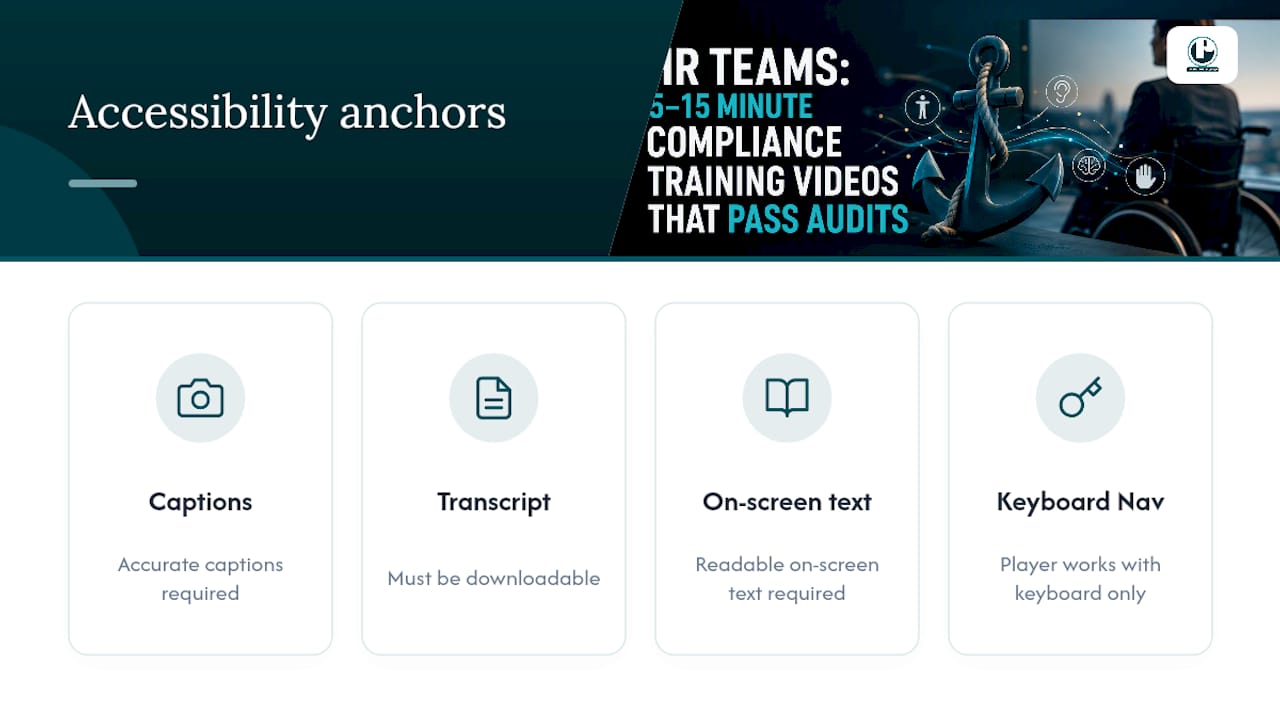
Every compliance video needs accurate captions, a downloadable transcript, readable on-screen text, and a player that works with keyboard navigation alone. These aren’t nice-to-haves. Section 508 and WCAG standards exist because inaccessible training creates legal exposure on top of the compliance exposure you’re trying to fix.
Documentation matters just as much as the video itself. Every module should carry a record of who approved the content, the version number and date, and the specific scope the legal or SME reviewer signed off on. If a regulator or plaintiff’s attorney ever asks whether your training was current and accurate, that paper trail is your answer.
Review cadence should run every 6 to 12 months, tied to your policy update calendar, with records retained well beyond the training’s active life. Quiz and acknowledgment metadata counts as personal data in many jurisdictions, so handle storage and access permissions with the same care you’d apply to HR files generally.
Pro Tip: Store your approval sign-off as a separate document linked to the video’s version number, not buried in an email thread. When an audit request lands on your desk, you want that history retrievable in minutes, not days.
Your First 30 to 90 Days: A Compliance Training Video Checklist
Start small, prove the workflow, then scale. Here’s the sequence that keeps a rollout from stalling:
Days 1 to 15: Prioritize your top three compliance risks and select one for a pilot module.
Days 15 to 30: Script, get SME and legal review, and lock version 1.0.
Days 30 to 45: Produce the video, add captions and transcripts, and run QC.
Days 45 to 60: Package for SCORM or xAPI, assign by role, and publish to your LMS.
Days 60 to 90: Track completion data, gather learner feedback, and evaluate before greenlighting the next topic.
Before calling any module done, confirm packaging format, version documentation, retention plan, and acknowledgment capture are all functioning, not just built. Assign a named owner to each stage so nothing stalls waiting on “someone.”
Puritano’s Approach to Compliance Training Video Production
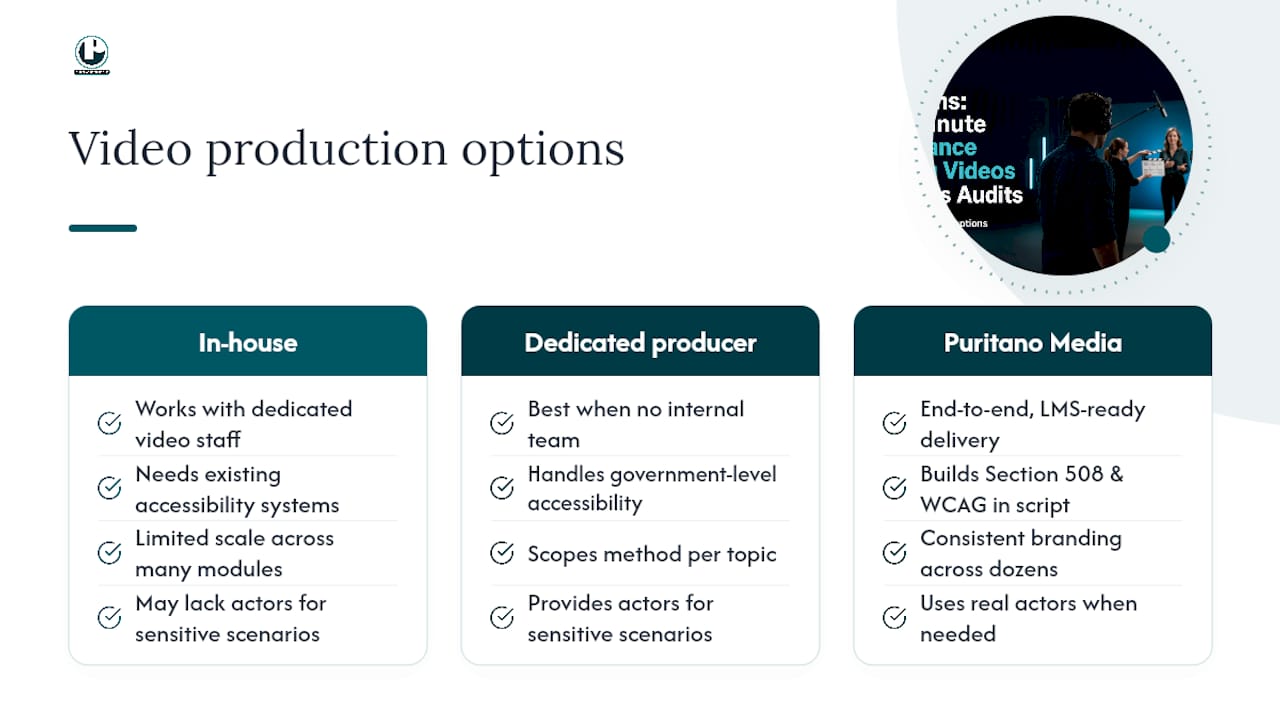
Building this in-house works when you have dedicated video staff and existing accessibility infrastructure. Most HR and compliance teams don’t, and that’s where a dedicated producer earns its cost, especially once you’re dealing with multiple departments, sensitive scenarios, or government-level accessibility requirements.
Puritano Media Group produces learning modules and training videos end-to-end, from scripting and SME coordination through final LMS-ready delivery. The team’s experience with government and institutional clients means accessibility compliance, including Section 508 and WCAG requirements, gets built in from the first script draft rather than patched on afterward. For sensitive scenarios that call for the emotional weight of real actors, or high-volume libraries that need consistent branding across dozens of modules, Puritano scopes the production method to the topic rather than defaulting to one format for everything.
If your compliance calendar has topics stacking up faster than your internal team can script and shoot them, that’s the signal to bring in a producer. Reach out for a production quote and walk through which modules make sense to build first.
Sources
For deeper reading on the standards referenced above, the HHS Office of Inspector General’s HEAT video series and Ohio State’s 5-minute compliance library are both public examples worth studying. For production and AI-assisted workflow guidance, review the practical breakdowns from VideoLearningAI and Synthesia.
FAQ
Where Can I Find Compliance Training Videos for My Employees?
Government agencies like the HHS Office of Inspector General and university compliance offices publish free, ready-to-adapt video libraries. Commercial vendors also license modules, but for policies unique to your organization, custom production from a provider like Puritano typically fits better than a generic library.
What Are the Seven Pillars of Compliance?
The seven pillars generally include written policies and procedures, compliance leadership and oversight, effective training and education, open communication channels, internal monitoring and auditing, consistent enforcement of standards, and prompt response to detected issues. Training and education is the pillar a well-built compliance training video directly supports.
What Are the Three C’s of Compliance?
Definitions vary slightly by industry, but a common version names Culture, Communication, and Controls as the three C’s. A strong compliance training video supports all three by reinforcing culture through scenario modeling and improving communication of the actual controls employees need to follow.
Can You Give Me an Example of Compliance Training?
A workplace harassment module that opens with a realistic scenario, forces the viewer to choose a response, shows the consequence of each choice, and ends with a knowledge check is a solid example. The HHS Office of Inspector General’s video series offers a public model of this same scenario-driven structure applied to healthcare fraud topics.
Recommended


Comments