

Objective First: 3 E Learning Video Production Paths for L&D Teams
Updated: 3 days ago

Good e-learning video production measures success in learner behavior, not screen time or camera moves. Before you write a script or book a studio, choose one of three practical paths: build it in-house for smaller, low-frequency needs, use AI-assisted production when speed and volume matter most, or hire a partner like Puritano for complex or high-stakes training. Whichever path you pick, your first real step is the same: write one observable learning objective for the video before anyone touches a camera or a script template.
What Are the Main Types of E-Learning Videos?
Picking the right format is the single decision that determines whether your budget goes toward learning or toward wasted footage. Each type solves a different instructional problem, and matching format to need is more important than production value.
Microlearning videos run two to five minutes and target one skill or fact. They work best for onboarding steps, policy refreshers, and just-in-time performance support. Screencasts capture a screen with narration, ideal for software tutorials and systems training where learners need to see exactly where to click. Instructor-led videos put a subject-matter expert on camera, which builds trust for compliance training or leadership content where authority matters more than visual flash. Animated explainers simplify abstract or conceptual material, such as financial processes or scientific mechanisms, that would be awkward or expensive to film live. Interactive or branching videos let learners make choices that change the outcome, useful for scenario-based sales or customer-service training. Avatar and AI-generated videos use synthetic presenters to produce localized or frequently updated content fast, trading some warmth for speed and scale. Blended modules combine two or more of these formats inside a single course, often pairing a screencast with a short instructor introduction.
Before locking in a format, run through this quick checklist:
How often will this content need updating? Frequent changes favor screencasts or AI-generated videos over expensive live shoots.
Does the audience span multiple languages or regions? Animated and avatar formats localize faster than live-action.
Will learners revisit this as a reference tool? If so, favor microlearning segments over long-form video.
Can you actually measure the outcome this format targets? A branching scenario only pays off if you can track the decisions learners make.
Get this selection wrong and you’ll spend your postproduction budget polishing a format that never matched the learning need.
How Do You Plan Learning Objectives Before You Shoot?
Every strong e-learning video starts with one sentence, not a script. Write a single observable outcome using this structure: role, context, action, and business result. For example, “A new warehouse associate, during their first shift, correctly scans and logs inventory using the handheld reader, reducing intake errors.” That sentence becomes your production brief, your storyboard filter, and your measurement plan all at once.
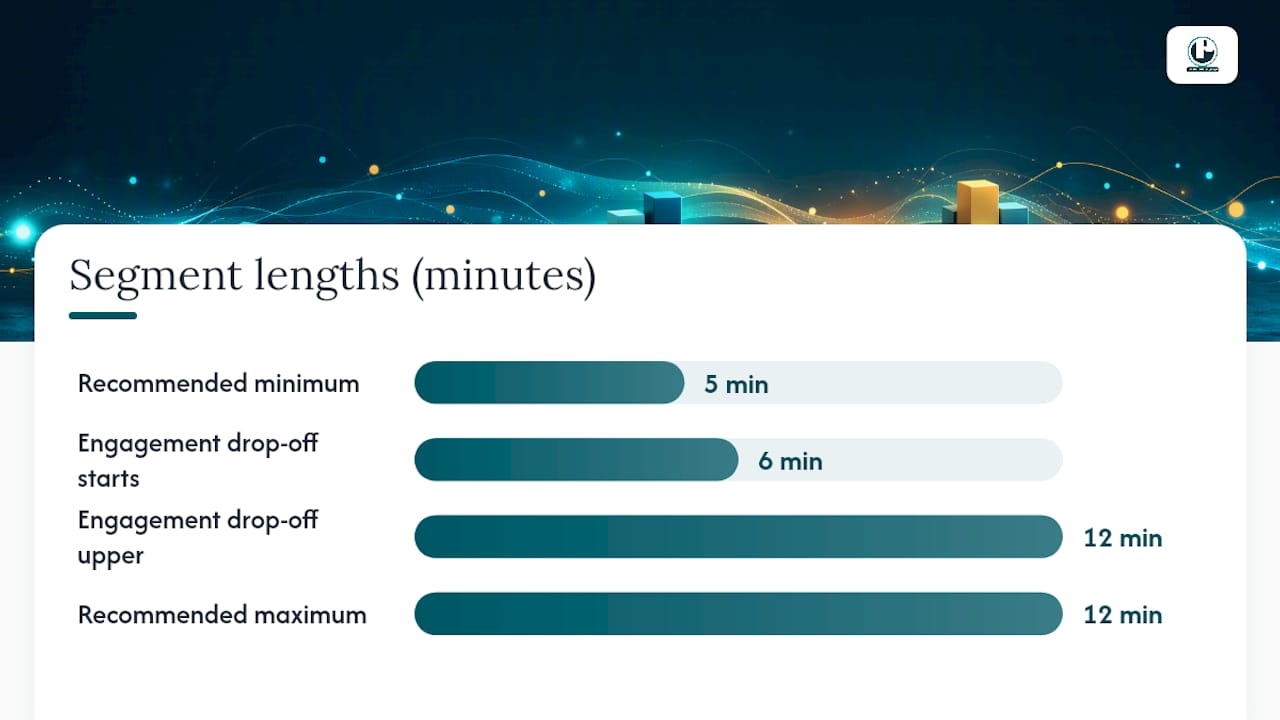
Chunking matters just as much as the objective itself. Engagement research on educational video consistently finds a drop-off after roughly six to twelve minutes, which is why practitioner research on segmenting recommends breaking content into digestible bursts, generally under five to twelve minutes, so learners can revisit specific sections without rewatching an entire module. Brame’s recommendations for segmenting, signaling, and weeding give editors a concrete method: cut anything that doesn’t serve the stated objective, flag key transitions visually, and never bury the main point in a long preamble.
Set your success metrics before you shoot, not after launch. Here’s a sequence that works:
Define the observable outcome (the role/context/action/result sentence above).
Choose one primary metric: completion rate, a measurable performance change, a drop in support tickets, or reduced time-to-competence.
Decide how you’ll capture that metric inside your LMS or performance system before production starts.
Share the objective and metric with your scriptwriter and editor so every cut decision has a filter.
Pro Tip: If you can’t write the observable outcome in one sentence, the video isn’t ready for a script yet. Send it back to the stakeholder for clarification first. It saves far more time than reshooting.
What Does the E-Learning Video Production Workflow Actually Look Like?
A realistic production timeline runs through three phases, and skipping steps in any of them shows up as rework later. Preproduction should include a finished script, a storyboard or shot list, an accessibility plan for captions and transcripts, and confirmation of any licensed assets or footage rights. Guides for producing online course video consistently flag storyboarding and audio planning as the two steps teams most often shortcut, and both are expensive to fix after filming.
Production itself varies by format. Presenter shoots need consistent lighting and a quiet, treated room, since audio problems are far more distracting to learners than mediocre video. Remote recordings from subject-matter experts require a simple checklist sent in advance: external microphone if possible, camera at eye level, and a plain background. Screencasts need a clean desktop, disabled notifications, and a script read at a deliberately slower pace than natural conversation, since narration paired with on-screen action needs breathing room. One efficient production habit worth adopting: instead of stopping and restarting for every flubbed line, have the presenter pause, mark the moment verbally, and continue. That single habit can cut retake time dramatically during editing.
Postproduction covers rough cut, caption and transcript generation, an accessibility QA pass, stakeholder review, and final packaging for your learning management system. Budget more than one edit pass. A first pass for structure and pacing, a second for accuracy and captions, and a final pass for LMS-specific export settings.
Timelines vary widely by production choice. Fully polished presenter-led video with custom graphics typically runs several hours of postproduction per finished minute, while AI-assisted or screencast-based content can move much faster because there’s less footage to sync, color-correct, and layer. AI course video generators can compress that postproduction window substantially, though the time saved should go toward instructional review, not skipped entirely.
AI Tools, Authoring Platforms, or Traditional Editing: Which One Fits?
The honest answer is that most teams end up using all three, just for different parts of the same project. AI platforms generate drafts fast and handle localization at a scale no human editor can match, but they still need a human pass for tone, accuracy, and pedagogical fit. Traditional editing tools like Premiere Pro or DaVinci Resolve give you full control over pacing, color, and sound design, which matters for instructor-led or brand-heavy content but costs more time per finished minute. Screen-capture and authoring tools such as Camtasia sit in the middle, fast enough for internal training, flexible enough for basic interactivity, and generally easier for non-editors to learn.
The tradeoffs come down to four factors: speed, editing accuracy, how easily you can revise later, and whether the output exports cleanly into your LMS. AI tools work best in a draft-then-refine workflow, where an AI platform produces the first cut and a human editor corrects factual errors, adjusts pacing, and checks that the tone matches your organization’s voice. Reach for traditional editing software when the video needs precise brand matching, complex graphics, or interview-style footage that AI tools can’t replicate convincingly. Authoring tools make the most sense for screencasts and quizzable interactive content that needs to plug directly into SCORM or xAPI packages.
Before locking in a vendor or tool stack, check for:
Multilingual and localization support, including whether captions translate automatically or require manual review.
Brand template consistency across every video the tool or vendor produces.
Export compatibility with your specific LMS, including SCORM, xAPI, or MP4 with sidecar caption files.
Any accuracy guarantee or review step built into the AI-assisted workflow, since unreviewed AI output can introduce factual errors.
Pro Tip: Ask any AI video vendor exactly what their human review step looks like before you sign. “AI-generated” and “AI-assisted with editorial review” are very different products with very different error rates.
What Accessibility and Compliance Steps Does Every Video Need?
Accessibility isn’t a postproduction afterthought. It’s a preproduction decision. Planning captions and transcripts before filming prevents the costly rework that happens when teams try to retrofit compliance into a finished video.
Every institutional or corporate e-learning video needs a baseline set of deliverables:
Accurate closed captions, reviewed by a human rather than published straight from auto-generated speech-to-text.
A downloadable transcript for learners who prefer reading or need it for screen readers.
An accessible video player with visible controls and sufficient color contrast for on-screen text.
Clear attribution for any third-party footage, music, or images, especially open educational resources with specific license terms.
In the United States, Section 508 and WCAG standards set the practical bar most institutions and government-adjacent organizations are expected to meet, and accessibility planning is often treated as a legal requirement rather than a nice-to-have for corporate and institutional training programs. Building these steps into your first draft is far cheaper than adding them after a compliance audit flags the gap.
How Does a Production Partner Like Puritano Run an E-Learning Project?
Seeing a real workflow end to end makes the abstract advice above concrete. Puritano’s virtual events and case study work shows how a production partner handles scale, from scripting and storyboarding through accessible captioning and final LMS-ready delivery, on projects too complex or time-sensitive for a small internal team to carry alone.
A well-run partner engagement typically includes a locked script and storyboard before filming begins, a defined number of revision rounds built into the quote up front, and accessibility deliverables specified in the contract rather than negotiated after the fact. Handoff should include source files, caption files, and export formats matched to your specific LMS.
Use this quick checklist to decide whether to hire out or keep production internal:
Does the project need multiple locations, presenters, or complex graphics beyond your internal team’s tools?
Is the timeline tight enough that a dedicated production team would finish faster than internal staff working around other duties?
Does the content need to scale across many languages or business units simultaneously?
Is this a high-visibility or compliance-critical video where errors carry real cost?
If two or more of those apply, a partner-led production timeline usually pays for itself in avoided rework.
A Practitioner’s Checklist and Two Templates You Can Steal
Here’s the one-page version of everything above: objective, learner role, format, target length, deliverables, accessibility plan, and success metric, written down before anyone opens a camera app or an AI tool.
For a vendor brief, state your observable learning outcome, target length, required deliverables (captions, transcript, LMS export format), and your review and revision process in one paragraph. For an in-house kickoff, list the same fields plus who owns the script, who owns the edit, and the date the accessibility QA pass happens.
The three mistakes that derail most projects: letting scope creep add “just one more section” after the script is locked, treating accessibility as a postproduction cleanup task instead of a preproduction line item, and underestimating how long editing actually takes relative to filming.
— Charlie
Ready to Produce Your Next E-Learning Video With Puritano?
There are alternatives to building an entire in-house production team from scratch. Some production partners handle preproduction planning, accessible caption and transcript delivery, and scalable production teams that flex up for high-volume or multi-location projects without the overhead of hiring and training internal crew. That means your L&D team spends time on instructional design and stakeholder review, not on managing lighting kits or caption vendors.
Suitable projects include multi-video training series, live virtual event capture that needs to become reusable training content afterward, and compliance-critical modules where accuracy and accessibility can’t be an afterthought. Review the virtual events case study to see how a full-scale project comes together from kickoff to delivery, or browse the production portfolio for examples of finished work. Reach out through Puritano’s site to scope your first project and get a real timeline and quote based on your specific learning objective.
Sources
Recommended
Choosing a production path gets easier once you look at what the learning has to accomplish. For the American College of Obstetricians and Gynecologists, we produced a provider video paired with an interactive e-module on early onset breast cancer, part of four education programs we have made for the college. The video carries the clinical demonstration, the module carries the practice and checks, and named experts reviewed the work at every stage. Format followed the objective, which is the order that keeps training budgets honest. Series work is where this approach proves itself: for Alexandria City Public Schools, PMG created a 12-part teacher training series budgeted at nearly $200,000, a program a school district trusted us to carry from the first module to the last.


Comments