

12 Recruitment Video Ideas HR Teams Can Shoot in a Day
The most effective recruitment video strategy combines short, role-focused clips with authentic employee voices, cut into platform-specific versions and built with accessibility from the first draft. We’ve produced enough hiring campaigns to know the formula isn’t complicated. It’s the execution, from the brief through the caption file, that determines whether a video sits at 200 views or drives real applicants. Below, you’ll find specific concepts to try, a lean production workflow, and the compliance guardrails that keep your campaign out of trouble with the EEOC.
Recruitment Video Ideas Worth Producing This Quarter
Every one of these concepts has a job to do. Some sell the role, some sell the culture, and a few exist purely to stop the scroll. Pick the ones that match a real hiring need rather than shooting everything on the list just because it’s there.
Day-in-the-life (60 to 90 seconds). Follow one employee through a real shift, from badge-in to a wrap-up thought on why they stay. SHRM’s UPS case study documents this exact format at 60 to 90 seconds, repurposed across the careers site and social feeds. Shot list: arrival, three work moments, one candid aside, closing line. CTA: “See open shifts.”
Role explainer (60 to 90 seconds). A hiring manager or team lead breaks down what the job actually involves, day to day, skipping the posting’s boilerplate language. This works best for roles with high applicant confusion, like technical or shift-based positions. CTA: “Read the full job description.”
Meet-the-team (30 to 60 seconds). Quick, punchy intros from three or four team members, each answering one question on camera. Low production complexity, since you can shoot it in a single afternoon with a phone gimbal. CTA: “Apply to join the team.”
Leader origin story (90 seconds). A founder or department head shares how they got there, including a real setback. This one carries more weight than a mission statement slide ever will. CTA: “Learn about our leadership.”
Benefits and development explainer (45 to 90 seconds). Skip the stock photo of a 401(k) brochure. Have an actual employee describe how tuition reimbursement or a mentorship program changed their trajectory. CTA: “See our benefits.”
ERG spotlight (60 seconds). Feature an employee resource group discussing what the group does and why it matters to them, not a diversity statistics slide. Keep the tone conversational, not corporate. CTA: “Learn about our culture.”
FAQ clips (15 to 45 seconds). Short, single-question answers, “What’s the interview process like?” or “Is this role remote-friendly?” Batch-shoot ten of these in one sitting and release them across a week. CTA: “Ask us anything.”
Workplace or process tour (60 seconds). A walk-through of the actual space, the actual tools, or the actual production floor. Skip this one if your workplace is fully remote; it won’t land.
Event or hiring-campaign cutdown (30 seconds). Repurpose footage from a career fair or hiring event into a fast highlight reel. Great for retargeting ads to people who visited your booth.
Short-form hook (15 to 30 seconds). Built specifically for Instagram Reels or TikTok, opening with a bold statement or a surprising number in the first three seconds. CTA: “Link in bio.”
Application walkthrough (60 to 90 seconds). A recruiter narrates exactly what happens after someone hits “submit,” which timeline to expect, and who they’ll talk to first. This single video reduces the anxious email volume more than almost anything else on this list.
Onboarding sneak peek (45 to 90 seconds). Show a new hire’s first week, easing the fear of the unknown that keeps qualified candidates from accepting an offer. Pair this with your onboarding video brief template if you want a repeatable structure for future hires.
Categorize your library into employee-generated (phone footage, unscripted, high authenticity) and studio-produced (higher polish, used for leadership or brand-anchor pieces) so you know which crew, budget, and timeline each concept needs.
How to Plan and Produce a Recruitment Video Without Slowing Down Your Hiring Timeline
Start with the role and the action you want the candidate to take, not the video concept itself. A vague goal like “show our culture” produces a vague video. “Get 20 qualified applicants for the warehouse supervisor role by month’s end” produces a focused one.
Validate the story with actual employees. SHRM’s MarketAxess case found that employer-brand content works best when it’s grounded in research across functions, locations, and former employees, not assumptions from the marketing team.
Write a one-page brief. Fields: objective, target candidate, key questions for the interview, desired CTA, and hard deadline.
Shoot the essentials. Interview footage, b-roll of the workplace, and two or three cutaway shots (hands at work, a whiteboard, a team huddle) give editors enough material for multiple versions.
Edit for reuse. Cut a long-form asset first, then pull 30-second and 15-second versions from the same footage rather than reshooting.
Add captions and a transcript before publishing anywhere. This isn’t optional; it’s covered in the accessibility section below.
Assign owners. A recruiter typically handles the brief and interview questions (1 to 2 hours), a videographer handles the shoot (half a day), and an editor handles versions and captions (1 to 2 days).
Getting Real Value From Employee-Generated Video
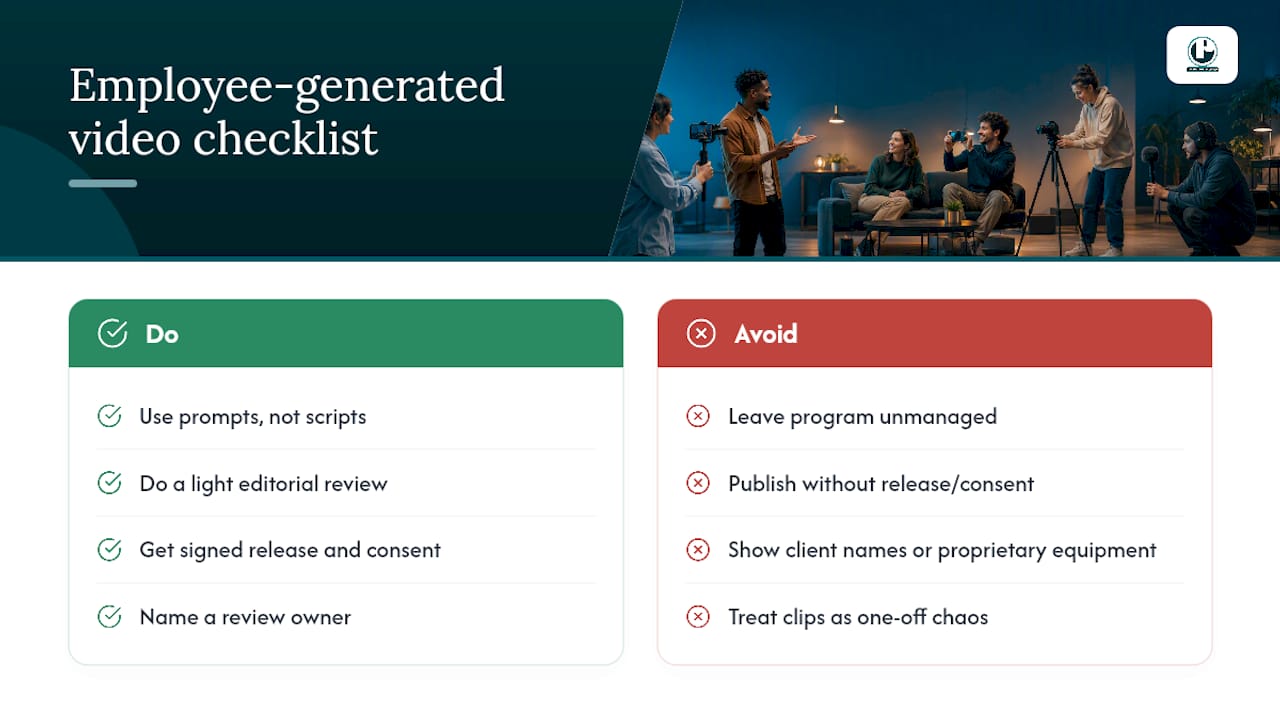
Employee voices read as more credible than polished corporate messaging, and SHRM’s research on employee-generated video backs that up directly. The catch is that “authentic” doesn’t mean “unmanaged.” You still need prompts, not scripts, and a light editorial review before anything goes live.
A workable prompt set looks like this: “What surprised you most in your first month?” “What would you tell someone considering this role?” “Describe one hard day and how your team handled it.” Each question invites a real answer instead of a rehearsed one.
Before anyone hits record, lock down four things: a signed release form, a named review owner, clear brand boundaries (what can’t be shown, like client names or proprietary equipment), and a simple way for an employee to withdraw footage if they change their mind.
Operational permission, consent, a release, a review owner, brand boundaries, and a withdrawal process are what let an employee-generated program stay authentic without becoming a liability for either side.
Pro Tip: Batch your employee interviews on the same day using the same five prompts for everyone. You’ll build a reusable interview library instead of a pile of one-off clips that don’t cut together.
Some video production companies have built systems for clients who need employee stories that hold up under both brand scrutiny and legal review, which is exactly the kind of guardrail work that separates a usable program from a risky one.
Keeping Your Recruitment Videos Compliant and Fair
The EEOC doesn’t ban recruitment video. It requires that whatever selection tool you build around it stays job-related and applied consistently. The agency has been explicit that video use is technology-neutral: allowed, but not a free pass to skip the same fairness standards you’d apply to any other hiring step.
A quiet risk that many teams miss: an attractive video can unintentionally filter out qualified candidates if you require applicants to submit a video resume of their own. Not everyone has the equipment, the confidence on camera, or, in some cases, the ability to appear on video at all.
Three safeguards keep you clear:
Offer an alternate application route for anyone who can’t or doesn’t want to submit video.
Score every candidate against the same written rubric, regardless of how they applied.
Publish every recruitment video with captions, a transcript, and, where relevant, audio description.
The EEOC’s ADA employer guide also flags that online recruiting content and application steps need to stay accessible and free of language that discourages applicants with disabilities from applying at all.
Turning One Video Into Ten Assets
Shoot once, publish everywhere, in the right shape for each platform. SHRM’s UPS documentation shows this repurposing model in practice: a single interview library feeds day-in-the-life segments, culture clips, and leader stories that get distributed across the careers site and social channels rather than shot separately for each.
LinkedIn: 60 to 90 second landscape or square cuts, posted midweek, captioned natively.
YouTube: Full-length interviews and day-in-the-life features, 90 seconds to 3 minutes, optimized with a keyword-rich title and description following our video SEO guide.
Instagram and TikTok: 15 to 30 second vertical hooks, first three seconds carrying the strongest line of the whole video.
Add UTM tags to every link in your bio or job description so your applicant tracking system can credit the right source.
Design a thumbnail around a face and a short text overlay; a blank b-roll frame gets ignored in a feed.
Check platform-specific specs before you export, since aspect ratios and length limits shift often enough to break a cut that worked fine last quarter. A platform spec guide is worth bookmarking for exactly that reason.
What to Track: KPIs That Actually Predict Applications
Watch time and view-through rate tell you if people finish the video. Click-through rate to the job page tells you if the CTA worked. Application conversion rate tells you if the job page itself is doing its job once they arrive. Source-to-hire, pulled from your applicant tracking system, tells you whether video applicants actually get hired at a comparable rate to other channels.
Set a baseline before you optimize anything. Run your first three videos, record the numbers, then test one variable at a time, two different CTAs, or two different thumbnails, never both at once.
Watch time: are viewers dropping off in the first 10 seconds, or after the hook?
CTR to job page: does the CTA text match what you promised in the video?
Application conversion: is the job page itself the bottleneck, not the video?
Source-to-hire: tag every video-driven click with a UTM parameter your ATS can log.
A production case study is a useful reference point if you want to see how measurement discipline connects directly to hiring outcomes rather than vanity view counts.
Your Pre-Shoot and Post-Shoot Checklist
Skipping a step here is how teams end up reshooting a video that was 90% finished. Keep this list next to your production calendar.
Pre-shoot: finalize the brief, collect signed consent forms, build the shot list, note any accessibility requirements (an interpreter, captions plan), and confirm equipment.
Post-shoot: log the footage, build the edit list, add captions and a transcript, cut platform versions, and run a final upload checklist before anything goes live.
Master asset | 90-second version | 30-second version | 15-second version |
Full interview + b-roll library | Role story for careers page and YouTube | Social cut for LinkedIn and Instagram feed | Hook for TikTok and Reels |
Build this matrix once per role, and every future hire in that department gets a head start on its own campaign.
Where to Read More on Compliant, Effective Recruitment Video
For deeper detail beyond this article, SHRM’s coverage of employee-generated video programs and its employer branding case study are both worth a full read. The EEOC’s guidance on video resumes covers the compliance side in more depth than any single section here can. For accessibility specifics, our Section 508 compliance guide walks through producer-level requirements. And for storytelling technique, brand video storytelling strategies is a strong companion read.
Where Puritano Fits Into Your Hiring Campaign
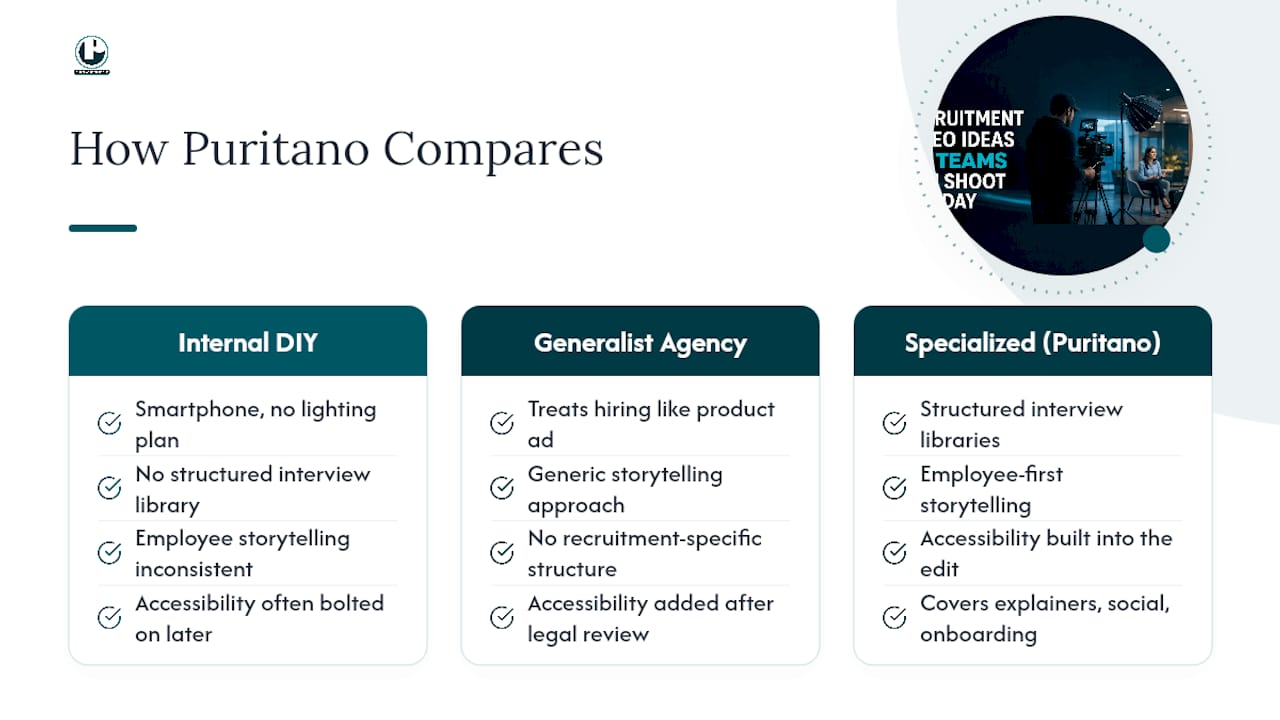
Most recruiting teams either try to shoot this internally with a smartphone and no lighting plan, or they hire a generalist agency that treats a hiring video the same as a product ad. A specialized video production company is neither. Such companies build recruitment video campaigns the way SHRM’s own case studies describe them: structured interview libraries, employee-first storytelling, and accessibility built into the edit from day one rather than bolted on after a legal review flags it.
Our video production services cover the full range this article walks through, corporate explainer videos, branded social content, internal communication pieces for onboarding, and full crews for day-in-the-life shoots across the DMV area and nationally. If you’re planning a hiring campaign for a specific role or department and want a team that already knows how to shoot once and cut ten platform-ready versions, get in touch with Puritano to scope your next project.
Sources
FAQ
How do you make a good recruitment video?
Start with one clear candidate action you want, then build the video around real employees answering unscripted prompts rather than reading a script. Keep it under 90 seconds for most formats, add captions before publishing, and cut platform-specific versions from the same footage rather than reshooting for each channel.
What are the 5 C’s of recruitment?
Definitions vary across HR sources, but the concept generally centers on clarity, connection, culture, candidate experience, and consistency, keeping your message clear, your employees’ voices genuine, and your evaluation process fair across every applicant. Treat it as a framing tool rather than a fixed checklist.
What should you include in a recruiting video?
Include a real employee or hiring manager speaking directly to the camera, a clear picture of what the role actually involves day to day, and a specific call to action like “apply now” or “see open roles.” Captions and a transcript should go on every version before it publishes, per EEOC accessibility guidance.
What are some good video ideas for hiring campaigns?
Day-in-the-life features, role explainers, meet-the-team clips, and short FAQ answers cover most hiring needs without requiring a large production budget. Puritano’s approach favors a small set of well-executed formats, day-in-the-life, employee testimonials, and role explainers, cut into multiple lengths from a single shoot day.
Are video resumes legal to require from applicants?
Requiring a video resume from every applicant creates risk, since it can filter out qualified candidates who lack the equipment, confidence, or ability to submit video content. The EEOC’s position is that video itself isn’t prohibited, but employers should offer an alternate application route and evaluate every candidate against the same job-related criteria regardless of format.
Recommended
Comments